Topic 33 of 119 4. Control Flow in Java Interactive Tutorial

Using if...else in Java for Two-Way Decisions

11 mins read Last updated: 22 Aug 2026 20,709 views

Direct Answer & Core Concept

The if...else statement is Java simplest tool for making a decision, and it is the one you will use more than any other control flow tool. Here is the whole idea in one breath. You write a condition that produces a boolean value, either true or false. If it is true, the block under if runs. If it is false, the block under else runs instead. The crucial part, and the part that surprises people, is that exactly one of the two blocks always runs. Never both, and never neither. That guarantee is what makes if...else a clean fallback: when the first path does not apply, the second one always catches it. The second thing worth knowing up front is that the condition must be a genuine boolean. Java has no idea of truthy and falsy values like some other languages, so writing if (count) is a compile error, and writing if (count == 0) is the correct form. Getting this right from the beginning saves a lot of confusion later. Finally, a practical habit that prevents the single most common bug in this construct: always use curly braces, even when your block holds only one line. Java actually allows you to skip them, and skipping them is exactly what causes the famous dangling else problem, where an else quietly attaches itself to the wrong if.

Detailed Explanation & Mechanics

1) The Basic Shape

Here is the smallest complete example that does something useful. Read it, then run it in your head.

Main.java
Run Online
int number = 17;
int remainder = number % 2;
if (0 == remainder) {
    System.out.println(number + " is EVEN");
} else {
    System.out.println(number + " is ODD");
}

Change 17 to 16 and the output flips. That is the entire concept. The if block handles one case, the else block handles everything else.


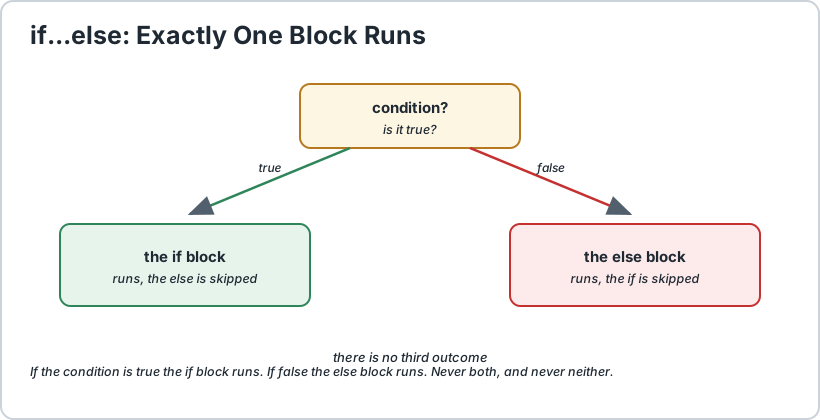
Flow diagram with a diamond decision node where the true branch goes to the if block and the false branch goes to the else block
One condition, two paths, and exactly one of them runs.

For the single-condition version on its own, we have a separate page on the Java if statement. This page is about what happens when you have two paths.

2) The One Rule That Defines Everything

Exactly one block always runs. If the condition is true the if block runs and the else is skipped completely. If it is false the else block runs and the if is skipped completely. There is no third outcome.

This sounds obvious, but it is the reason if...else is so useful. You never have to check whether both failed, and you never need a fallback at the end. When you have two paths and you want to be certain one of them happens, this is the tool.

Two practical consequences follow from it. First, code after a complete if...else runs either way, so you should not expect it to be "the case where neither matched". Second, because exactly one branch runs, anything you declare inside one branch is simply not there in the other. We will come back to that in the scoping section, because it catches everyone eventually.

3) Writing a Condition That Behaves Correctly

The condition is just a boolean expression, so anything that produces true or false is allowed. The most common beginner mistake is not about if...else at all, it is about writing the condition.

You want to checkWrongCorrect
Is the number even?if (remainder)if (0 == remainder)
Is the count above zero?if (count)if (0 < count)
Is it a vowel?if (ch == "a" || ch == "e")if (ch == 'a' || ch == 'e')
Is the name Alex?if (name == "Alex")if (name.equals("Alex"))
Is it null?if (obj == null)if (obj == null) — this one is correct

Two of those deserve a warning. First, == does not compare text in Java. It compares references, meaning it asks "are these the same object in memory", which is not the same question as "do these words match". For text you need equals(). The one exception is null, where == is exactly right and equals() would crash.

Second, a character is not a string. A single letter uses single quotes, so 'a' is a char and "a" is a String. They are not interchangeable, and comparing a char to a String with == will quietly be always false rather than throwing an error, which makes it a genuinely nasty bug to track down.

All the comparison and logical operators are covered in detail on our relational comparisons page and our logical operators page.

4) Curly Braces and the Dangling Else

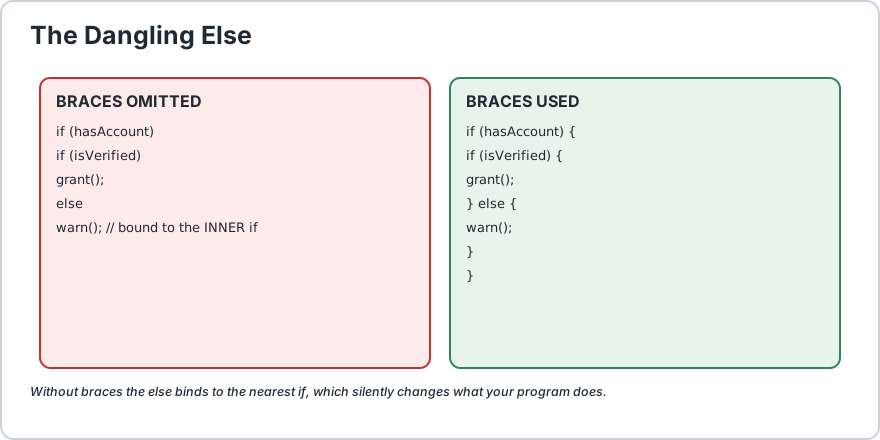
Java lets you write an if without braces when there is only one statement, and beginners often do this to save typing. Do not. Here is exactly what goes wrong.

Main.java
Run Online
// BROKEN: the else attaches to the INNER if, not the outer one
if (hasAccount) if (isVerified) grantAccess();
else showVerificationWarning();
// belongs to the inner if!
// CORRECT: braces make the grouping explicit
if (hasAccount) {
    if (isVerified) {
        grantAccess();
    } else {
        showVerificationWarning();
    }
}

In the broken version, the else silently pairs with the nearest unmatched if, which is the inner one. So when hasAccount is true but isVerified is false, the warning shows, which is probably what you wanted. But when hasAccount is false, the whole inner statement is skipped and nothing happens at all, which is almost certainly a bug.

The habit that prevents this: always use curly braces, even for a single line. It costs two characters and makes the grouping impossible to misread, for you and for whoever edits the file next.

The general lesson, which applies well beyond if...else, is that indentation is for humans and braces are for the compiler. If you rely on indentation alone, a single auto-format or copy-paste can change the meaning of your program without changing a single character of logic.


Two code panels side by side comparing the broken dangling else version with the corrected version using curly braces
Same keywords, completely different behaviour. Braces decide what the else belongs to.

5) Scope: What You Can Declare Inside a Branch

Each block has its own scope, which means a variable declared inside a branch simply does not exist outside it. This is worth seeing early, because it is one of the most common compile errors in Java.

Main.java
Run Online
int score = 75;
int passMark = 50;
if (score > passMark) {
    String message = "You passed";
    // declared inside the block
    System.out.println(message);
}// System.out.println(message);   // ERROR: message does not exist here

The fix is not to move everything outward, which is the usual beginner reaction. The better fix is to declare the variable where you actually use it, and if you genuinely need a value afterwards, return it from the method or restructure the code.

There is one rule that catches even experienced people: you cannot redeclare a variable from the enclosing scope inside the block, but you can reassign it.

Main.java
Run Online
int total = 0;
if (true) {
    total = 50;
    // fine: assigning the existing variable
    // int total = 50; // ERROR: redeclaring the outer total
}

More detail on how long variables live is on our Java scope explained page.

6) The Null Trap, and Why Order Matters

If your condition uses a Boolean object rather than a primitive boolean, the object might be null, and unboxing it throws a NullPointerException at exactly the wrong moment.

Main.java
Run Online
Boolean flag = getFlag();
// the wrapper type, may be null
// DANGEROUS: throws NullPointerException when flag is null
if (flag) {
    System.out.println("on");
}// SAFE: short-circuit evaluation skips the second test
if (flag != null && flag) {
    System.out.println("on");
}

Why does the safe version work? Because Java evaluates the left side of && first. If flag != null is false, the right side is never evaluated, so the null never gets unboxed. Reverse the order and you are back to crashing.

The cleanest fix is to avoid the wrapper entirely and use a primitive boolean, which cannot be null. We explain the difference on our autoboxing and unboxing page.

7) When to Use if...else, and When Not To

if...else is the right tool when the decision is a genuine either-or and each branch does real work. It becomes a problem in three common situations.

SituationProblemBetter Tool
You need a value, not an actionAn if is a statement and cannot be assigned from.A ternary expression, or a switch expression.
More than a handful of branchesThe chain grows long and becomes hard to follow.switch, which names each case.
An else wraps most of a methodEverything ends up indented and the main path is buried.Guard clauses with an early return.

The Early Return Pattern

This one habit makes real code noticeably cleaner. Instead of nesting the main work inside an else, handle the unusual case first and return, then let the normal path continue unindented.

Main.java
Run Online
// HARDER TO READ: the main work is buried and indented
int adultAge = 18;
String label;
if (age >= adultAge) {
    if (hasId) {
        label = "adult with id";
    } else {
        label = "adult without id";
    }
} else {
    label = "minor";
}// EASIER TO READ: unusual cases leave early, main path stays flat
String label;
if (age < adultAge) {
    label = "minor";
} else if (!hasId) {
    label = "adult without id";
} else {
    label = "adult with id";
}

The second version keeps the interesting path at the left margin, which is much easier to scan as more checks get added. For three or more branches like this, a switch expression is usually clearer still, and we cover both on our Java switch statement page.


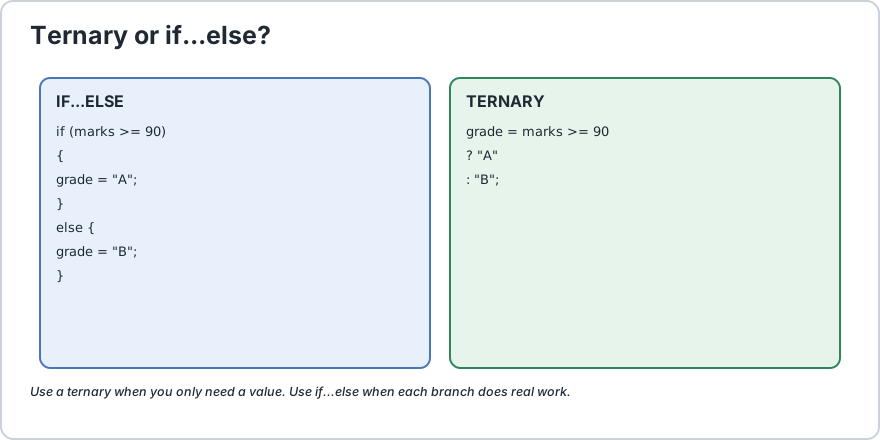
Comparison showing an if else block rewritten as a ternary operator producing the same value
When you only need a value, a ternary is shorter than a full if...else block.

For the compact version, see the Java conditional and ternary operator. Use it sparingly, because a long ternary chained across several lines is harder to read than a plain if block.

8) Realistic Mini Examples

Short, complete programs showing if...else in situations you will actually meet.

Example A, Discount Eligibility

Main.java
Run Online
int total = 1200;
int minimumForDiscount = 500;
boolean isMember = true;
if (isMember && total >= minimumForDiscount) {
    int discount = total / 10;
    int finalPrice = total - discount;
    System.out.println("You saved 10% and now pay " + finalPrice);
} else {
    System.out.println("No discount. You pay " + total);
}

Note the && combining two conditions. That is a very common shape, and short-circuit evaluation means the discount logic only runs when both are true.

Example B, A Safe Null Check Before Use

Main.java
Run Online
String username = getUsername();
if (username == null || username.isBlank()) {
    System.out.println("No username supplied, using Guest");
} else {
    System.out.println("Welcome back, " + username);
}

The || here is what makes it safe. If username is null, the left side is true and Java never evaluates the right side, so isBlank() is never called on a null reference.

Example C, A Grading Decision

Main.java
Run Online
int marks = 87;
int topMark = 90;
if (marks >= topMark) {
    System.out.println("Grade A");
} else {
    System.out.println(marks >= 75 ? "Grade B" : "Needs work");
}

That inner ternary shows when nesting is reasonable. One small ternary inside a branch is easy to read; a ternary nested five levels deep is not.

Frequently Asked Questions

Can an else exist without an if?


No. An else must always be attached to a preceding if that has not already been paired with another else. Java will not compile a standalone else.

Can I have several else blocks on one if?


No. One if can have at most one else. When you need more branches you want an if...else if ladder, which is covered on our if...else if ladder page.

Why does if (count) not compile?


Because Java has no truthy or falsy values. A condition must be strictly a boolean expression, so write if (0 < count) instead. The explicit form also documents your intent for the next reader.

Is the condition evaluated more than once?


No, exactly once. This matters when the condition itself calls a method, because that method runs a single time regardless of what happens inside the branches.

Can I put any statement inside an if block?


Yes, including declarations, assignments, method calls, loops and further if statements. Just remember that a variable declared inside the block will not exist outside it.

Should I use a ternary or an if...else?


Use a ternary when you are only producing a value and the whole thing fits on one readable line. Use if...else when the branches contain several statements, or when the condition is complex enough that inlining it would hurt clarity.
Runnable Code Example: Using if...else in Java for Two-Way Decisions

Java 17+
Main.java
Run Online
// Demonstrates if...else for two-way decisions.
public class IfElseDemo {
    public static void main(String[] args) {
        // 1) The simplest possible case: even or odd.
        int number = 17;
        if (number % 2 == 0) {
            System.out.println(number + " is EVEN");
        } else {
            System.out.println(number + " is ODD");
        } // 2) Comparing TEXT requires equals(), never ==
        String name = "Alex";
        if (name.equals("Alex")) {
            System.out.println("Welcome back, " + name);
        } else {
            System.out.println("Hello, stranger. You are " + name);
        } // 3) Why == fails for text, and what it actually compares.
        String a = new String("hello");
        String b = new String("hello");
        if (a == b) {
            System.out.println("== said TRUE (you will probably NOT see this)");
        } else {
            System.out.println("== said FALSE even though the words match");
        } System.out.println("Same content? " + a.equals(b));
        // 4) A char and a String are NOT the same thing.
        char letter = 'a';
        if (letter == 'a') {
            System.out.println("char comparison works");
        } else {
            System.out.println("char comparison failed");
        } // Note: letter == "a" would compare a char to a String
        // and be silently false forever. Use single quotes.
        // 5) Guard clause first, main path flat and unindented.
        int age = 22;
        boolean hasId = false;
        String label;
        if (age < 18) {
            label = "minor";
        } else if (!hasId) {
            label = "adult without id";
        } else {
            label = "adult with id";
        } System.out.println("Status: " + label);
        // 6) Short-circuit && protects the null check on the right.
        String username = null;
        if (username != null && username.length() > 3) {
            System.out.println("Long enough username");
        } else {
            System.out.println("Rejected, and no crash");
        } // 7) A ternary when you only need a value, not an action.
        int marks = 87;
        String grade = marks >= 90 ? "A" :(marks >= 75 ? "B" : "C");
        System.out.println("Marks " + marks + " is grade " + grade);
        // 8) Exactly one branch runs. Prove it with a counter.
        int branch = 5;
        if (branch > 0) {
            System.out.println("took the if branch");
        } else {
            System.out.println("took the else branch");
        }
    }
}/*
    ACTUAL OUTPUT:

        17 is ODD
        Welcome back, Alex
        == said FALSE even though the words match
        Same content? true
        char comparison works
        Status: adult without id
        Rejected, and no crash
        Marks 87 is grade B
        took the if branch

    THE THREE THINGS TO REMEMBER
    1) Exactly one of the two blocks always runs. Never both, never neither.
    2) The condition must be strictly boolean. if (count) does not compile,
       write if (count > 0). And use equals() for text, not ==.
    3) Always use curly braces, so an else can never attach to the wrong if.
*/

Common Java Technical Interview Questions & Answers

Interview Prep
Q1

How many blocks of an if-else statement execute?

Exactly one. If the condition is true the if block runs and the else is skipped, and if it is false the else block runs and the if is skipped. There is no case where both run or neither runs.
Q2

Can an else statement exist on its own?

No, an else must always be directly paired with a preceding if that has not already been consumed by another else.
Q3

Why is if (count) a compile error in Java?

Java has no truthy or falsy values, so a condition must be strictly a boolean expression. Write if (count > 0) instead, which is also clearer about the intent.
Q4

When must you use equals() instead of == ?

For any object comparison that is not null. The == operator compares references, meaning it asks whether both variables point at the same object, not whether the content matches. equals() compares the actual content. The exception is null, where == is correct and equals() would throw.
Q5

What is the dangling else problem?

When an if has no braces, the else binds to the nearest preceding unmatched if rather than the one you intended, which silently changes the logic. Always using curly braces prevents it entirely.
Q6

How many else blocks can a single if have?

At most one. For more branches you need an if-else if ladder or a switch statement.
Q7

Is the condition of an if evaluated more than once?

No, exactly once. This is worth remembering when the condition calls a method, since that method runs a single time no matter what happens inside the branches.
Q8

When should you prefer a ternary over an if-else?

When you only need to produce a value rather than perform an action, and the whole expression stays readable on one line. An if is a statement and cannot be assigned from, so a ternary or switch expression is the correct tool there.
Q9

Why does if (wrapperBoolean) risk a NullPointerException?

A Boolean wrapper can be null, and the condition unboxes it automatically. Testing it as if (flag != null && flag) is safe because short-circuit evaluation skips the unboxing once the null check fails, though a primitive boolean is the better fix.
Q10

What is a guard clause and why does it help?

It is an early check that handles the unusual case and returns immediately, letting the normal path continue unindented. It keeps the main logic at the left margin and prevents an else block from nesting the rest of the method.

Key Takeaways, Best Practices & Clean Code Rules

Java Best Practice & Production Rules

1) Always use curly braces, even for a single statement, because the omission is what turns an else into a dangling one that binds to the inner if and silently changes the program behaviour.
2) Write conditions that are strictly boolean, such as count > 0 rather than a bare count, since Java has no truthy or falsy values and the explicit form documents your intent.
3) Use equals() for text comparisons and == only for primitives and for null, because == compares references rather than content and this mistake is silent rather than loud.
4) Put the null check on the left of an && or ||, as in flag != null && flag, since short-circuit evaluation is what makes the guard safe and reversing the order reintroduces the crash.
5) Prefer primitive boolean over Boolean wherever possible, so a nullable field cannot turn a condition into a NullPointerException.
6) Handle unusual cases first with an early return instead of wrapping the rest of the method in an else, which keeps the main path unindented and readable as checks are added.
7) Move to a switch statement once you have more than a few branches, since a long if-else-if chain is harder to scan than named cases.
8) Keep side effects out of the condition, because it is evaluated exactly once and mixing an action with a test makes the code harder to reason about and to test.
9) Declare variables inside the block where they are used rather than at the top of the method, and never try to redeclare an enclosing local inside a block, since the compiler rejects it, so reassign the existing variable instead.
10) Use a ternary only when the result is a single readable value, and never chain several deep, because a nested ternary is far harder to read than the plain if-else block it replaced.
We value your privacy & transparency

OperateTools uses cookies and local storage to ensure basic tool functionality, preserve preferences, and analyze aggregated traffic. We never sell your personal data or index your document files. Learn more in our Privacy Policy.