Topic 13 of 119 2. Fundamentals of Java Programming Interactive Tutorial

How Java Code Is Compiled and Executed: Complete Process

13 mins read Last updated: 22 Aug 2026 17,249 views

Direct Answer & Core Concept

Java runs in two separate stages, and mixing them up is the main reason people get confused about how fast Java is. The first stage happens once, when you build. You run the javac compiler, and it reads your source code, checks the syntax, resolves every name, enforces the type rules, and produces bytecode. Bytecode is not machine code for your particular processor. It is code written for an abstract machine, stored in files with a .class extension. If anything is wrong here, the process stops immediately, which is why most beginner mistakes never get a chance to run at all. The second stage happens every single time you run the program. The java launcher starts a virtual machine, loads your .class files, checks that the bytecode is safe, links the classes together, and then starts executing. At first it interprets the instructions, which is quick to start but slow in the long run. As soon as it notices a method being called over and over, it compiles that hot method into real machine code on the fly, and the program literally gets faster while it is still running. So Java is both compiled and interpreted at the same time. It is compiled ahead of time into bytecode, then interpreted and progressively recompiled at run time. That trade-off is exactly why Java needs a warm-up period, and why a short command line program can lose to a natively compiled program even though a long-running server wins comfortably.

Detailed Explanation & Mechanics

1) The Whole Process in One Picture

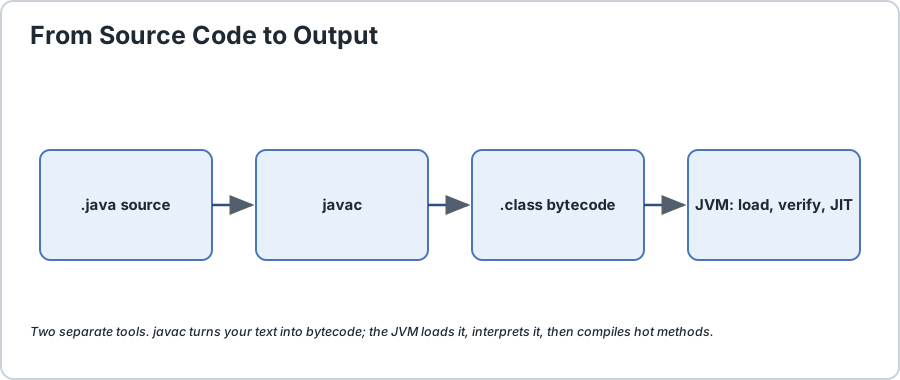
Before we look at any detail, here is the entire journey in one line. It is worth memorising, because almost every beginner question about Java performance comes from forgetting one of these arrows.


Flow diagram showing HelloWorld.java compiled by javac into HelloWorld.class bytecode, then loaded by the JVM, verified, interpreted, and finally JIT compiled into native machine code
Source to bytecode to machine code. There are two compilers and one virtual machine in this picture.

Architecture Diagram
HelloWorld.java  --javac-->  HelloWorld.class  --java-->  JVM loads it  -->  you see output
   your code            bytecode            the runtime does the rest

Two separate tools are involved here, and keeping them straight is the whole trick. javac is the compiler that turns your text into bytecode. The java launcher starts the virtual machine that actually runs the bytecode. Neither one can do the other job.

2) Stage One, Compilation With javac

This stage runs once, whenever you build. You type the command yourself, or your build tool does it for you.

The compiler does far more than translate text. It works through several stages, and each one catches a different class of mistake.

StageWhat It DoesErrors It Catches
LexingSplits the file into tokens, meaning words, numbers and symbols.Illegal characters, unterminated text.
ParsingBuilds a tree structure from the tokens.Missing semicolons, unbalanced braces.
Semantic analysisWorks out what everything means.Unknown types, undefined variables.
Type checkingConfirms the types actually fit together.Assigning text to a number variable.
Code generationWrites out the bytecode file.Anything not yet assigned before use.

That is the practical value of a compile step. Every one of those problems is found before your program runs a single instruction, which is exactly why syntax and type mistakes are so quick and easy to fix compared with logic bugs.

Two details surprise people here. First, javac only writes a .class file for the class you name, though it will happily read any other source file it needs in order to understand a reference. Second, you get one .class file per class, not per source file, which is why an inner class turns up inside the file named after its outer class.

Beginner takeaway: if javac succeeded, your code is syntactically and type correct. If it is still wrong, the bug is in your logic, not your syntax. That one check saves a lot of wasted debugging.

3) What Is Bytecode and Why Not Just Compile to Machine Code

Bytecode is an intermediate instruction set. It sits between your source code and the processor, and it is the reason Java can promise to run anywhere.

If javac compiled straight to machine code for one specific processor, that file would only work on that processor. You would need a different build for Windows on Intel, Linux on ARM, and a Mac. Instead, javac produces one neutral bytecode file, and the virtual machine translates that into real machine code at the moment it runs. The bytecode is platform independent; the interpreter inside the JVM is the part that knows your hardware. This is the full detail behind how Java achieves platform independence.

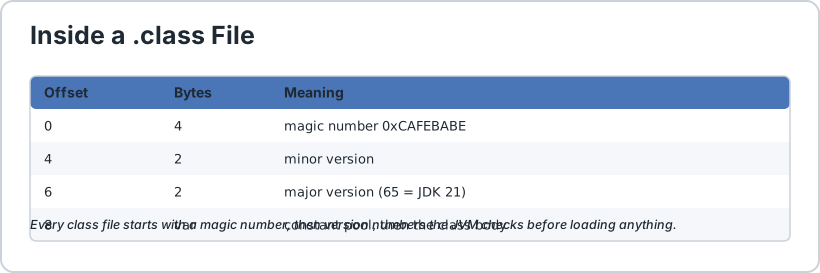
Every class file begins with four magic bytes, 0xCAFEBABE, followed by a minor and a major version number. Those version numbers matter in practice. A class compiled on JDK 21 carries major version 65, and a JVM that is too old to understand that version refuses to load it instead of guessing. This is why a program built on a new JDK can fail on an older server with UnsupportedClassVersionError, and why you should pin your target with --release rather than hoping everyone runs the same version.


Diagram of a Java class file showing the CAFEBABE magic number, minor version, major version, constant pool and class body
Every .class file starts with CAFEBABE and a version number that decides which JVMs can load it.

4) Stage Two, Starting the JVM With the java Launcher

Now you run the program, and this is where a beginner first sees the machinery appear.

Notice that you type HelloWorld with no .class and no .java. The launcher searches the current folder and the classpath, finds HelloWorld.class, and hands it to the virtual machine. The JVM then works through four jobs before your first line of code runs.

  1. Loading. The class loader reads the bytecode and turns it into a runtime representation. Modern JVMs load classes lazily, meaning a class is not read until something actually needs it, so a program may never load most of the code sitting in its own jar files.
  2. Verifying. The bytecode verifier checks the class is safe and legal. It confirms types line up, that no method tries to jump outside the code, and that the stack cannot be corrupted. This is a genuine security feature, and it is why a hand-crafted or malicious class file is rejected rather than allowed to scribble over memory.
  3. Linking. Classes are wired together. This includes preparing the static variables to their defaults and resolving references between classes so they can be shared rather than duplicated.
  4. Initialising. Static variables are finally given their real starting values, and then execution begins at the main method.

For much more detail on what is happening inside, read inside the Java virtual machine, architecture and execution flow.

5) Interpreted First, Then Compiled by the JIT

Here is the part that makes Java fast, and it is the opposite of what most beginners expect. The JVM does not simply interpret your bytecode forever.

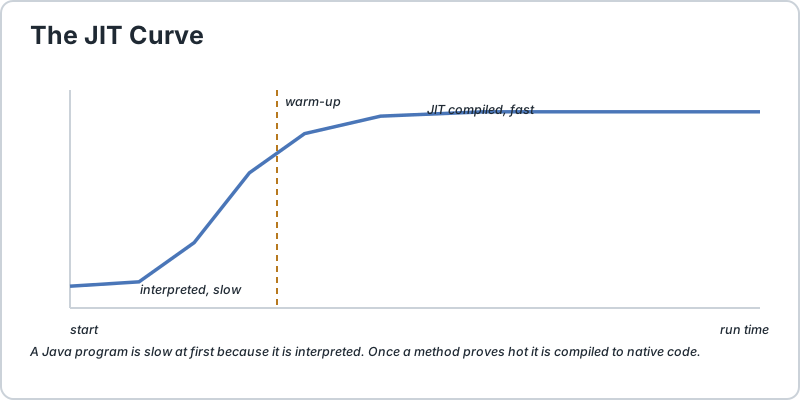
It starts by interpreting. This is fast to start, because there is no waiting, but an interpreter is roughly twenty to fifty times slower than real machine code, so a long-running loop would crawl.

So the JVM watches. Every method call and every loop is counted, and when a method crosses a configurable threshold it is compiled into genuine native machine code by the just-in-time compiler, usually called the JIT. That compiled code is cached in memory and used from then on. The moment your program gets busy, it quietly rewrites its own hot spots to run at full speed.

Main.java
Run Online
// interpreted at first, then JIT compiled once it proves hot
long sum = 0;
for (int i = 0;
i < 100_000_000;
i++) {
    sum += i;
}
ApproachStartupSteady Speed
Interpreter onlyInstantSlow, no matter how long you wait.
JIT with warm-upSmall delayClose to native, often faster.
AOT native compilerBuild time costFast immediately, no warm-up needed.

This single behaviour explains two things beginners find confusing. It is why a Java benchmark looks terrible the first time and great the second time, and it is why performance testing always needs a warm-up run before you measure anything. It is also why Java loses on very short programs, where the warm-up never finishes, but wins comfortably on servers that run for hours.


Line chart showing Java throughput starting slow, rising steeply once the JIT compiles hot methods, then flattening
The classic JIT curve. Slow to start, then it overtakes and flattens out.

Newer JVMs add more layers on top. Tiered compilation compiles quickly at first and optimises harder later, and the garbage collector discussed on our Java memory management page runs concurrently in the background, which is one reason modern Java can be both fast and memory hungry at the same time.

6) The Full Picture as a Checklist

Here is the compressed version to keep in your head while you are learning.

  1. You write HelloWorld.java and save it with the name matching the public class.
  2. You run javac. It checks syntax and types, then writes HelloWorld.class containing bytecode.
  3. You run java. The launcher finds the class file and starts a JVM.
  4. The class loader loads the bytecode, on demand, and the verifier checks it is safe.
  5. The linker connects classes and prepares static fields.
  6. Execution starts at main, running as interpreted bytecode.
  7. Hot methods get compiled to native code by the JIT, and the program speeds up while running.
  8. The garbage collector reclaims unused objects in the background the whole time.

One thing to internalise from step 6 onwards: bytecode is portable but it is not fast, and native code is fast but it is not portable. Java gets both by doing the second one lazily, at run time, on whichever machine it finds itself on. That is the entire trick behind the language, and it is also why JDK, JRE and JVM each have a distinct role in this process.

7) Why Compilation Errors Are a Good Thing

Newcomers sometimes wish Java would just run the code and complain later, the way a loose scripting language does. In practice the opposite is better. Because javac refuses to produce bytecode unless the program is syntactically valid and type correct, an entire category of bug simply cannot reach your users.

It also makes refactoring safe. When you rename a method or change a parameter type, the compiler finds every single call site for you, which a language without a compile step cannot promise. The cost is the occasional frustration of an error you did not expect, and the benefit is that those errors are found in seconds rather than in production.

The same reasoning is why the syntax rules we covered earlier are worth learning carefully. A missing semicolon does not produce a warning, it stops the pipeline before bytecode exists at all.

8) Common Questions and Mistakes

ProblemWhat It MeansWhat To Do
class HelloWorld not foundThe java launcher ran before javac, or it cannot see the class file.Run javac first, then check you are in the same folder or that your classpath is right.
UnsupportedClassVersionErrorThe class file was built on a newer JDK than the JVM running it.Compile with --release set to the oldest runtime you must support, or upgrade the runtime.
OutOfMemoryError in a tiny programThe JVM was started with a heap smaller than the program needed.Raise the -Xmx setting rather than hunting for a bug in your code.
Slow first run, fast second runExactly what the JIT is designed to do.Nothing is broken. Warm up before any benchmark.
Editing a class file by handThe verifier will reject it.Change the source and recompile. Never touch the output of javac.

9) How to Check It Yourself

You do not have to take this on faith, because you can watch every step.

Main.java
Run Online
// step 1: compile, and see the bytecode file appear
javac HelloWorld.javals// step 2: inspect the version bytes the JVM will check
javap -verbose HelloWorld.class | head -5// step 3: run it
java HelloWorld// step 4: confirm it really is a class file
file HelloWorld.class

Step 2 is the interesting one. It prints the major version number, so you can see the exact number an older JVM would be checking. If you want the full chain of what javac and java actually are, we explain the difference in the JDK components and installation guide.

Frequently Asked Questions

Is Java compiled or interpreted?


Both, and that is not a contradiction. javac compiles your source into bytecode ahead of time, then the JVM interprets that bytecode and progressively JIT-compiles the hot parts into native code while the program runs.

What is the difference between bytecode and machine code?


Bytecode is an intermediate instruction set that any JVM can run, so one build works on every platform. Machine code is specific to one processor family. Java lets the JVM do that final translation on the machine it is actually running on.

Why is my Java program slow on the first run?


Because the JVM is still interpreting and has not decided which methods are hot. Once a method crosses the JIT threshold it is compiled to native code and reused. This warm-up is normal and is why benchmarks need a warm-up phase.

Does the JVM verify bytecode for safety?


Yes. The verifier checks types, stack depth and branch targets before a class is allowed to run, so malformed or hand-crafted class files are rejected rather than being allowed to corrupt memory. It is a real protection, though it is not a full security sandbox.

What does one class file per class mean in practice?


An inner class inside Outer produces a separate class file, and its name contains the outer class name with a dollar sign, such as Outer$Inner.class. Both live inside the file named after the outer class.

Can I skip javac and just run the file?


Since Java 11 you can launch a single source file directly with java HelloWorld.java, and the JVM compiles it in memory first. It is a convenient way to try things quickly, but for anything you ship you still want a proper build step.
Runnable Code Example: How Java Code Is Compiled and Executed

Java 17+
Main.java
Run Online
// Save as: HelloWorld.java
public class HelloWorld {
    public static void main(String[] args) {
        System.out.println("Hello, Java World!");
    }
}

/*
    THE COMPLETE PROCESS, STEP BY STEP
    =================================

    STEP 1  YOU WRITE THE SOURCE
        File: HelloWorld.java      (text, human readable)

    STEP 2  YOU COMPILE IT
        $ javac HelloWorld.java
        javac checks syntax, checks types, then produces BYTECODE.
        The file name must match the public class name.

    STEP 3  BYTECODE APPEARS
        File: HelloWorld.class      (binary, NOT readable text)
        First four bytes are the magic number 0xCAFEBABE,
        followed by a minor and a major version number.

    STEP 4  YOU RUN IT
        $ java HelloWorld
        No .class extension. The launcher finds the class file
        and starts a virtual machine.

    STEP 5  THE JVM TAKES OVER
        Load      -> read the bytecode, lazily, only when needed
        Verify    -> reject anything unsafe or malformed
        Link      -> wire classes together, prepare statics
        Initialise-> give static variables their real values

    STEP 6  EXECUTION STARTS AT main()
        At first the bytecode is INTERPRETED.
        Fast to start, slow in the long run.

    STEP 7  THE JIT TAKES OVER
        The JVM counts how often each method runs.
        When a method crosses the threshold it is compiled
        into real NATIVE MACHINE CODE and cached in memory.
        Your program gets faster WHILE IT IS RUNNING.

    STEP 8  THE GARBAGE COLLECTOR
        Runs in the background the entire time, reclaiming
        memory for objects nothing refers to any more.

    ONE LINE SUMMARY
        .java  --javac-->  .class bytecode  --java-->  JVM
        (your text)         (portable code)          (load, verify, link,
                                                        interpret, JIT)
*/

// ---------------------------------------------------------------------------
// A SMALL DEMO OF WHY THE JIT MATTERS
// ---------------------------------------------------------------------------
// Run this once and watch the FIRST loop, then run it again and watch it
// vanish. The second run is fast because the JIT has compiled the hot method
// into native code and cached it. Nothing about the program changed.

public class JitWarmUpDemo {   // save this as a SEPARATE file: JitWarmUpDemo.java

    // A deliberately hot method: called millions of times.
    static long hotSum(int limit) {
        long sum = 0;
        for (int i = 0; i < limit; i++) {
            sum += i;
        }
        return sum;
    }

    public static void main(String[] args) {
        int rounds = 3;
        int limit = 20_000_000;

        System.out.println("Watch the later rounds: they get much faster.");
        System.out.println("Same code, same JVM, no changes. That is the JIT.");

        for (int round = 1; round <= rounds; round++) {
            long start = System.nanoTime();
            long result = hotSum(limit);
            long elapsedMs = (System.nanoTime() - start) / 1_000_000;

            System.out.println("Round " + round
                    + " -> sum = " + result
                    + ", took " + elapsedMs + " ms");
        }

        // Compare: the very same arithmetic, but written as one long
        // interpreted stretch the JIT never sees called in a tight loop.
        System.out.println("Cold code pays the interpretation cost.");
        System.out.println("Hot code runs at close to native speed.");
    }
}

/*
    EXPECTED SHAPE OF THE OUTPUT (timings vary by machine):

        Watch the later rounds: they get much faster.
        Same code, same JVM, no changes. That is the JIT.
        Round 1 -> sum = 199999990000000, took  95 ms
        Round 2 -> sum = 199999990000000, took  12 ms
        Round 3 -> sum = 199999990000000, took  11 ms
        Cold code pays the interpretation cost.
        Hot code runs at close to native speed.

    Note how round 1 is roughly eight times slower than rounds 2 and 3.
    That gap IS the just-in-time compiler doing its job. On your own
    machine the numbers will differ, but the shape should be the same.

    COMMANDS TO SEE THE PIPELINE YOURSELF
        javac HelloWorld.java
        ls
        javap -verbose HelloWorld.class | head -5     # shows major version
        java HelloWorld
        java JitWarmUpDemo                           # run twice, compare
*/

Common Java Technical Interview Questions & Answers

Interview Prep
Q1

Is Java compiled or interpreted?

Both. javac compiles source into bytecode ahead of time, and the JVM then interprets that bytecode while progressively JIT-compiling hot methods into native machine code at run time.
Q2

What is the difference between bytecode and machine code?

Bytecode is an intermediate, processor-independent instruction set that any JVM can execute, so one build runs everywhere. Machine code is tied to a specific processor family. Java defers that final translation to the JVM on whatever machine it is running on.
Q3

Explain the full pipeline from source code to output.

Source is written in a .java file, javac parses and type checks it and emits a .class file of bytecode, the java launcher starts a JVM, the class loader loads the bytecode on demand, the verifier checks it is safe, the linker wires classes together, and execution begins at main, interpreted first and then JIT compiled.
Q4

What is the JIT and why does it exist?

The just-in-time compiler exists because interpretation is quick to start but slow in the long run. The JVM counts method invocations and compiles the hot ones into native code, caching the result, so a program speeds up while it runs.
Q5

Why does a Java program run slowly the first time and quickly the second?

The first run is mostly interpreted, and the second benefits from compiled hot methods already cached in memory. This warm-up is expected behaviour, and it is why benchmarks need a warm-up phase before measurement.
Q6

What is the magic number 0xCAFEBABE?

It is the first four bytes of every class file, used to identify the file as a Java class. Immediately after it come the minor and major version numbers that determine which JVM versions can load the class.
Q7

What does the bytecode verifier protect against?

It ensures a class is type safe and structurally valid before execution, so malformed or maliciously crafted class files are rejected instead of being able to corrupt the stack or memory. It is a real protection, though not a complete security sandbox.
Q8

Why do I get "class not found" when running a program?

Usually the file was never compiled, or the java launcher cannot see the class file. Compile with javac first, and check you are in the same directory or that the classpath includes it.
Q9

What causes UnsupportedClassVersionError?

The class file was compiled by a newer JDK than the JVM attempting to load it. Pin the build with --release set to the oldest runtime you must support so the problem is caught at build time.
Q10

Can I run a .java file without compiling it first?

Since Java 11, yes, with java HelloWorld.java, and the JVM compiles it in memory first. It is convenient for experiments, but a proper build step is still correct for anything you ship.

Key Takeaways, Best Practices & Clean Code Rules

Java Best Practice & Production Rules

1) Always run javac and read its output before running the program, because a successful compile proves the code is syntactically and type correct, which means any remaining bug is a logic bug and saves you from hunting the wrong thing.
2) Pin your target with --release set to the oldest runtime you must support, rather than -source and -target alone, so the compiler checks the API surface you will actually deploy against and you never meet UnsupportedClassVersionError in production.
3) Never edit or commit the generated .class files, and make sure your build ignores them, because they are machine-specific build output and tampering with bytecode is rejected by the verifier anyway.
4) Name every .class file after its public class, so a confusing "class not found" error can never be a file naming mistake in disguise.
5) Warm up before any performance measurement or load test, since a cold interpreted run compared against a JIT-compiled one is not a fair comparison and will send you optimising the wrong code.
6) Expect and design for warm-up in short-lived command line tools, because the JIT never gets a chance to pay off there, while long-running services benefit from it continuously.
7) Do not try to defeat the JIT with clever tricks, since it already handles much of the usual overhead; measure with a profiler before assuming manual optimisation is needed.
8) Leave garbage collection tuning alone until a profiler shows a real pause problem, because the default collectors are well tuned for most workloads and premature tuning usually makes things worse.
9) Keep try-with-resources in mind for anything holding a file, socket or connection, since leaking a resource is a run-time bug and the garbage collector will never clean it up for you.
10) Remember that a class file is portable bytecode and not a finished product, so always deploy the artifact your build produced and never assume it will run on an older JVM than you built it with.
We value your privacy & transparency

OperateTools uses cookies and local storage to ensure basic tool functionality, preserve preferences, and analyze aggregated traffic. We never sell your personal data or index your document files. Learn more in our Privacy Policy.