The enhanced for loop, usually called the for-each loop, is a simplified way to walk through an array or a collection. It arrived in Java 5 and it exists for one reason: to remove the three things you get wrong most often with an indexed loop, which are the starting index, the ending bound and the increment. The syntax looks nothing like a normal for loop, and that is deliberate.
for (String name : names) {
    System.out.println(name);
}
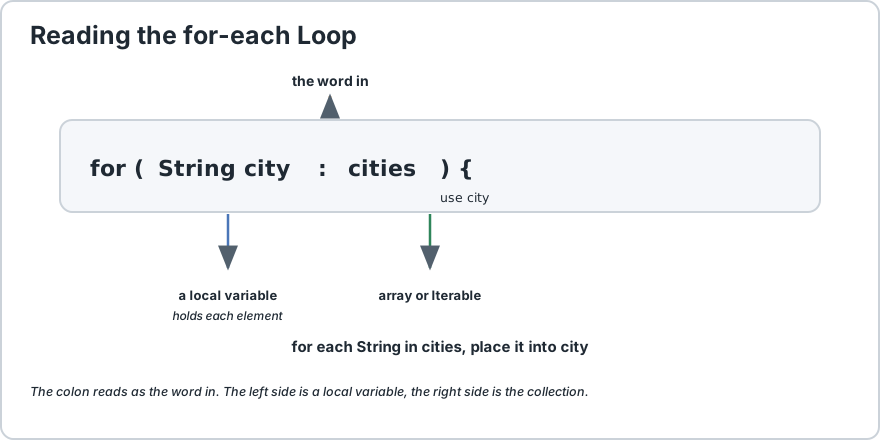
Read the colon as the word in. It says: for each String in names, put it into name. There is no counter, no index and no chance of an off-by-one error, because there is nothing to get out of bounds. That is why it is the safest loop in Java and the one you should reach for by default whenever you are simply visiting every element. The critical thing to understand is that it is read-only in two different ways. You cannot change the size of the collection while iterating it, and you cannot assign a new value to the loop variable to change the element. What you can do is modify the object the element points at, such as calling a setter on it, because that changes the object rather than the reference. Knowing that boundary is what lets you pick the right loop with confidence.
for (int i = 0;
i < cities.length;
i++) {
    System.out.println(cities[i]);
}
Three parts, and the colon reads as the word in.
2) The Three Mistakes It Removes
This is the reason to prefer it, so it is worth being concrete about what it deletes.
Indexed for loop
What can go wrong
For-each
int i = 0
Starting at 1 or 2 and silently skipping an element.
Not applicable, there is no start.
i < cities.length
Using <= throws, using < alone is easy to mistype.
Not applicable, there is no bound.
i++
Forgetting it means an infinite loop.
Not applicable, it cannot be forgotten.
That is the entire argument for the for-each loop. Three sources of bugs, all removed, and the result is code that says what you mean rather than how to do it.
3) What It Works On
The for-each loop works on two things: arrays, and anything that implements Iterable, which is the interface that gives a class the ability to be used in a for-each loop.
import java.util.ArrayList;
import java.util.List;
import java.util.Set;
import java.util.HashSet;
import java.util.Map;
int[] numbers = {
    1, 2, 3
};
String[] words = {
    "a", "b"
};
double[] prices = {
    1.5, 2.5
};
List<String> list = new ArrayList<>();
Set<String> set = new HashSet<>();
Map<String, Integer> map = new HashMap<>();
for (int n : numbers) {
} // arrays of any primitive type
for (String w : words) {
}for (double p : prices) {
}for (String s : list) {
} // any List
for (String s : set) {
} // any Set
for (Map.Entry<String, Integer> e : map.entrySet()) {
} // a Map, via entrySet
The line worth pausing on is the last one. A Map cannot be traversed directly, because it holds key-value pairs rather than single values. You iterate over map.entrySet() and each item is a Map.Entry giving you both halves.
If you only need the keys, iterate map.keySet(). If you only need the values, iterate map.values(). Both are clearer than looping over entries and discarding half of each one.
4) The Two Rules You Cannot Break
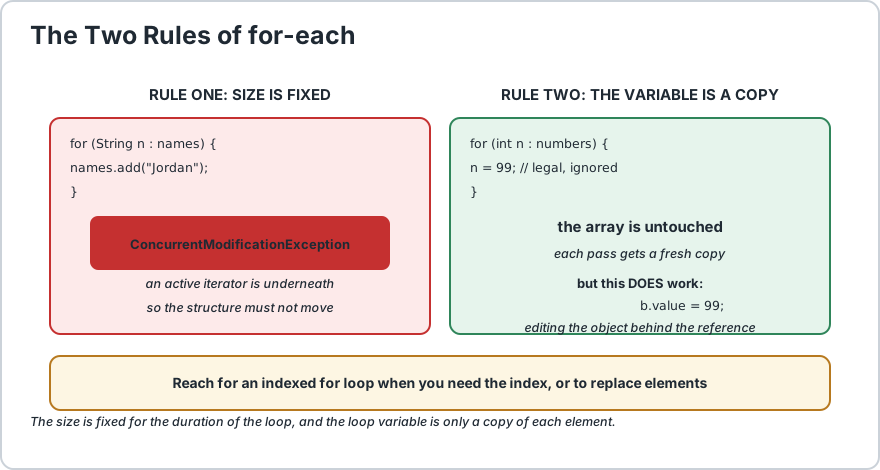
Rule one: you cannot add or remove elements while the for-each loop is running. It throws ConcurrentModificationException. Rule two: you cannot assign a new value to the loop variable to change the element in the collection.
import java.util.ArrayList;
import java.util.List;
List<String> names = new ArrayList<>(List.of("Alex", "Sam", "Robin"));
for (String name : names) {
    if (name.equals("Sam")) {
        names.add("Jordan");
        // throws ConcurrentModificationException
    }
}
The reason is not arbitrary. The for-each loop holds an iterator over the collection, and modifying the structure underneath an active iterator leaves that iterator pointing at a position that no longer means what it did. Rather than let that produce silently wrong results, Java throws.
The fix is to iterate over a copy, or to use an explicit iterator which is designed for exactly this job.
// Safe: modify a copy, iterate the copy
for (String name : new ArrayList<>(names)) {
    if (name.equals("Sam")) {
        names.add("Jordan");
    }
}// Or remove safely, which does not change the size mid-iteration
names.removeIf(n -> n.equals("Sam"));
int[] numbers = {
    1, 2, 3
};
for (int n : numbers) {
    n = 99;
    // legal Java, but changes nothing
}System.out.println(numbers[0]);
// still 1
That line looks like it should work and it does not. Each iteration the loop creates a new copy of the element into n. Assigning to n changes that copy, and the copy is thrown away at the end of the iteration. The array is untouched.
What you can do is modify the object the element points at. This is the distinction that trips people up.
class Box {
    int value;
    Box(int value) {
        this.value = value;
    }
}final int FIRST = 1;
final int SECOND = 2;
final int ZERO = 0;
Box first = new Box(FIRST);
Box second = new Box(SECOND);
Box[] boxes = {
    first, second
};
for (Box b : boxes) {
    b.value = 99;
    // WORKS: changes the object behind the reference
}for (Box b : boxes) {
    System.out.println(b.value);
    // 99, 99
}// Replacing the reference in the array needs an indexed loop
for (int i = 0;
i < boxes.length;
i++) {
    boxes[i] = new Box(ZERO);
}
The size is fixed for the duration. Modifying the objects inside it is fine.
5) When to Use for Each, and When Not To
Situation
Use
Why
Visiting every element
for-each
No index, so no off-by-one possible.
You need the position
Indexed for
The for-each loop gives you no index.
Iterating backwards
Indexed for
for-each only goes forwards.
Skipping every other element
Indexed for
You cannot count without an index.
Replacing elements
Indexed for
Assigning the loop variable changes nothing.
Adding or removing items
Iterator or removeIf
Direct modification throws.
Printing or logging
for-each
The clearest possible expression of intent.
A useful habit is to write the for-each version first whenever the task is simply "do this to each item". If you then find yourself needing the index, switch to the indexed form knowingly, rather than starting with the indexed form and treating for-each as an optimisation you cannot afford.
// Readable: printing a report line for every sale
for (Sale sale : sales) {
    System.out.println(sale.getDate() + "  " + sale.getTotal());
}// Needs the index? Now switch, on purpose
for (int i = 0;
i < sales.size();
i++) {
    System.out.println("row " + i + " total " + sales.get(i).getTotal());
}
6) What Happens Under the Hood
It is worth knowing that the for-each loop is not magic, and the compilation is different depending on what you are iterating.
Iterating
Becomes roughly
An array
A plain indexed for loop, with the length read once up front.
A Collection
A call to iterator(), then hasNext() and next() each pass.
// What you write
for (String city : cities) {
    System.out.println(city);
}// Roughly what the compiler produces for an array
for (int i = 0;
i < cities.length;
i++) {
    String city = cities[i];
    System.out.println(city);
}
This explains two behaviours you may have already noticed. It explains why a for-each over a collection throws when you modify the structure, because an iterator is what is underneath. And it explains why the for-each over an array is not slower than an indexed loop, since it compiles to the same thing.
One subtlety: for an array the length is evaluated once, before the loop starts. If something inside the loop changes the array reference itself, the loop keeps using the original one. This is a real but rare edge case, and it is a good reason to prefer a collection when the structure is being modified.
7) Common Mistakes
Mistake
Symptom
Fix
Adding or removing during the loop
ConcurrentModificationException at run time.
Iterate a copy, or use an iterator or removeIf.
Assigning to the loop variable
No error, and no change either.
Use an indexed for loop to replace elements.
Expecting an index
Compile error, there is no index variable.
Switch to an indexed for loop.
Iterating a Map directly
Compile error, a Map is not Iterable.
Use entrySet(), keySet() or values().
Reusing the variable name outside
Compile error, the variable is scoped to the loop.
Declare your own variable before the loop if you need it after.
Wrong element type declared
Compile error on a type mismatch.
Declare the variable with the collection's element type.
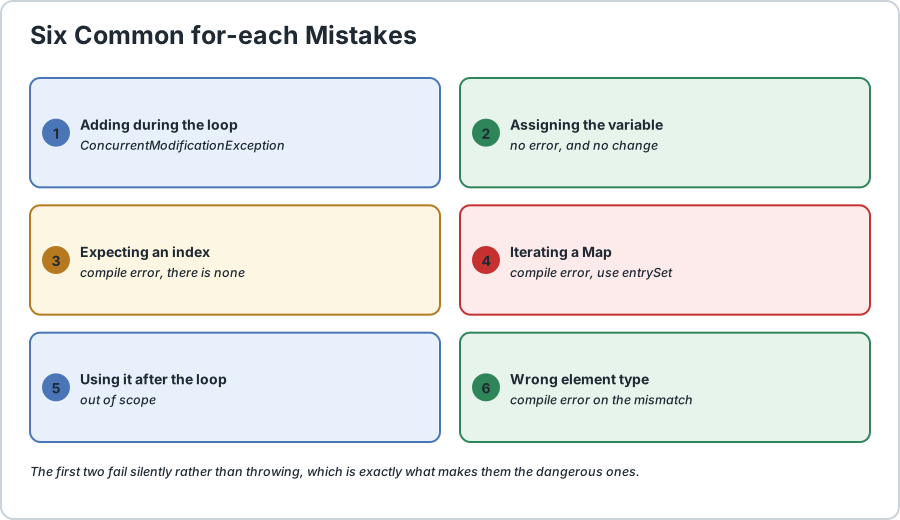
Six for-each mistakes. The first two fail silently, which is why they are the dangerous ones.
The second row is the one to remember. Assigning to the loop variable is not an error in any sense, it just quietly does nothing, and it is a common instinct coming from other languages where the loop variable is a real reference.
Frequently Asked Questions
What does the colon in a for-each loop mean?
Read it as the word in. The statement for (String city : cities) means for each String in cities, place it into the variable city. The left side is a local variable, the right side is the array or collection.
Can I modify a collection inside a for-each loop?
Not its size. Adding or removing elements throws ConcurrentModificationException. You may however modify the objects the elements point at, such as calling a setter, because that changes the object rather than the structure. To change the size, iterate over a copy or use an iterator.
Why does assigning to the loop variable change nothing?
Because each iteration copies the element into the loop variable. Assigning to it changes that temporary copy, which is discarded at the end of the iteration. The array or collection is untouched. To replace an element you need an indexed for loop.
Can I iterate backwards with a for-each loop?
No, it only traverses forwards from the first element. Use an indexed for loop starting at size minus one and counting down if you need reverse order.
Does a for-each loop work with a Map?
Not directly, because a Map holds key-value pairs. Iterate map.entrySet() for both parts, map.keySet() for keys only, or map.values() for values only. Each entry gives you getKey and getValue.
Is a for-each loop slower than an indexed for loop?
No. For an array the compiler produces essentially the same indexed loop. For a collection it uses an iterator, which has a small overhead per element but buys you safety and readability, and that trade is almost always worth it.
Can I use a for-each loop on a two-dimensional array?
Yes, but each element is itself an array, so you need a nested loop. The outer for-each gives you a row and the inner one walks that row. This is the standard way to print a matrix.
// Demonstrates the Java enhanced for loop.
import java.util.ArrayList;
import java.util.HashMap;
import java.util.List;
import java.util.Map;
public class EnhancedForDemo {
    // A simple mutable object, to show rule two clearly.
    static class Box {
        String label;
        Box(String label) {
            this.label = label;
        }
    } public static void main(String[] args) {
        String[] cities = {
            "Dhaka", "London", "Tokyo"
        };
        int[] scores = {
            88, 74, 95
        };
        List<String> names = new ArrayList<>(List.of("Alex", "Sam", "Robin"));
        Map<String, Integer> totals = new HashMap<>();
        totals.put("Alex", 120);
        totals.put("Sam", 95);
        totals.put("Robin", 140);
        // 1) THE BASICS: no index, no bound, no increment to get wrong.
        System.out.println("cities:");
        for (String city : cities) {
            System.out.println("  " + city);
        } // 2) IT WORKS ON ANY PRIMITIVE ARRAY TOO.
        int best = scores[0];
        for (int score : scores) {
            if (score > best) {
                best = score;
            }
        } System.out.println("highest score: " + best);
        // 3) IT WORKS ON ANY COLLECTION, NOT JUST ARRAYS.
        System.out.println("names:");
        for (String name : names) {
            System.out.println("  " + name);
        } // 4) A MAP IS NOT ITERABLE ITSELF. Go via entrySet()
        //    when you need both the key and the value.
        System.out.println("totals:");
        for (Map.Entry<String, Integer> entry : totals.entrySet()) {
            System.out.println("  " + entry.getKey() + " -> " + entry.getValue());
        } // 5) RULE TWO, PART ONE: assigning the loop variable
        //    changes nothing, because each value is a fresh copy.
        int[] numbers = {
            1, 2, 3
        };
        for (int n : numbers) {
            n = 99;
            // legal, and completely ignored
        } System.out.println("after n = 99, first element is still " + numbers[0]);
        // 6) RULE TWO, PART TWO: you CAN modify the object behind
        //    the reference, because that is not the same thing.
        Box[] boxes = {
            new Box("first"), new Box("second")
        };
        for (Box box : boxes) {
            box.label = box.label.toUpperCase();
        } System.out.println("labels uppercased: " + boxes[0].label + ", " + boxes[1].label);
        // 7) RULE ONE: changing the SIZE mid-loop throws.
        //    This line is left commented because it would crash.
        // for (String name : names) {
        //     names.add("Jordan");       // ConcurrentModificationException
        // }
        // The safe alternatives, shown uncommented:
        List<String> growable = new ArrayList<>(names);
        growable.add("Jordan");
        System.out.println("copy grew safely to " + growable.size() + " items");
        // 8) WHEN YOU NEED THE INDEX, SWITCH DELIBERATELY.
        //    This is not a limitation to work around, it is a signal.
        for (int i = 0;
        i < names.size();
        i++) {
            System.out.println("  " +(i + 1) + ". " + names.get(i));
        } // 9) A TWO-DIMENSIONAL ARRAY NEEDS A NESTED for-each.
        int[][] grid = {
{
                1, 2, 3
            }, {
                4, 5, 6
            }
        };
        System.out.println("grid:");
        for (int[] row : grid) {
            // each element is itself an array
            for (int value : row) {
                System.out.print(value + " ");
            } System.out.println();
        }
    }
}/*
    ACTUAL OUTPUT:

        cities:
          Dhaka
          London
          Tokyo
        highest score: 95
        names:
          Alex
          Sam
          Robin
        totals:
          Robin -> 140
          Sam -> 95
          Alex -> 120
        after n = 99, first element is still 1
        labels uppercased: FIRST, SECOND
        copy grew safely to 4 items
1. Alex
2. Sam
3. Robin
        grid:
        1 2 3
        4 5 6

    THE FOUR THINGS TO REMEMBER
    1) Read the colon as the word in: for (X x : xs) means
       for each X in xs, put it into x.
    2) It removes the three things indexed loops get wrong: the
       start index, the ending bound and the increment.
    3) You cannot change the SIZE of a collection while iterating
       it, and you cannot assign the loop variable to change an
       element. You CAN modify the object behind the reference.
    4) Reach for it by default. Switch to an indexed for loop the
       moment you genuinely need the position.
*/
Common Java Technical Interview Questions & Answers
Interview Prep
Q1: What does the colon in a for-each loop mean and what are its two parts?\nA1: Read it as the word in. The left side is a local variable that holds each element in turn, and the right side is the array or collection being traversed, so for (String city : cities) means for each String in cities, place it into city.\nQ2: Why is a for-each loop safer than an indexed for loop?\nA2: Because it removes the three things indexed loops most often get wrong: the starting index, the ending bound and the increment. With no index there is no possibility of an off-by-one error or an ArrayIndexOutOfBoundsException.\nQ3: Can you add or remove elements while a for-each loop is running?\nA3: No, it throws ConcurrentModificationException. The loop holds an iterator over the structure, and changing the size underneath it would leave that iterator in an invalid position. Iterate a copy, or use an iterator or the removeIf method instead.\nQ4: Why does assigning to the loop variable change nothing?\nA4: Because each iteration copies the element into the loop variable, and that temporary copy is discarded at the end of the pass. Assigning to it changes only the copy. You can still modify the object the element points at, such as calling a setter, because that changes the object rather than the reference.\nQ5: How do you iterate a Map with a for-each loop?\nA5: A Map is not itself Iterable. Iterate map.entrySet() for both key and value, map.keySet() for keys only, or map.values() for values only. Each entry exposes getKey and getValue.\nQ6: Can you iterate backwards with a for-each loop?\nA6: No, it only traverses forwards. Use an indexed for loop starting at size minus one and counting down when reverse order is required.\nQ7: Is a for-each loop slower than an indexed for loop?\nA7: No. For an array the compiler produces essentially the same indexed loop. For a collection it uses an iterator, which costs a little per element but removes a whole class of bugs, and that trade is almost always worth taking.\nQ8: When should you deliberately choose an indexed for loop instead?\nA8: When you need the index, want to iterate backwards, want to skip elements, or need to replace elements in the structure. Needing the index is not a limitation to work around but a clear signal that the indexed form is the right tool.
Key Takeaways, Best Practices & Clean Code Rules
Java Best Practice & Production Rules
Reach for the for-each loop by default whenever the task is simply doing something to every element, and switch to an indexed for loop only when you genuinely need the position.\nTreat needing the index as a signal rather than an obstacle, since the indexed form is clearer for anything that involves positions, reverse order or skipping.\nNever add or remove elements while a for-each loop is running, and instead iterate a copy, use an explicit iterator, or call removeIf which is designed for safe removal.\nDo not expect assigning to the loop variable to change an element, because it only changes a temporary copy, and use an indexed loop when you need to replace elements.\nDo modify the objects that elements point at when you need to change their state, since calling a setter through the loop variable works correctly and is often what you actually want.\nUse entrySet, keySet or values when iterating a Map rather than trying to iterate the Map directly, and choose keySet or values when you only need one half of each pair.\nDeclare the loop variable with the collection actual element type, since a mismatch is a compile error that is easy to fix now and annoying to trace later.\nDo not try to reuse the loop variable after the loop, because it is scoped to the loop, and declare a separate variable beforehand if you need the final value.\nWhen the collection is being modified during the work, prefer a collection over a raw array, since the array form captures the length once at the start.\nRead for-each code as a sentence, for each sale in sales, so if the line does not read naturally in English the loop is probably the wrong shape for the job.
Share with friends, students, or your developer network
We value your privacy & transparency
OperateTools uses cookies and local storage to ensure basic tool functionality, preserve preferences, and analyze aggregated traffic. We never sell your personal data or index your document files. Learn more in our Privacy Policy.
Stay Updated
Enable Notifications?
Get real-time updates, instant tool alerts & daily news directly on your device.