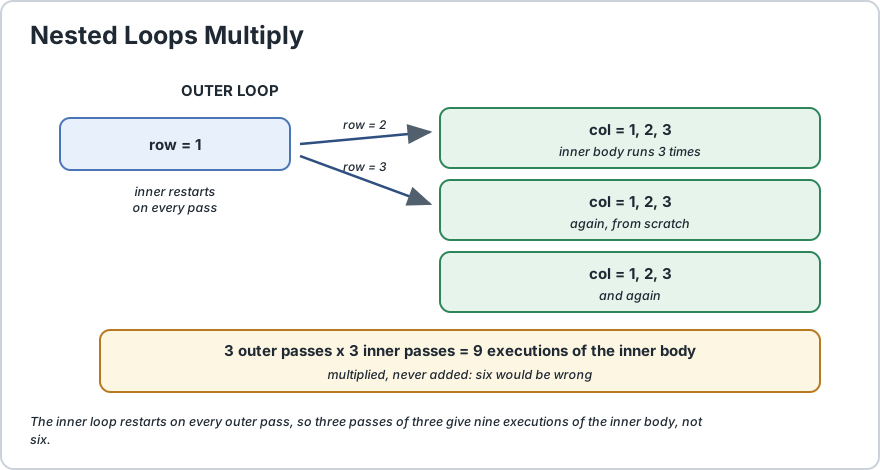
A nested loop is simply a loop written inside the body of another loop. There is no special syntax for it, no keyword and no import. You place one loop inside the braces of another and it simply works, which is why nesting is so easy to start and so easy to overdo. Here is the key mechanic. The inner loop is re-initialised and run to completion every single time the outer loop's body executes. So if the outer loop runs three times and the inner loop runs four times each time, the inner body executes twelve times, not seven. The total is a multiplication, never an addition. That single fact is the one to hold on to, because it is both how you reason about nested loops and where their performance trap comes from. The second thing to know is that break and continue inside a nested loop only affect the innermost loop containing them. That is almost never what people expect the first time. If you want to leave the outer loop early you need a label, which is a name you put before a loop and then reference with break labelName;. The practical warning is about cost. Two nested loops over a thousand items is a million operations, and three levels is a billion. Nesting is perfect for grids, tables and matrices, and dangerous the moment you reach for it as a general shortcut.
final int SIZE = 3;
for (int row = 1;
row <= SIZE;
row++) {
    for (int col = 1;
    col <= SIZE;
    col++) {
        System.out.print(row + "," + col + " ");
    } System.out.println();
}
That prints a 3 by 3 grid. Read it carefully: the outer loop counts row, and every time it advances one step, the inner loop starts again from the beginning and runs all three columns.
final int SIZE = 1000;
for (int a = 0;
a < SIZE;
a++) {
    // 1,000 iterations
    for (int b = 0;
    b < SIZE;
    b++) {
        // 1,000 each  = 1,000,000
        for (int c = 0;
        c < SIZE;
        c++) {
            // 1,000 each  = 1,000,000,000
            // one billion times over
        }
    }
}
One billion iterations of even a trivial statement will visibly freeze your program. This is the single most important practical fact on the page, and it is why nesting three or more levels deep over large collections is something to avoid rather than optimise later.
3) Mixing Different Loop Types
The inner loop does not have to match the outer one. A very common shape is an outer for-each over a collection with an inner for over a range.
String[] products = {
    "Book", "Pen", "Bag"
};
final int MAX_ITEMS = 2;
for (String product : products) {
    for (int count = 1;
    count <= MAX_ITEMS;
    count++) {
        System.out.println(count + " x " + product);
    }
}
That prints every product at two quantities. A for-each outer loop is usually the better choice when you do not need the index, because it removes one whole class of off-by-one mistakes from the outer level. We compare the two forms on the enhanced for loop page.
Outer loop
Use it when
for-each
You do not need the index of the outer items.
indexed for
You need the position, or you must skip items.
while
The outer count is not known in advance.
do-while
The outer body must run at least once.
4) break and continue Only Reach the Inner Loop
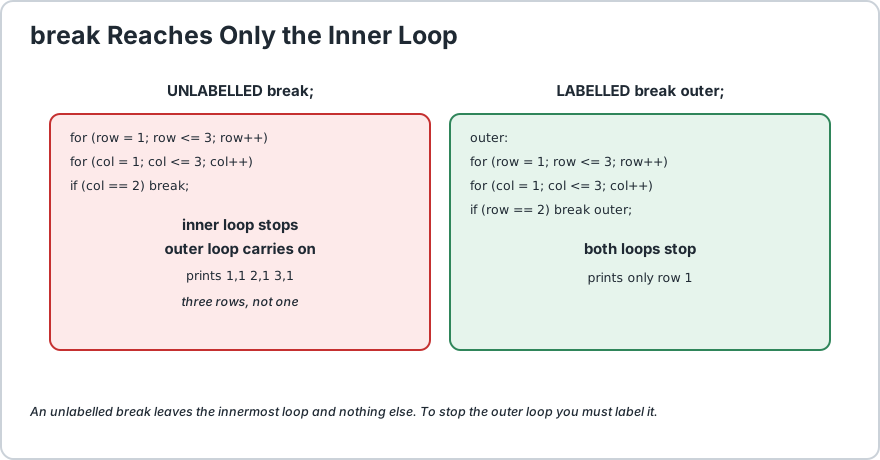
This is the surprise that catches almost everyone. Inside nested loops, break and continue apply to the innermost loop only. There is no way for the inner loop to end the outer one without help.
final int SIZE = 3;
final int STOP_COLUMN = 2;
for (int row = 1;
row <= SIZE;
row++) {
    for (int col = 1;
    col <= SIZE;
    col++) {
        if (col == STOP_COLUMN) {
            break;
            // leaves the INNER loop only
        } System.out.print(row + "," + col + " ");
    } System.out.println();
}
Output is 1,1 on each of the three lines. The break skipped column 2 and 3, but the outer loop carried on to the next row regardless. If the intent was to stop everything, this code is wrong, and it is wrong silently.
An unlabelled break exits only the inner loop. A labelled break can exit the outer one.
5) Labelled break and continue
A label is a name you attach to a loop. Put a name and a colon before the loop, then use it with break or continue to control that specific loop from anywhere inside.
final int SIZE = 3;
outer:for (int row = 1;
row <= SIZE;
row++) {
    for (int col = 1;
    col <= SIZE;
    col++) {
        if (row == col) {
            continue outer;
            // skip to the next ROW, not the next column
        } System.out.print(row + "," + col + " ");
    }
}
This prints every pair except the diagonal, which is exactly the shape you want when you are finding pairs that are not equal to each other.
Statement
Effect
break;
Leaves the innermost loop.
continue;
Skips to the next pass of the innermost loop.
break outer;
Leaves the loop labelled outer.
continue outer;
Skips to the next pass of the labelled loop.
return;
Leaves the method entirely, whatever loops you are in.
Use labels sparingly. They are genuinely the only way to control an outer loop from an inner one, but a program that depends on them is usually a program that wanted a different shape. If you find yourself labelling three loops, step back and reconsider the algorithm.
String[] names = {
    "Alex", "Sam", "Alex", "Robin", "Sam"
};
final int LENGTH = names.length;
for (int i = 0;
i < LENGTH;
i++) {
    for (int j = i + 1;
    j < LENGTH;
    j++) {
        if (names[i].equals(names[j])) {
            System.out.println("Duplicate found: " + names[i]);
        }
    }
}
Two details matter there. First, j starts at i + 1 rather than zero, so each pair is only compared once and a value is never compared with itself. Comparing a string needs equals(), not ==. Getting the inner start point wrong here is the classic off-by-one in a nested loop.
Note the inner condition uses grid[row].length rather than a hard-coded number, so the code keeps working if the rows have different sizes.
7) The Performance Trap and Its Alternatives
Nested loops multiply. Two levels over n items is n squared, and three levels is n cubed. Before nesting a third level, check whether a single loop over a collection or a stream can do the job.
There is a simple test you can apply before committing to a nested loop. Ask whether the work in the inner loop really depends on the outer value. If it does not, you almost certainly want a single loop that does the inner work once per item rather than repeatedly. Nesting exists for genuinely two-dimensional problems like grids and matrices, not as a general way to run some code several times.
8) Common Mistakes
Mistake
Symptom
Fix
Reusing the same variable name
Compile error, the inner shadows the outer.
Use different names, such as row and col.
Inner loop starts at zero when it should not
Duplicate output, every pair compared twice.
Start the inner loop at i + 1.
Hard-coding the inner bound
Breaks if the collection changes size.
Use .length or .size().
Unlabelled break to exit the outer loop
Only the inner loop stops, silently.
Add a label and use break label;.
Three or more levels of nesting
The program appears to hang.
Flatten it, or use a collection or a stream.
Wrong closing brace placement
Indentation lies about the real structure.
Count braces, and let the editor re-indent.
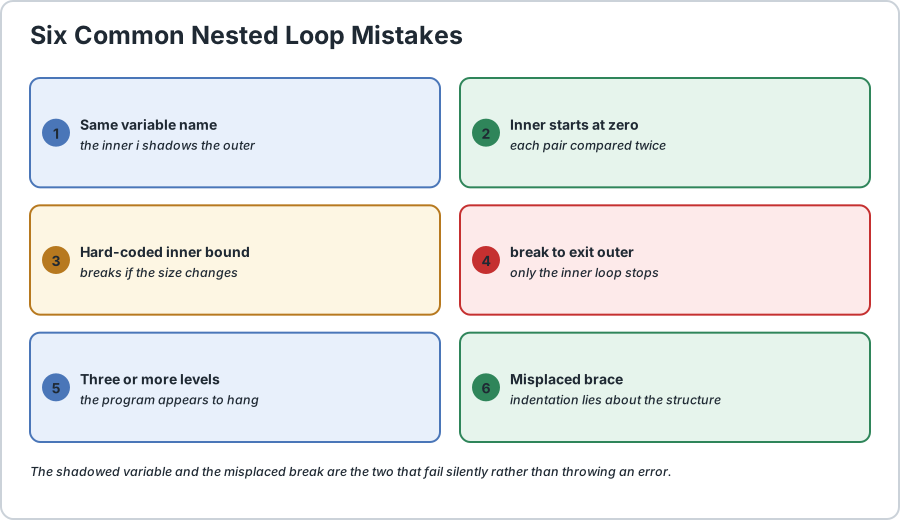
The first one deserves emphasis. If both loops declare int i, the inner declaration shadows the outer one, and the outer counter becomes invisible inside the inner loop. The compiler rejects redeclaring in the same block but allows it in a nested one, so this fails in a confusing way rather than an obvious one.
Six nested loop bugs. The shadowed variable and the misplaced break are the two that fail silently.
Frequently Asked Questions
How many times does a nested loop body run?
The number of times the outer loop runs multiplied by the number of times the inner loop runs on each pass. Three passes of the outer loop with four inner iterations each means twelve executions of the inner body, not seven.
Does break exit both loops in a nested loop?
No. An unlabelled break exits only the innermost loop containing it. To exit the outer loop you must label it and write break labelName;, or use return to leave the method entirely.
What is a loop label and how do I use one?
A label is a name attached to a loop, written before it with a colon, as in outer: for (...). Inside that loop you can then write break outer; to leave it or continue outer; to skip to its next pass, regardless of how deeply nested you are.
When should I avoid nested loops?
When the inner work does not actually depend on the outer value, because then you can flatten it into a single loop. Also avoid three or more levels, since the cost multiplies at each level and the program becomes slow enough to appear frozen.
Can I use a for-each loop as the inner loop?
Yes, the two styles mix freely. Using a for-each inner loop removes index mistakes from that level, but remember it still re-runs from the first element on every pass of the outer loop, so it does not save iterations.
How do I compare every pair in a list exactly once?
Use an indexed outer loop starting at zero and an inner loop starting at i + 1. Starting the inner loop at zero instead would compare each pair twice and would also compare every element with itself.
Is a nested loop slower than a stream?
For simple transformations, a stream is usually faster because it avoids repeated work and reads closer to the intent. For genuinely two-dimensional problems such as grids and matrices, a nested loop is the natural and correct tool.
What happens if the inner loop never ends?
The outer loop simply never advances, so the program appears to hang on the first pass. Check the inner update expression first, exactly as you would with a single loop.
// Demonstrates nested loops in Java.
public class NestedLoopsDemo {
    public static void main(String[] args) {
        final int SIZE = 3;
        final int LIMIT = 3;
        final int MAX_ITEMS = 2;
        final int LENGTH = 3;
        String[] products = {
            "Book", "Pen", "Bag"
        };
        String[] names = {
            "Alex", "Sam", "Alex"
        };
        // 1) THE BASIC GRID
        //    The inner loop restarts from scratch on every outer pass,
        //    so the inner body runs SIZE * SIZE = 9 times.
        System.out.println("a 3x3 grid:");
        for (int row = 1;
        row <= SIZE;
        row++) {
            for (int col = 1;
            col <= SIZE;
            col++) {
                System.out.print(row + "," + col + "  ");
            } System.out.println();
        } // 2) COUNTING THE MULTIPLICATION
        //    3 outer passes x 3 inner passes = 9 executions, not
        6. int executions = 0;
        for (int i = 1;
        i <= SIZE;
        i++) {
            for (int j = 1;
            j <= SIZE;
            j++) {
                executions++;
            }
        } System.out.println("inner body ran " + executions + " times (3 x 3 = 9)");
        // 3) MIXING LOOP TYPES
        //    A for-each outer loop with a counted inner loop.
        System.out.println("order lines:");
        for (String product : products) {
            for (int count = 1;
            count <= MAX_ITEMS;
            count++) {
                System.out.println("  " + count + " x " + product);
            }
        } // 4) break REACHES ONLY THE INNER LOOP
        //    Each row stops at column 1, but the outer loop keeps going.
        System.out.println("unlabelled break, per row:");
        for (int row = 1;
        row <= SIZE;
        row++) {
            for (int col = 1;
            col <= SIZE;
            col++) {
                if (col == 2) {
                    break;
                    // inner loop only
                } System.out.print(row + "," + col + " ");
            } System.out.println();
        } // 5) A LABELLED break LEAVES THE OUTER LOOP TOO
        System.out.println("labelled break:");
        outer: for (int row = 1;
        row <= SIZE;
        row++) {
            for (int col = 1;
            col <= SIZE;
            col++) {
                if (row == 2 && col == 2) {
                    break outer;
                    // leaves BOTH loops
                } System.out.print(row + "," + col + " ");
            } System.out.println();
        } // 6) LABELLED continue SKIPS THE WHOLE REMAINING ROW
        System.out.println("labelled continue, diagonal skipped:");
        outerLoop: for (int row = 1;
        row <= LENGTH;
        row++) {
            for (int col = 1;
            col <= LENGTH;
            col++) {
                if (row == col) {
                    continue outerLoop;
                    // jump to the next row
                } System.out.print(row + "," + col + " ");
            } System.out.println();
        } // 7) FINDING DUPLICATES WITHOUT COMPARING TWICE
        //    The inner loop starts at i + 1, so each pair is seen once.
        System.out.println("duplicates:");
        for (int i = 0;
        i < names.length;
        i++) {
            for (int j = i + 1;
            j < names.length;
            j++) {
                if (names[i].equals(names[j])) {
                    // equals, never ==
                    System.out.println("  " + names[i] + " appears twice");
                }
            }
        } // 8) A MULTIPLICATION TABLE
        System.out.println("multiplication table:");
        for (int i = 1;
        i <= LIMIT;
        i++) {
            for (int j = 1;
            j <= LIMIT;
            j++) {
                System.out.printf("%4d", i * j);
            } System.out.println();
        }
    }
}/*
    ACTUAL OUTPUT:

        a 3x3 grid:
        1,1  1,2  1,3
        2,1  2,2  2,3
        3,1  3,2  3,3
        inner body ran 9 times (3 x 3 = 9)
        order lines:
          1 x Book
          2 x Book
          1 x Pen
          2 x Pen
          1 x Bag
          2 x Bag
        unlabelled break, per row:
        1,1
        2,1
        3,1
        labelled break:
        1,1 1,2 1,3
        2,1
        labelled continue, diagonal skipped:
        1,2 1,3
        2,1 2,3
        3,1 3,2
        duplicates:
          Alex appears twice
        multiplication table:
           1   2   3
           2   4   6
           3   6   9

    THE THREE THINGS TO REMEMBER
    1) The inner loop restarts on every outer pass, so the total is
       outer x inner, never outer + inner.
    2) An unlabelled break or continue affects only the INNER loop.
       Use a label to control the outer one.
    3) The cost multiplies at every level. Two levels is n squared,
       three is n cubed, so a billion iterations will look like a hang.
*/
Common Java Technical Interview Questions & Answers
Interview Prep
Q1: How many times does the body of a nested loop execute?\nA1: The number of times the outer loop runs multiplied by the number of times the inner loop runs on each pass. Three outer passes with four inner iterations each gives twelve executions of the inner body, not seven.\nQ2: Does an unlabelled break exit both loops in a nested loop?\nA2: No. An unlabelled break exits only the innermost loop containing it. To leave the outer loop you must label it and write break labelName, or use return to leave the method entirely.\nQ3: What is a loop label and how is it used?\nA3: A name attached to a loop, written before it with a colon as in outer: for (...). Inside that loop you can then write break outer to leave it or continue outer to skip to its next pass, no matter how deeply nested the current loop is.\nQ4: What is the time complexity of two nested loops over n items?\nA4: O(n squared), because the iterations multiply. Three levels of nesting is O(n cubed), so a thousand items at three levels is a billion iterations, which will appear to freeze the program.\nQ5: When should nested loops be avoided?\nA5: When the inner work does not actually depend on the outer value, since you can then flatten it into a single loop. Also avoid three or more levels over large collections, and consider a collection lookup or a stream instead.\nQ6: How do you compare every pair in an array exactly once?\nA6: Use an indexed outer loop from zero and an inner loop starting at i + 1. Starting the inner loop at zero would compare each pair twice and would compare every element with itself.\nQ7: Can a for-each loop be nested inside another loop?\nA7: Yes, the styles mix freely. A for-each inner loop removes index mistakes at that level, but it still restarts from the first element on every outer pass, so it does not reduce the iteration count.\nQ8: What happens if the inner loop of a nested loop never terminates?\nA8: The outer loop never advances, so the program appears to hang on the very first pass. Check the inner update expression, exactly as you would for a single loop.
Key Takeaways, Best Practices & Clean Code Rules
Java Best Practice & Production Rules
Keep the total work visible in your head by remembering that nested iterations multiply rather than add, and prefer a single loop whenever the inner work does not actually depend on the outer value.\nLimit nesting to two levels and treat a third level as a signal to redesign the algorithm rather than something to optimise later.\nUse a for-each loop for the outer level when you do not need the index, since it removes an entire class of off-by-one mistakes at that level.\nGive the outer and inner loops distinct variable names such as row and col, because reusing i shadows the outer counter and makes the inner loop unable to see it.\nUse a labelled break or continue when you genuinely need to leave or skip an outer loop, but prefer restructuring the condition, since a program that depends on labels is usually a program with the wrong shape.\nStart the inner loop at i + 1 when comparing pairs, so each combination is examined exactly once rather than twice.\nUse .length or .size() for every loop bound rather than a hard-coded number, so nested code keeps working when a collection changes size.\nPlace the update inside the innermost loop and verify it moves that loop toward its bound, since an inner loop that never advances hangs on the first outer pass.\nWhen a nested loop is slow, look for repeated work that could be hoisted out of the inner loop, or replaced by a Map or Set lookup for constant-time access.\nKeep nesting readable by letting the editor indent the braces rather than formatting by hand, because a misplaced closing brace changes which loop a break actually belongs to.
Share with friends, students, or your developer network
We value your privacy & transparency
OperateTools uses cookies and local storage to ensure basic tool functionality, preserve preferences, and analyze aggregated traffic. We never sell your personal data or index your document files. Learn more in our Privacy Policy.
Stay Updated
Enable Notifications?
Get real-time updates, instant tool alerts & daily news directly on your device.