Topic 35 of 119 4. Control Flow in Java Interactive Tutorial

Java switch Statement: Case-Based Program Flow Explained

13 mins read Last updated: 22 Aug 2026 20,993 views

Direct Answer & Core Concept

A switch is the tool you reach for when one value needs to be matched against a list of exact options. Instead of writing a long chain of if...else if comparisons, you name each option once and let Java do the matching. There are two forms, and understanding the difference is the whole point of this page. The classic switch statement has been in Java since the beginning. It uses case and break, and it has a famous behaviour called fall-through, where a case without a break silently continues into the next case. That is the single biggest source of confusion for beginners, and it is exactly what the modern form was designed to remove. The modern switch, available from Java 14 onwards, uses an arrow, ->, instead of a colon. It never falls through, it needs no break, and it can produce a value that you assign directly to a variable. Most importantly, when you switch over an enum or a sealed type, the compiler requires you to handle every possibility, so if you add a new enum constant later and forget a case, your code stops compiling instead of failing quietly in production. For almost all new code, use the arrow form. Learn the classic form too, because you will meet it constantly in older code and in interview questions.

Detailed Explanation & Mechanics

1) Why Switch Exists

Here is the problem a switch solves. To pick an action based on a day number, an if...else if ladder looks like this.

Main.java
Run Online
final int MONDAY = 1;
final int TUESDAY = 2;
final int WEDNESDAY = 3;
String type;
if (day == MONDAY) {
    type = "Start of week";
} else if (day == TUESDAY) {
    type = "Mid week";
} else if (day == WEDNESDAY) {
    type = "Mid week";
} else {
    type = "Other";
}

That works, but notice how hard it is to scan. Every option is wrapped in a condition, so the reader has to mentally strip away the if (day == noise to see the list of options. A switch shows the options plainly.

Main.java
Run Online
String type = switch (day) {
    case MONDAY -> "Start of week";
    case TUESDAY, WEDNESDAY -> "Mid week";
    default -> "Other";
};

Now the options are immediately visible, and the whole thing is three lines. That readability is the entire reason to prefer a switch once you have more than a few options.


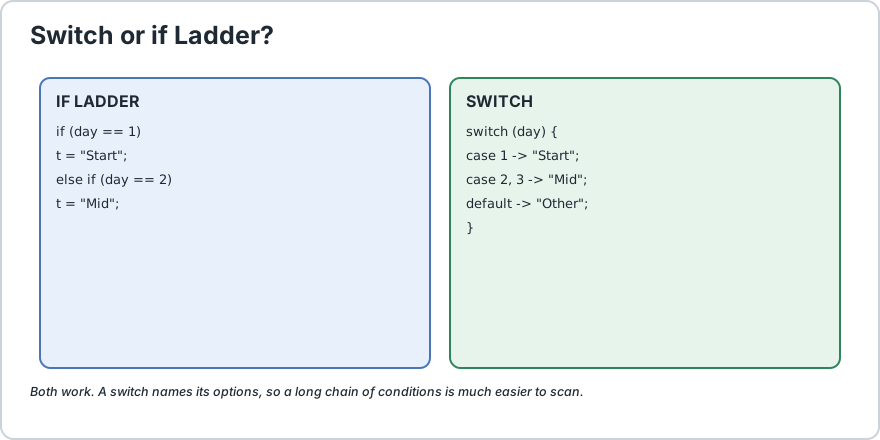
Side by side comparison of an if else if ladder and an equivalent switch expression for the same day of week decision
Same decision, but the switch shows its options at a glance.

If you have not read the two-way and multi-way versions yet, they are on our if...else page and our if...else if ladder page.

2) The Classic Switch and the Fall-Through Trap

The older form uses a colon after each case and relies on break to stop.

Main.java
Run Online
final int MONDAY = 1;
final int TUESDAY = 2;
int day = MONDAY;
switch (day) {
    case MONDAY: System.out.println("Start of week");
    break;
    case TUESDAY: System.out.println("Mid week");
    break;
    default: System.out.println("Other day");
}

Remove the break from the MONDAY case and something surprising happens.

Main.java
Run Online
switch (day) {
    case MONDAY: System.out.println("Start of week");
    // no break here
    case TUESDAY: System.out.println("Mid week");
    break;
    default: System.out.println("Other day");
}

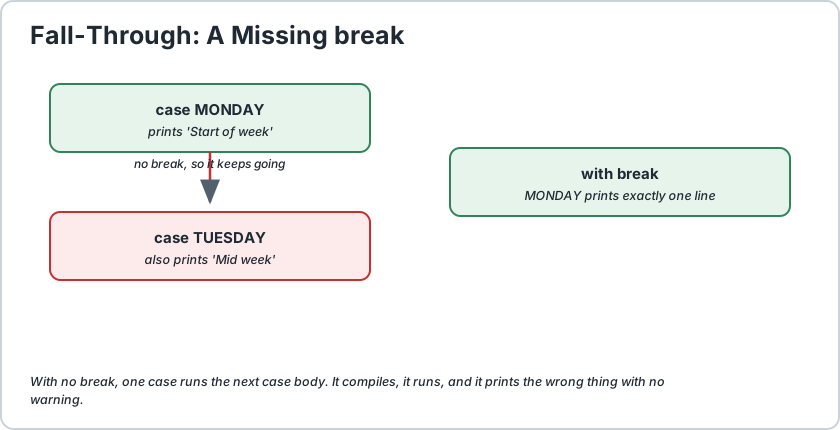
With day set to MONDAY, this prints both lines. That is fall-through: when a case ends without a break, Java does not stop, it simply carries on executing the next case body from the top.

This is the classic switch bug. Forget one break and a case quietly runs code meant for a different case. It compiles, it runs, and it produces wrong answers with no warning at all.


Diagram showing a switch case without a break falling through into the next case body
Fall-through: a missing break lets one case run the next case body.

Fall-through is not always a mistake. Grouping related cases is a legitimate use, and it is the reason the feature exists. Here the intent is deliberate, so no break is wanted between them.

Main.java
Run Online
switch (dayOfWeek) {
    case MONDAY: case TUESDAY: case WEDNESDAY: case THURSDAY: case FRIDAY: System.out.println("Weekday");
    break;
    case SATURDAY: case SUNDAY: System.out.println("Weekend");
    break;
    default: System.out.println("Invalid day");
}

Here the stacked cases mean "any of these values, run this one body". If a break appeared between MONDAY and TUESDAY, Monday would fall into Tuesday body, which is not what the code means. Read stacked cases as a single group, not as separate blocks.

3) The Modern Arrow Form, and Why You Should Prefer It

From Java 14 onwards you can use -> instead of a colon. This single change removes three problems at once.

Classic with colonModern with arrow
Needs a break in every caseNo break needed, it never falls through
Cannot be used to produce a valueIs an expression, so you can assign or return its result
Missing cases compile silentlyCompiler checks exhaustiveness for enums and sealed types
Several values need stacked case linesSeveral values fit on one line with commas

Here is the same day logic in the modern style.

Main.java
Run Online
String type = switch (day) {
    case MONDAY -> "Start of week";
    case TUESDAY, WEDNESDAY -> "Mid week";
    case 6, 7 -> "Weekend";
    default -> "Other day";
};

Read that as an expression: switch on day, and the result is a String that gets stored in type. Because it is an expression, you can also return it directly, use it in a System.out.println, or pass it to a method.


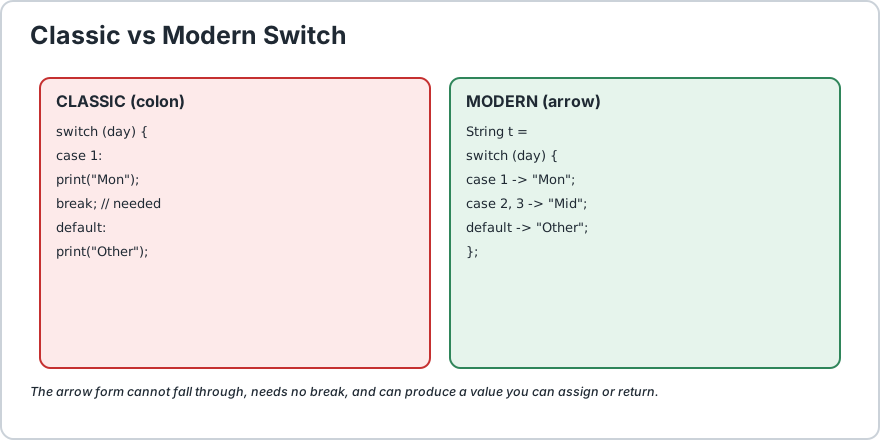
Comparison of classic colon switch with break statements against modern arrow switch expression
Classic on the left needs break everywhere. Modern on the right cannot fall through.

4) The Block Form When a Case Needs Several Statements

One arrow plus one expression is not always enough. When a case needs more than a single statement, use yield to supply the value, or use the block form.

Main.java
Run Online
// yield form, when a case needs to compute something first
int bonus = switch (level) {
    case "gold" -> 500;
    case "silver" -> {
        int base = 200;
        yield base * 2;
        // yield supplies the value for this case
    } default -> 0;
};

For running several statements and then not producing a value, the arrow form handles it directly, because a plain statement switch does not need to yield.

Main.java
Run Online
switch (level) {
    case "gold" -> {
        sendGift();
        announceWinner();
    } case "silver" -> sendSmallGift();
    default -> sendNothing();
}

The rule to remember: if the switch produces a value, every path must produce one, and yield is how a multi-statement case says so. If the switch only performs actions, there is no value to supply and no yield anywhere.

5) The Exhaustiveness Check, the Best Reason to Use Switch

Here is a genuinely valuable modern feature. When you switch over an enum or a sealed type, the compiler checks that you have handled everything, and refuses to compile if you have not.

Main.java
Run Online
enum Status {
    PENDING, APPROVED, REJECTED
}String label = switch (status) {
    case PENDING -> "Waiting for review";
    case APPROVED -> "Accepted";
    case REJECTED -> "Declined";
    // no default needed: the compiler proves all three are covered
};

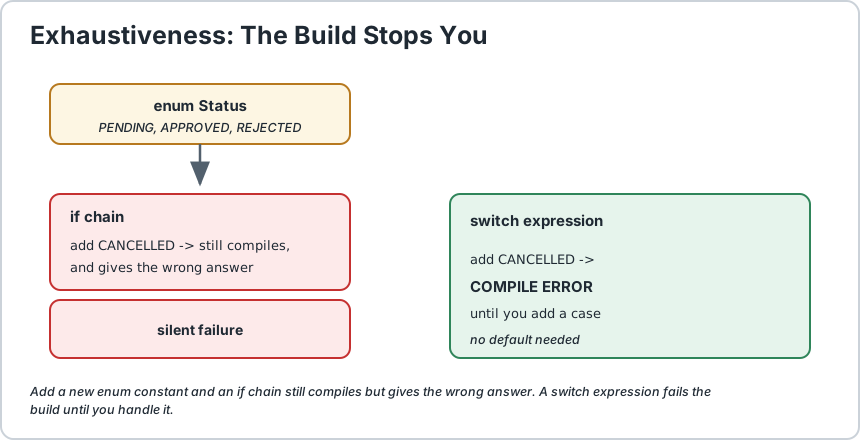
Now imagine someone adds CANCELLED to the enum next month. The old code would still compile with an if-chain, and CANCELLED would quietly fall into whatever came last, usually wrong. With a switch expression over an enum, the build fails until you handle it. The compiler turns a silent production bug into a build error you find in seconds.

This is the single strongest reason to prefer a switch over an if ladder. It is not about speed, it is about being forced to confront every case at the point where you change the data.

The same guarantee works for sealed classes, which is the other way to get a closed set of possibilities. Both ideas are covered on our Java enums page and our modern Java features page.


Diagram showing an enum switch where adding a new constant causes a compile error until the new case is added
Add an enum constant, forget a case, and the build stops until you handle it.

6) What You Can Switch On, and What You Cannot

TypeClassic switchModern switch
int, short, byte, charYesYes
StringYes, since Java 7Yes
enumYesYes, plus exhaustiveness checking
long and floatNoNo
booleanNoNo, and it never will be
Sealed class or interfaceNoYes, pattern matching with exhaustiveness

Three of those surprise people. long is not allowed in any switch form, which catches people who reach for it to store an ID. boolean is not allowed either, and this one is by design rather than an oversight: a boolean has only two values, so an if says it better and a switch would just be noise.

For the boolean case, write this instead.

Main.java
Run Online
// Clearer than any switch could be
if (isEnabled) {
    start();
} else {
    stop();
}

One more trap worth naming. A String switch works, but the same identity rule as everywhere else in Java applies to the case labels, so a case must be a compile-time constant. You cannot switch on a variable, and you cannot write default twice.

7) Common Mistakes

MistakeWhat HappensFix
Missing break in a classic switchSilent fall-through into the next case.Use the arrow form, or add break everywhere.
Switching on a long or booleanCompile error, and it is not going to be allowed.Use an if for booleans, or an int wrapper for large numbers.
Forgetting default on a String switchNothing happens for unmatched values, silently.Add a default, and note that over an enum the compiler makes it optional.
No value on one path of a switch expressionCompile error, which is the point.Supply a value with yield on every path.
Using break inside an arrow caseCompile error, because it can never fall through.Delete the break, it is unnecessary.
Duplicate case valuesCompile error, since the second is unreachable.Remove the duplicate, or combine with commas.

That third and fourth rows are worth contrasting. In the classic statement, a missing default is a quiet failure. In a switch expression, forgetting to produce a value on one path is a compile error. Modern Java deliberately moved these mistakes from runtime to compile time, which is why the newer form is safer.

8) A Complete Example Using Both Forms

Here is a small program that shows a classic statement, a modern expression, and an enum switch with exhaustiveness.

Main.java
Run Online
// A modern switch expression over an enum needs no default,
// because the compiler proves every constant is covered.
String badge = switch (status) {
    case PENDING -> "GRAY";
    case APPROVED -> "GREEN";
    case REJECTED -> "RED";
};

That is the form to reach for in real code. It is short, it cannot fall through, and adding a new Status constant breaks the build until you deal with it.

Frequently Asked Questions

What is fall-through and is it ever useful?


Fall-through is when a case without a break continues into the next case body. It is almost always a bug, but it is genuinely useful for grouping several values onto one shared body, which is what stacked case lines achieve.

Should I still learn the classic switch?


Yes, you should recognise it because you will meet it everywhere in older codebases, and it comes up constantly in interviews. Just write the arrow form in new code, since it removes an entire category of bug.

Why can I not switch on a boolean?


By design, not by accident. A boolean has exactly two values, so an if expresses it far more clearly, and a switch would add structure without adding meaning.

Why can I not switch on a long?


It has never been allowed in any version of Java. If you need to branch on a large number, store an int alongside it and switch on that, or use an if chain.

Is default required?


In a classic statement you should always include one. In a modern switch over an enum or a sealed type, the compiler can prove you covered everything, so default becomes optional, and adding one can even be a warning since it may be unreachable.

Can I use a variable as a case value?


No. Case labels must be compile-time constants, literals, enum constants, or in the modern form, patterns. A variable is not known until run time, so it cannot be a case label.

When should I still choose an if ladder instead?


When your conditions are ranges rather than exact values, such as checking whether a number is above a threshold, or when you are combining several different variables. A switch matches one value against exact options, so an if chain is the right tool for range and compound logic.

Does a switch make my program faster?


Not meaningfully. The JVM compiles a switch into a jump table or a lookup, which is efficient, but a well-written if chain over a handful of conditions is already fast enough that you will never measure a difference. Choose a switch for readability and safety, not speed.
Runnable Code Example: Java switch Statement

Java 17+
Main.java
Run Online
// Demonstrates classic switch, modern switch, and exhaustiveness.
public class SwitchDemo {
    // An enum gives a closed set of values, which is the ideal
    // input for a switch. The compiler can then check every case.
    enum Status {
        PENDING, APPROVED, REJECTED
    } public static void main(String[] args) {
        final int MONDAY = 1;
        final int TUESDAY = 2;
        final int SATURDAY = 6;
        int day = TUESDAY;
        // 1) CLASSIC SWITCH: uses a colon and needs break everywhere.
        //    Remove the break from MONDAY and it falls through,
        //    running the TUESDAY body as well. That is the trap.
        switch (day) {
            case MONDAY: System.out.println("classic: Monday, type is start of week");
            break;
            case TUESDAY: System.out.println("classic: Tuesday, type is mid week");
            break;
            case SATURDAY: System.out.println("classic: Saturday, type is weekend");
            break;
            default: System.out.println("classic: some other day");
        } // 2) DELIBERATE FALL-THROUGH: stacked cases share one body.
        //    The empty case labels mean "also do this for these values".
        int weekdayNumber = SATURDAY;
        if (weekdayNumber >= MONDAY && weekdayNumber < SATURDAY) {
            System.out.println("stacked: that is a weekday");
        } else {
            System.out.println("stacked: that is a weekend day");
        } // 3) MODERN SWITCH EXPRESSION: uses an arrow, needs no break,
        //    and produces a value you can store in a variable.
        String type = switch (day) {
            case MONDAY -> "start of week";
            case TUESDAY, 3, 4, 5 -> "mid week";
            case SATURDAY, 7 -> "weekend";
            default -> "some other day";
        };
        System.out.println("modern: " + type);
        // 4) IT IS AN EXPRESSION, so you can return or print it inline.
        System.out.println("inline: " + describe(day));
        // 5) EXHAUSTIVENESS: switching over an enum with every constant
        //    covered needs no default, and the compiler proves it.
        Status status = Status.APPROVED;
        String badge = switch (status) {
            case PENDING -> "GRAY";
            case APPROVED -> "GREEN";
            case REJECTED -> "RED";
        };
        System.out.println("badge for " + status + " is " + badge);
        // 6) A BLOCK CASE using yield when you must compute first.
        Status another = Status.PENDING;
        String note = switch (another) {
            case PENDING -> {
                int days = 3;
                yield "waiting " + days + " days";
            } case APPROVED, REJECTED -> "decision made";
        };
        System.out.println("note: " + note);
    } // A switch expression can be returned directly from a method.
    static String describe(int day) {
        return switch (day) {
            case 1 -> "the very first day";
            case 6, 7 -> "a weekend day";
            default -> "an ordinary working day";
        };
    }
}/*
    ACTUAL OUTPUT:

        classic: Tuesday, type is mid week
        stacked: that is a weekend day
        modern: mid week
        inline: an ordinary working day
        badge for APPROVED is GREEN
        note: waiting 3 days

    THE FOUR THINGS TO REMEMBER
    1) A classic switch falls through when a case has no break. That is the
       classic bug, and it is silent.
    2) The arrow form, case X -> value, never falls through and needs no
       break. Use it for all new code.
    3) A switch expression produces a value, so you can assign it, return
       it, or print it. Use yield when a case needs several statements.
    4) Switching over an enum or a sealed type is checked at compile time,
       so adding a new constant breaks the build until you handle it.
       That safety is the best reason to prefer a switch.
*/

Common Java Technical Interview Questions & Answers

Interview Prep
Q1

What is fall-through in a switch and is it a bug?

It is when a case without a break continues executing the next case body. It is a bug in almost every case, but it is intentionally useful for grouping several values onto one shared body using stacked case labels.
Q2

What is the difference between a classic switch and a switch expression?

A classic switch uses a colon and requires break to avoid fall-through, and it cannot produce a value. A switch expression uses an arrow, never falls through, needs no break, and evaluates to a value you can assign, return or print.
Q3

Can a switch expression omit the default case?

Yes, when switching over an enum or a sealed type, the compiler verifies that every possible value is covered, so default becomes optional. For an int or a String, a default is still needed to handle unmatched values.
Q4

Why is yield used inside a switch expression?

Because a switch expression must produce a value on every path. A case containing several statements uses yield to supply that value. A case with a single expression supplies the value implicitly.
Q5

Why can I not switch on a boolean or a long?

A boolean is excluded by design because an if expresses two values far more clearly. A long has never been supported in any version of Java, so you store a smaller int alongside it and switch on that.
Q6

What types can a switch be used with?

Classic switch supports byte, short, char, int, String and enum. Modern switch additionally supports sealed types using pattern matching, and only those types are allowed in either form.
Q7

Does switch improve performance over an if-else chain?

Marginally in theory, since the JVM can compile a dense switch into a jump table. In practice the difference is unmeasurable for a handful of cases. Choose a switch for readability and exhaustiveness checking, not for speed.
Q8

What happens if a case value is duplicated?

It is a compile error, because the second case label would be unreachable. Combine the values with commas instead.
Q9

When is an if-else ladder still the better choice?

When the conditions are ranges rather than exact values, such as checking above a threshold, or when they involve several different variables. A switch matches one value against exact options, so compound range logic reads better as an if chain.
Q10

How do I group several values onto one case?

With commas in the arrow form, as in case 2, 3, 4 -> result, or by stacking empty case labels above a single body in the classic form.

Key Takeaways, Best Practices & Clean Code Rules

Java Best Practice & Production Rules

1) Write the arrow form for all new code, since it cannot fall through and therefore removes an entire category of silent bug that the classic form allows.
2) If you maintain code that still uses the classic form, check every case for a missing break, since that is the most common defect in legacy switch statements and nothing warns you about it.
3) Include a default case in a classic statement over an int or a String, and remember it becomes genuinely optional over an enum once the compiler can prove exhaustiveness.
4) Prefer a switch over an if-else ladder once you have more than three or four exact options, because named cases are far easier to scan than a chain of wrapped conditions.
5) Switch over an enum or a sealed type whenever the set of values is closed, because the compile-time exhaustiveness check turns a future silent bug into a build error you find immediately.
6) Keep each case to a single expression wherever possible, and reach for a block with yield only when the value genuinely needs computing first, so the intent stays obvious.
7) Never rely on fall-through for real logic, and if you do intend to group cases, add a brief comment saying so, because an unlabelled empty case looks identical to a forgotten break.
8) Group related values with commas in the arrow form rather than repeating separate case lines, which keeps a long list of options readable on single lines.
9) Use an if statement rather than a switch for booleans and for range checks, because a switch cannot express either, and forcing range logic into exact cases makes it harder to read.
10) Do not choose a switch for performance reasons, since the JVM already compiles both forms efficiently, and readability plus compile-time safety are the real reasons to prefer it.
We value your privacy & transparency

OperateTools uses cookies and local storage to ensure basic tool functionality, preserve preferences, and analyze aggregated traffic. We never sell your personal data or index your document files. Learn more in our Privacy Policy.