Java passes every argument by value, without exception. There is no call-by-reference in Java, and this is not a matter of interpretation. What makes objects seem to behave differently is that a variable holding an object holds a reference, and what gets copied is that reference value. So when you pass an object, two copies of the reference exist afterwards: yours and the parameter. Both point at the same object on the heap. That is why mutating the object through the parameter changes what the caller sees, while reassigning the parameter to a different object leaves the caller untouched. The method changed its own copy of the address, not the object, and not your copy of the address. Once that picture is clear, every case follows. Reassigning a primitive does nothing to the caller. Reassigning an object parameter does nothing to the caller. Mutating an object the parameter points to is visible everywhere. Returning a new object and assigning it at the call site also works. The interesting cases live at the edges, which is where arrays and the two forms of Integer misbehave, and those are covered below.
Detailed Explanation & Mechanics
1) The Two Things You Can Do With a Parameter
Inside a method you have exactly two moves available, and separating them is the whole topic. You can change what the parameter points to, or you can change the thing it points to.
Move
Example
Caller sees a change?
Reassign the parameter
num = 99
No
Reassign the parameter to a new object
p = new Person()
No
Mutate the object it points to
p.name = "Bob"
Yes
Return a value and assign it
num = double(num)
Yes
Only the third row mutates shared state. The other three all work on something local to the method.
2) Primitives Are Simple
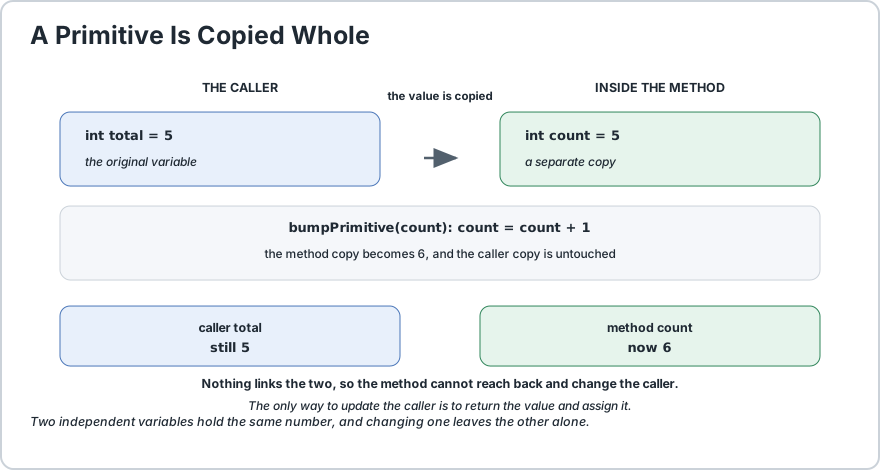
A primitive argument is copied outright. The method holds its own variable with its own value, so any change to it is invisible outside.
public static void bumpPrimitive(int count) {
    count = count + 1;
    // changes the local copy only
}public static void demoPrimitive() {
    int total = 5;
    bumpPrimitive(total);
    System.out.println(total);
    // still 5
}
If you want the caller to see a new value, return it and assign it. That is the honest mechanism for primitives.
A primitive value is copied. Two independent variables hold the same number, and changing one leaves the other alone.
3) Objects: The Reference Copy
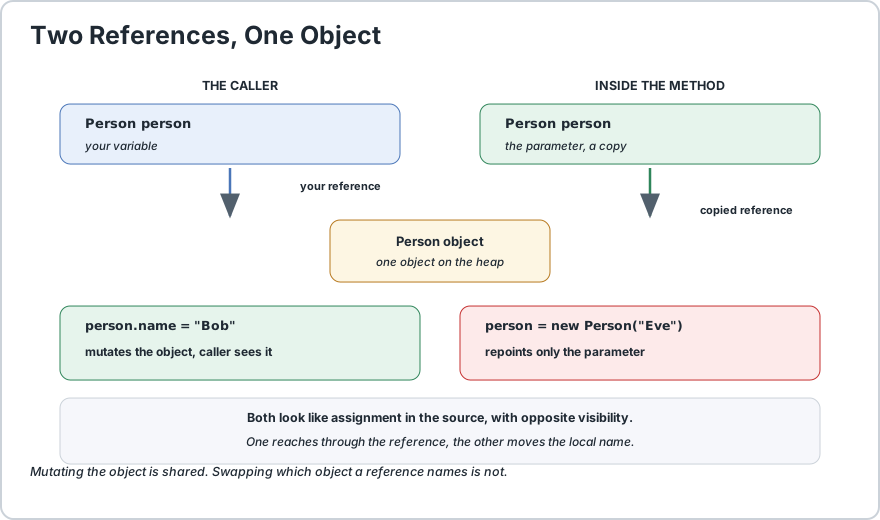
When you declare a variable of a class type, the variable holds a reference. Passing it copies that reference value, so both variables address the same object.
public static void mutateObject(Person person) {
    person.name = "Bob";
    // changes the shared object, caller sees it
}public static void replaceObject(Person person) {
    person = new Person("Eve");
    // changes this reference only, caller sees nothing
}
The rule people find hardest: person.name = "Bob" reaches through the reference and modifies the object. person = new Person(...) does not reach through it at all, it just points the local reference somewhere else. Both are assignments in the source, with completely different effects.
4) Both Moves in One Method
Putting both in a single method makes the contrast concrete, because the caller observes one change and not the other.
public static void modifyValues(int count, Person person) {
    count = 99;
    // local copy changes, caller unaffected
    person.name = "Bob";
    // shared object changes, caller sees it
    person = new Person("Eve");
    // local reference changes, caller unaffected
}public static void demoBoth() {
    int original = 10;
    Person person = new Person("Alice");
    modifyValues(original, person);
    System.out.println(original);
    // 10,  unchanged
    System.out.println(person.name);
    // Bob,  changed by mutation
}
The final assignment is the instructive one. After it runs, the person inside the method points at a brand new object that the caller has never seen and cannot reach.
5) The Three Ways to Change the Caller
If you need the caller to end up with something different, three mechanisms work, and they are worth setting side by side.
Mechanism
Works for
Note
Mutate a reachable object
Objects
Relies on shared state, so it surprises callers
Return a value
Everything
Explicit and the usual choice
Return a filled container
Collections
Creates a new object, so no shared state
Prefer returning. It reads clearly at the call site and keeps the caller in control of when state changes.
6) Arrays Behave Like Objects
An array variable is a reference, so arrays follow the object rules exactly. This surprises people who expect arrays to act like long primitives.
public static void mutateArray(int[] values) {
    values[0] = 99;
    // changes the shared array, caller sees it
}public static void replaceArray(int[] values) {
    values = new int[] {
        1, 2, 3
    };
    // local reference only, caller sees nothing
}public static void demoArray() {
    int[] data = {
        1, 2, 3
    };
    mutateArray(data);
    System.out.println(data[0]);
    // 99, changed
}
This is the single most common practical surprise in the topic, and it is covered at length in passing arrays to methods.
Returning a mutated array and assigning it back is usually clearer than mutating in place, because it makes the change visible at the call site: data = transform(data).
7) Collections and the Trap That Is Not a Trap
A mutable collection passed as an argument behaves like any other object: list.add(item) inside the method is visible to the caller. This is correct, and worth stating plainly, because people often assume it must not work.
public static void addToList(java.util.List<String> items) {
    items.add("added inside");
    // mutates the shared list, caller sees it
}
What does not work is items = new ArrayList<>() inside the method, because that only repoints the local reference. If you need a different list, return one.
Note that String is the exception that proves the rule. Since it is immutable, the String class has no mutating methods at all, so a passed String behaves exactly like a primitive.
8) Integer Is Not What You Expect
This trips up nearly everyone, because the Integer overload is chosen at compile time while the mutation happens at runtime.
public static void mutateInteger(Integer count) {
    count = count + 1;
    // unboxes, adds, boxes a NEW object, stores locally
}public static void demoInteger() {
    Integer count = 5;
    mutateInteger(count);
    System.out.println(count);
    // still 5
}
Inside the method, count + 1 unboxes to a primitive, adds, then boxes the result into a brand new Integer. The parameter is then repointed at that new object. The object the caller referenced was never touched, so the caller still sees five.
This is the reason Integer behaves like a primitive despite being an object. The same applies to every wrapper type listed in wrapper classes, and to any immutable object such as a String or a record.
Type
Mutating inside a method
Why
int
Not visible
The value itself is copied
Integer
Not visible
Immutable, so assignment creates a new object
String
Not visible
Immutable, and has no mutating methods
int[]
Visible
A reference to a shared array
ArrayList
Visible
A mutable object on the heap
A record
Not visible
Fields are final, so the object cannot change
9) Common Misconceptions
Claim
Verdict
Java passes primitives by value and objects by reference
False. Everything is by value, including references.
Passing an object cannot change the caller
False. Mutating the object is visible.
Passing a reference lets the method repoint my variable
False. Only its own copy moves.
Arrays are passed by reference
False. The array reference is copied.
Integer is mutable like other objects
False. It is immutable.
Passing null lets the method assign my variable
False. A copy of null is still null.
Final parameters change the passing rules
False.final only blocks reassignment.
Method parameters are fields of the object
False. They are locals on the stack frame.
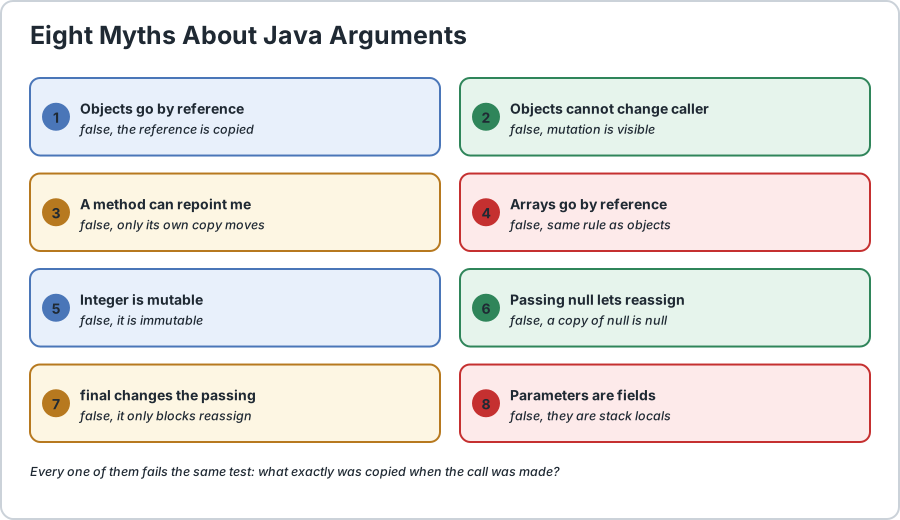
Eight myths about Java argument passing. Every one of them fails the same test: what exactly was copied?
Frequently Asked Questions
Does Java use pass by value or pass by reference?
Java uses pass by value exclusively. There is no pass-by-reference mechanism in the language at all. When you pass an object, the reference value held by your variable is copied into the parameter, so both variables address the same object while remaining independent names.
Then why does changing an object inside a method affect the caller?
Because the copied reference still points at the same heap object. Assigning to the parameter, such as person.name, reaches through the reference and modifies that shared object. The caller is looking at the same object, so it observes the change. This is mutation, not reference passing.
Why does assigning to an object parameter not change my variable?
Because the parameter is a separate copy of the reference. The assignment repoints the method copy at a different object, leaving your reference and the original object untouched. To change what the caller holds, return the new value and assign it at the call site.
Are arrays passed by reference in Java?
No. An array variable holds a reference, so arrays follow the same rule as any other object. Mutating an element through the parameter is visible to the caller, but assigning a new array to the parameter is not, since that only moves the method copy of the reference.
Why does changing an Integer parameter not affect the caller?
Because Integer is immutable. The expression count plus one unboxes to a primitive, adds, then boxes the result into a brand new Integer object, which the parameter is then repointed at. The original object is untouched, so the caller still sees the old value, exactly as with a primitive.
Can a method change the variable it was passed?
Not directly, since that would require pass by reference. A method can mutate an object reachable through the parameter, return a value for the caller to assign, or return a container the caller reads. Returning is the clearest of these and makes the change visible at the call site.
Do final parameters change how arguments are passed?
No. A final parameter is passed exactly like any other, and final affects only whether the method may reassign that local name. It does not make an object immutable, and it does not prevent mutation of the object the parameter points to.
How do I pass data so the caller can never be surprised?
Prefer immutable values. Passing a String, a record, or any object whose fields cannot change means a method has no way to alter what the caller holds, regardless of how the argument was passed. This is the reasoning behind records, and it removes a whole class of bugs rather than documenting around them.
Runnable Code Example: Passing Data to Java Methods
// Demonstrates that every Java argument is passed by value.
public class CallByValueDemo {
    // A mutable object, so mutation is visible to the caller
    public static class Person {
        String name;
        public Person(String name) {
            this.name = name;
        }
    } // An immutable value, which behaves like a primitive
    public record Money(long amountInCents) {
    } private static final int TEN = 10;
    private static final long BASE_AMOUNT = 100L;
    private static final int NINETY_NINE = 99;
    private static final int ONE = 1;
    private static final int TWO = 2;
    private static final int THREE = 3;
    private static final String ALICE = "Alice";
    private static final String BOB = "Bob";
    private static final String EVE = "Eve";
    private static final String ADDED_INSIDE = "added inside";
    private static final String REPLACED_INSIDE = "replaced inside";
    // MUTATION is shared. REASSIGNMENT is not.
    public static void modifyValues(int count, Person person) {
        count = NINETY_NINE;
        // local copy changes, caller unaffected
        person.name = BOB;
        // shared object changes, caller sees it
        person = new Person(EVE);
        // local reference changes, caller unaffected
    } // Arrays follow the object rules exactly
    public static void modifyArray(int[] values) {
        values[0] = NINETY_NINE;
        // shared array, caller sees it
    } public static void replaceArray(int[] values) {
        values = new int[] {
            ONE, TWO, THREE
        };
        // local reference only, caller unaffected
    } // A mutable collection behaves the same way
    public static void addToList(java.util.List<String> items) {
        items.add(ADDED_INSIDE);
        // shared list, caller sees it
    } public static void replaceList(java.util.List<String> items) {
        items = new java.util.ArrayList<>();
        // local reference only
        items.add(REPLACED_INSIDE);
        // into a list the caller cannot reach
    } // An immutable value behaves like a primitive
    public static void mutateInteger(Integer count) {
        count = count + ONE;
        // unboxes, adds, boxes a NEW object
    } public static void mutateMoney(Money amount) {
        amount = new Money(amount.amountInCents() + ONE);
        // records cannot change
    } // RETURNING is the explicit mechanism the caller controls
    public static int doubled(int value) {
        return value * TWO;
    } public static void main(String[] args) {
        int original = TEN;
        Person person = new Person(ALICE);
        modifyValues(original, person);
        System.out.println("primitive after: " + original);
        // 10,  unchanged
        System.out.println("person after:    " + person.name);
        // Bob,  changed
        int[] data = {
            ONE, TWO, THREE
        };
        modifyArray(data);
        System.out.println("array after:     " + data[0]);
        // 99,  changed
        java.util.List<String> items = new java.util.ArrayList<>();
        items.add(ALICE);
        addToList(items);
        replaceList(items);
        System.out.println("list after:      " + items.size());
        // 2, only the add landed
        Integer boxed = TEN;
        mutateInteger(boxed);
        System.out.println("Integer after:   " + boxed);
        // 10,  unchanged
        Money amount = new Money(BASE_AMOUNT);
        mutateMoney(amount);
        System.out.println("record after:    " + amount.amountInCents());
        // unchanged
        // RETURNING is visible at the call site
        original = doubled(original);
        System.out.println("returned value:  " + original);
        // 20
        // THESE ARE ALL COMPILE ERRORS AND ARE SHOWN AS COMMENTS
        //
        // assigning to a final parameter
        // public static void finalParam(final int value) {
        //     value = NINETY_NINE;   // cannot reassign a final parameter
        // }
        //
        // trying to mutate an immutable value
        // public static void mutateString(String text) {
        //     text.concat(" more");   // returns a new String, changes nothing
        // }
        //
        // expecting the reassignment of a parameter to reach the caller
        // public static void noEffect(String text) {
        //     text = REPLACED_INSIDE;   // the caller keeps its own value
        // }
    }
}/*
    ACTUAL OUTPUT:

        primitive after: 10
        person after:    Bob
        array after:     99
        list after:      2
        Integer after:   10
        record after:    100
        returned value:  20

    THE NINE THINGS TO REMEMBER
    1) JAVA IS PASS BY VALUE, ALWAYS. There is no pass by reference in
       the language, and objects are not an exception.
    2) WHEN YOU PASS AN OBJECT, THE REFERENCE IS COPIED. Both names
       point at the same object, but they are separate variables.
    3) MUTATION IS SHARED. Assigning THROUGH the reference, such as
       person.name, changes the object both names see.
    4) REASSIGNMENT IS NOT SHARED. Assigning TO the parameter, such as
       person = new Person(), moves only the method copy.
    5) ARRAYS ARE OBJECTS, so they follow the same rules. Mutating an
       element is visible; assigning a new array to the parameter is not.
    6) Integer IS IMMUTABLE, so count plus one unboxes, adds, then
       boxes a brand new object. The caller sees the original value,
       exactly as with a primitive. String and records behave the same.
    7) A FINAL PARAMETER ONLY BLOCKS REASSIGNMENT of that local name.
       It does not change how the argument is passed, and it does not
       stop the method mutating the object behind it.
    8) TO LET THE CALLER KEEP A DIFFERENT VALUE, RETURN IT. Assigning at
       the call site makes the change obvious to every reader.
    9) FOR DATA THAT MUST NOT SURPRISE ANYONE, PASS IMMUTABLE VALUES.
       A String or a record gives a method no way to change what the
       caller holds, which removes a whole class of bugs.
*/
Common Java Technical Interview Questions & Answers
Interview Prep
Q1: Does Java use pass by value or pass by reference?\nA1: Java uses pass by value exclusively. There is no pass-by-reference mechanism in the language at all. When an object is passed, the reference value held by the variable is copied into the parameter, so both names address the same object while remaining independent variables.\nQ2: If Java is pass by value, why does changing an object inside a method affect the caller?\nA2: Because the copied reference still points at the same object on the heap. Assigning through the reference, such as person.name, modifies that shared object, and the caller is looking at the same object so it observes the change. That is mutation of shared state rather than reference passing.\nQ3: Why does assigning to an object parameter not change the caller variable?\nA3: Because the parameter holds its own copy of the reference, so the assignment repoints only the method copy at a different object. The caller reference and the original object are untouched. To change what the caller holds, return the value and assign it at the call site.\nQ4: Are arrays passed by reference in Java?\nA4: No. An array variable holds a reference, so arrays follow the same rule as any other object. Mutating an element through the parameter is visible to the caller, while assigning a new array to the parameter is not, since that moves only the method copy of the reference.\nQ5: Why does modifying an Integer parameter not affect the caller?\nA5: Because Integer is immutable. The expression unboxes to a primitive, adds, then boxes the result into a brand new Integer object that the parameter is repointed at. The original object is never modified, so the caller sees the old value, exactly as with a primitive. String and records behave the same way.\nQ6: What is the difference between mutating an object and reassigning a parameter?\nA6: Mutating an object reaches through the reference with an assignment to a field or an element, which changes the shared object and is visible to the caller. Reassigning the parameter changes only which object that local name refers to, so the caller sees nothing. Both look like assignments in the source but have opposite visibility.\nQ7: Can a final parameter change how an argument is passed?\nA7: No. A final parameter is passed exactly like any other parameter, and final affects only whether the method may reassign that local name. It does not make the referenced object immutable and does not prevent mutation of the object the parameter points to.\nQ8: How can I design a method so the caller is never surprised by a change?\nA8: Prefer immutable arguments. Passing a String, a record, or any object with final fields gives the method no way to alter what the caller holds, since there is no mutating operation to call. Alternatively return the new value and assign it at the call site, which makes the change visible in the code rather than hidden inside the method.
Key Takeaways, Best Practices & Clean Code Rules
Java Best Practice & Production Rules
Return values and assign them at the call site, rather than relying on a method to mutate an object the caller still holds.\nPrefer immutable argument types such as String and records when a method has no need to change what it is given.\nUse mutable objects deliberately when the caller should see changes, and document that expectation on the method.\nAvoid depending on mutation as an implicit output channel, since it makes the effect invisible at the call site.\nNever expect a method to repoint your variable, since assignment to a parameter only moves the method copy.\nRemember that a final parameter blocks reassignment but not mutation, so do not treat it as making the object immutable.\nTreat an Integer, String, or record argument as safe by construction, because immutability removes any way to alter it.\nReturn a new collection instead of mutating the one passed in, unless in-place mutation is clearly the intent.\nWhen mutating an argument is the intent, say so in the method name, such as sortInPlace, so the effect is obvious.\nCopy a collection before mutating it when the caller may still need the original contents.\nRemember that arrays are objects, so a method that replaces the array parameter leaves the caller pointing at the old one.\nPrefer records for data carriers, since their final fields remove a class of pass-by-value surprises by construction.
Share with friends, students, or your developer network
We value your privacy & transparency
OperateTools uses cookies and local storage to ensure basic tool functionality, preserve preferences, and analyze aggregated traffic. We never sell your personal data or index your document files. Learn more in our Privacy Policy.
Stay Updated
Enable Notifications?
Get real-time updates, instant tool alerts & daily news directly on your device.