Syntax is simply the rule book of a language. It works like grammar in English: "the dog barks" makes sense, but "barks dog the" does not. Java works the same way, and if even one character sits in the wrong place the compiler stops and refuses to run your program. That is not a bug, that is the rule book doing its job.
A Java program is always built in the same four layers, and the order never changes:
1. The file, saved with a .java extension, named exactly after its public class.
2. The class, which is the outer container for everything else.
3. The methods, including the special main method that is the entry point.
4. The statements, which are the actual instructions and each one ends with a semicolon.
The rules that beginners break most often are short and easy to remember. Every statement ends with a semicolon. Every opening curly brace has a matching closing brace. Java is strictly case-sensitive, so name and Name are two different variables. A file is named after its public class, with capital letters matching exactly. Reserved words such as class, static and int cannot be used as variable names. And main is not a keyword at all, it is a convention: the Java launcher simply looks for a method called main that is public, static, returns void and takes a String array, which is exactly why the odd-looking signature public static void main(String[] args) exists.
If you memorise only the layer order and those six rules, most of the "it will not compile" messages you meet in your first month simply stop appearing.
Detailed Explanation & Mechanics
1) Every Java Program Lives Inside a File
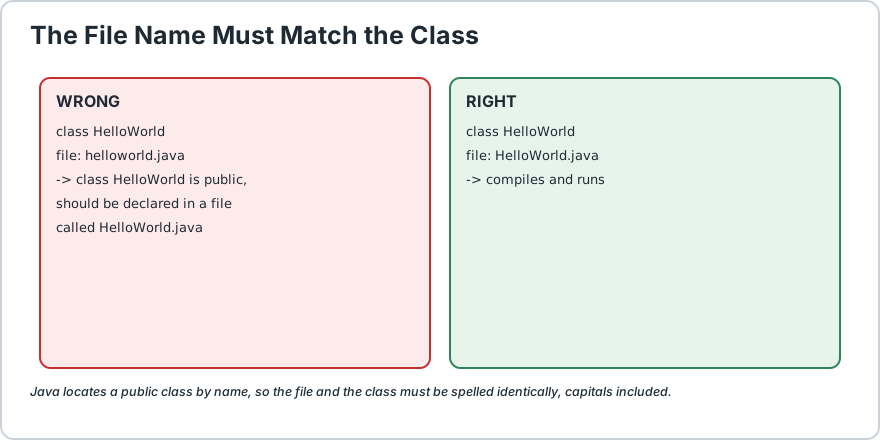
Java code must be saved in a file with the .java extension, and the file name must match the public class name exactly, including upper and lower case.
Public class is HelloWorld then the file must be HelloWorld.java
Public class is MyApp then the file must be MyApp.java
A file called helloworld.java holding a class called helloworld will not match
This trips up almost every beginner exactly once. The simple habit that prevents it: give the class the same name as the file and match the capital letters. This is because Java is case-sensitive, which means Java and java are two completely different words to the compiler.
What Does Case Sensitive Mean?
It means the computer treats upper case and lower case letters as different characters. name, Name and NAME are three separate identifiers. There is no forgiveness here at all.
The file name and the public class name must be identical, capital letters included.
A modifier meaning this class is visible and usable from outside. For a first program it must be public.
class
A keyword telling Java that what follows is the name of a class.
HelloWorld
The name you chose for the class, which is also the name of the file.
A class is like a blueprint. The program above is a blueprint for something that knows how to print a message. You will study classes much more deeply later, but for now remember one simple fact: Java is not a language where you scatter loose lines of code around. The code lives inside classes. It is the difference between leaving papers on a desk and filing them in a cabinet.
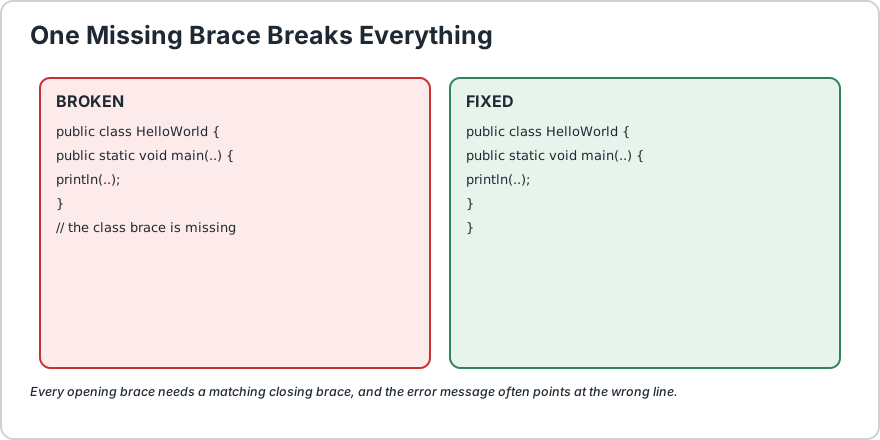
Also notice the opening curly brace { at the end of that line. Every { must have a matching }, and in this program the class closing brace is the very last line. If you forget it, the compiler message can be oddly unhelpful, something like reached end of file while parsing, but nine times out of ten the answer is simply that one } is missing.
One missing closing brace breaks the whole program. Count your braces.
3) Every Runnable Program Needs a main Method
This is the line most beginners cannot quite decode:
You do not need to fully understand every word yet. What you do need to know right now is that main is the entry point of a Java program. When you run a program, Java looks for this exact method and starts executing from inside it. No main, no execution.
Here is what each piece means in plain English.
public means anyone can call this method.
static means it can run without creating an object first. The object oriented details come later, so trust this word for now.
void means this method gives nothing back to anyone. It just does its job.
main is the special name. Spell it exactly this way, in lower case.
(String[] args) is the list of things the method can receive. Ignore these for now and just copy them exactly as written.
Beginner shortcut: until you learn static methods and objects properly, treat this whole line as a fixed ritual you type from memory. Change one letter and it stops being the entry point.
It is doing real work, printing text to the screen, and notice the small mark at the end. That is the semicolon. In Java almost every instruction must end with one. Think of it as the full stop at the end of an English sentence, because without it the compiler does not know where one instruction ends and the next one begins.
// This will NOT compile:
int age = 25System.out.println(age);
//                ^ the semicolon after 25 is missing
The compiler message for that is famously blunt: "; expected". When you see it, your job is simple. Scan the current line and the line above it for a missing semicolon.
Where semicolons are not needed: after the class declaration, after a method declaration, and after any line ending with { or }. Only actual instructions get semicolons. This "only sometimes" confusion is completely normal and fades quickly once you write code every day.
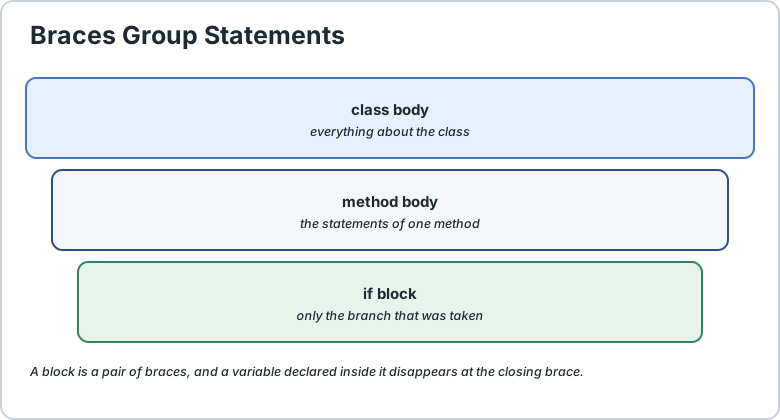
5) Braces Group Things Together
Braces act like selection boxes. Everything inside belongs to that block.
Curly braces in Java answer one question: which statements belong to which block? In the example the method body contains exactly one statement. Add a second line and it simply goes inside the same pair of braces.
public class HelloWorld {
    public static void main(String[] args) {
        System.out.println("Hello, Java World!");
        System.out.println("This is line two.");
    }
}
Here is a rule that saves you from hours of mystery debugging: count your braces. Opening braces: 2. Closing braces: 2. Balanced. The moment the count is off by one, you have a syntax problem, and the error may point at a line that is actually fine, because the real mistake is a misplaced brace three lines earlier. When you hit a strange error, step one is to count braces.
6) Indentation Is Not Required but It Is a Lifeline
Technically Java does not care about your indentation. You could write the whole program on one line and it would still run:
public class HelloWorld {
    public static void main(String[] a) {
        System.out.println("Hi");
    }
}
Does it compile? Yes. Will it run? Yes. Would a human being thank you for that code? No.
By convention we indent the code inside each block by four spaces or one tab. Indentation is the difference between a code file and an unreadable run-on sentence. Good editors such as IntelliJ, Eclipse or VS Code handle it for you automatically when you press Enter after a { and press Tab to move out, so never type your indentation by hand and never mix tabs with spaces in the same file.
7) Keywords Are Reserved So Do Not Use Them as Names
Java owns roughly fifty keywords: class, public, static, void, int, if, while, return, new, String and many more. These words already have jobs, so you are not allowed to use them as your own variable or class names.
// Broken: "class" is a reserved keyword
int class = 10;
// compile error
// Fine: "classroom" is not a keyword
int classroom = 10;
// compiles perfectly
You do not need to memorise all the keywords yet. Every editor highlights them in a distinct colour, usually blue or purple, and that colour is your brain learning to recognise them. Learn to read your editor.
8) Comments Are for Humans Not for the Compiler
Sometimes you want to leave a note inside your code, for a teammate or for future you. That is what comments are for.
// This is a single-line comment. Java ignores it completely.
/*
This is a multi-line comment.
It can stretch across several lines,
which makes it perfect for explaining tricky logic.
*/
The compiler ignores comments completely, so you could put a whole novel inside one and nothing would change about how the program runs. Here is advice based on experience though: comment why, not what. A comment that repeats the code, such as // print the number, only adds noise. A comment that explains the reason behind a decision, such as // retry after 2 seconds because the API rate-limits us, is genuinely useful to the next person.
9) The Complete Annotated Program
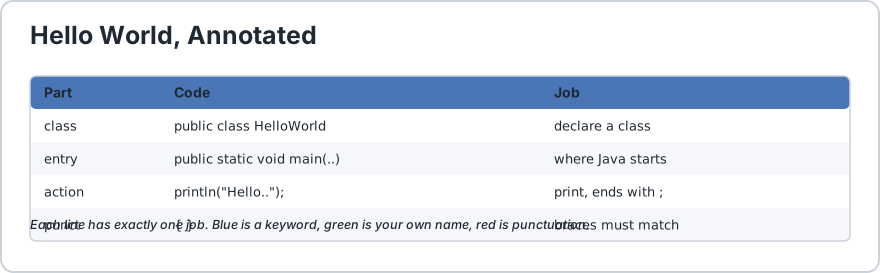
Every part of the program has a job. This is the map.
Let us put every rule together. This is the hello world program with each part labelled.
// the class. The file must be named HelloWorld.java
public class HelloWorld {
    // the entry point. Java starts executing here
    public static void main(String[] args) {
        // an instruction, and it ends with a semicolon
        System.out.println("Hello, Java World!");
    } // closing brace for the method
} // closing brace for the class
Read that block once slowly. A file with a matching name, one public class, one main method, statements with semicolons, matched braces and sensible indentation. That is the entire skeleton, and everything you will ever write in Java is this same skeleton with more furniture added inside.
10) The Golden Order From File to Statement
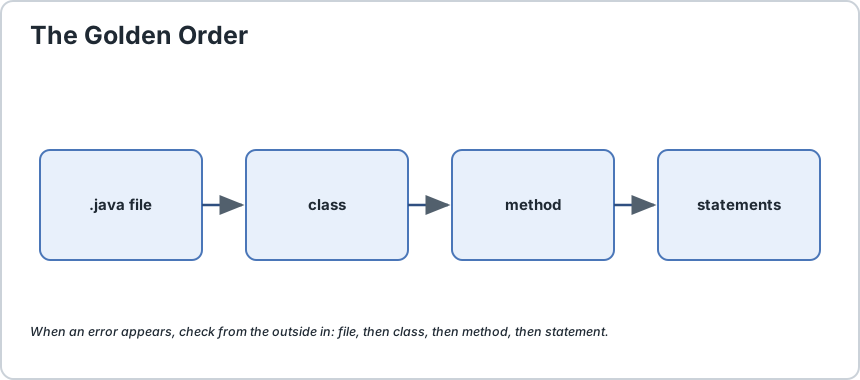
One picture in your head saves you from ninety percent of beginner syntax errors. Keep this order in mind.
The file, named exactly after the public class.
The class, the outer container for everything.
The methods, the blocks of behaviour inside the class, including main.
The statements, the actual instructions, each ending with a semicolon.
If you ever feel lost inside a Java error message, check the order from the outside in. Is the file named correctly? Is the class declared? Is main spelled correctly? Is the statement finished with a semicolon? Is every brace matched? Working top-down like this, almost every beginner error is found in under a minute.
The golden order. When an error appears, check from the outside in.
11) Common Syntax Mistakes and How to Fix Them
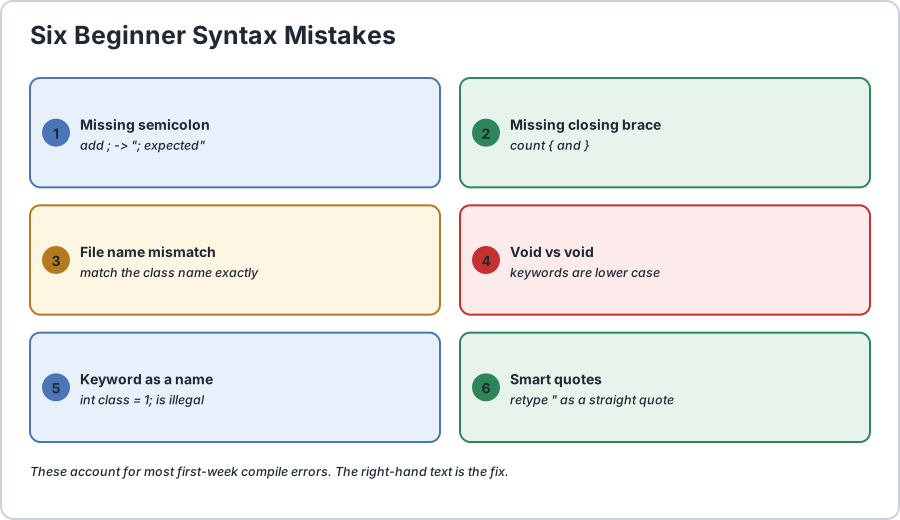
Six mistakes that account for most first week compile errors.
Mistake
Error You Will See
How To Fix It
Forgetting the semicolon at the end of a statement
"; expected"
Add a semicolon at the end of the statement, and also check the line above it.
Missing a closing brace
reached end of file while parsing
Count opening and closing braces, then add the missing one.
File name does not match the public class
class HelloWorld is public, should be declared in a file called HelloWorld.java
Rename the file so it matches, capital letters included.
Typing Void instead of void
cannot find symbol
Keywords are lower case. Write void.
Using a keyword as a variable name
variable already defined or class expected
Choose a different name that is not a reserved word.
Mismatched or fancy quotes on a string
unclosed string literal
Use matching straight double quotes and retype them by hand rather than pasting.
One extra note on that last row, because it catches people who copy code out of a document. If the code came from a PDF or a Word file, the straight quotes may have been converted into smart curly quotes. Java only understands straight quotes, so when a string error appears out of nowhere, retype the quotes yourself instead of pasting them.
Quick Self Check
Before moving on, try answering these out loud, or to your dog, there is no judgement.
Why must the file name match the public class name?
Which method does Java always start executing from?
Which punctuation mark ends a statement?
What are curly braces used for in Java code?
Name one thing you must never use as a variable name.
If you answered all five without checking the page, you have genuinely learned this rather than simply memorised it, and that is the difference that shows up three months from now.
Frequently Asked Questions
Do I have to memorise the main method line?
Type it by hand for your first ten to twenty programs and then let your editor autocomplete write it for you. Knowing it matters more than typing it, because that way you still know what is there when the autocompleter is off or you are at a whiteboard.
Can a Java file contain more than one class?
Yes, a file can contain several classes, but only one of them can be public, and that public class must match the file name. Beginners should keep it simple with one file and one class.
Why does Java need so many braces compared to Python?
Python uses indentation to define blocks while Java uses braces. Both approaches work, they are just different rule books. Braces are sometimes clumsier to type, but they make block boundaries visible even when the indentation becomes messy.
What happens if I get the order of keywords wrong, such as writing void public static?
Java is strict about the sequence. Modifiers come first, such as public static, then the return type void, then the name main. A different order means a syntax error, so learn the correct order once and it stops being confusing.
Is capitalisation really that important in Java?
Yes. Main is not main, and String is not string. This single rule causes more beginner errors than everything else combined, so when you are stuck on a cannot find symbol error, check capitalisation before anything else.
Do I really need indentation if the compiler does not require it?
The compiler does not require it, but you do. Broken indentation is the reason a small brace mistake turns into an hour of hunting, because you can no longer see which block a line belongs to. Let your editor handle it so the structure is always visible at a glance.
What To Learn Next
You now hold the skeleton of every Java program you will ever write. The natural next steps in your tutorial series are Java variables and data types, the first furniture you will place inside that skeleton, then Java output with System.out, and finally how your .java file is compiled and executed by the javac and java commands.
Write the hello world program three times before moving on: once carefully, once from memory, and once with the comments added. The third attempt is where it truly sticks. Happy coding.
// 1) The file must be named HelloWorld.java because the public class is HelloWorld
public class HelloWorld {
    // 2) main is the entry point. It must be spelled exactly like this.
    public static void main(String[] args) {
        // 3) Every statement ends with a semicolon
        System.out.println("Hello, Java World!");
        // 4) Indent by 4 spaces inside each block. Let your editor do this for you.
        int age = 25;
        String Name = "upper case N";
        // case-sensitive: a different variable from "name"
        String name = "lower case n";
        // 5) Braces group statements into blocks. Count them: 2 open, 2 closed.
        if (age >= 18) {
            System.out.println("You are an adult.");
        } else {
            System.out.println("You are a minor.");
        } // 6) Reserved words cannot be variable names, but similar words are fine
        // int class = 10;      // compile error: "class" is a keyword
        int classroom = 10;
        // perfectly legal
        System.out.println("classroom = " + classroom);
        // 7) Comments are for humans. The compiler ignores them completely.
        /*
            This block explains nothing, it only demonstrates the syntax.
            A useful comment explains WHY, never just repeats the code.
        */ System.out.println("name = " + name + " / Name = " + Name);
        // 8) Output always works from left to right, so add newlines where you want them
        System.out.print("No newline here. ");
        System.out.println("This one ends the line.");
        // 9) Command line arguments arrive inside args
        System.out.println("Arguments received = " + args.length);
    }
}/*
    Actual output:
        Hello, Java World!
        You are an adult.
        classroom = 10
        name = lower case n / Name = upper case N
        No newline here. This one ends the line.
        Arguments received = 0

    Now try breaking it on purpose:
        - delete the semicolon after int age = 25   ->  error: ";" expected
        - delete the final closing brace            ->  error: reached end of file while parsing
        - rename the file to helloworld.java        ->  error: class HelloWorld is public,
                                                      should be declared in a file called HelloWorld.java
*/
Common Java Technical Interview Questions & Answers
Interview Prep
Q1
What is syntax, and why does Java care so much about it?
Syntax is the set of structural rules the language enforces. Java enforces it at compile time rather than run time, so a misplaced brace or a missing semicolon is caught before the program ever runs.
Q2
Explain the order of parts inside a Java source file.
The file is named after the public class, the file contains the class, the class contains methods, and the methods contain statements. That order is the skeleton of every Java program.
Q3
Why must the file name match the public class name?
So the compiler and the classloader can find the class without searching every source file, and so the public API of a package is never ambiguous.
Q4
What does each word in public static void main(String[] args) do?
public lets the launcher reach the method from outside the class, static means it runs without an instance, void means it returns nothing, main is the name the launcher looks for, and String[] args receives the command line. None of these are keywords, only the exact shape matters.
Q5
Can a Java file contain more than one class?
Yes, several top-level classes can share one file, but at most one may be public, and that public class must match the file name.
Q6
When is a semicolon NOT required?
Not after a class declaration, not after a method declaration, and not after a line ending with an opening or closing brace. Only complete statements need one. The one exception worth memorising early is do-while, which needs a semicolon after its closing brace.
Q7
What is the fastest way to fix a "cannot find symbol" error?
Check capitalisation first, because Java is case-sensitive, then check for a typo in the name and confirm that the file name matches the public class name.
Q8
Are spaces and indentation required by the compiler?
No, Java ignores whitespace almost entirely and a program can sit on one line. Indentation is for humans, but because it is what makes the block structure visible, it should always be kept consistent.
Key Takeaways, Best Practices & Clean Code Rules
Java Best Practice & Production Rules
1) Name the file after the public class with exactly matching capital letters, because a mismatch that works on Windows will still fail on a Linux build server.
2) Type one public class per file while learning, and put the package declaration first with nothing above it except comments.
3) Close every block and terminate every statement as you type rather than saving it all for the end, since mismatched braces are the most common compile error in Java.
4) Let the editor handle indentation and never mix tabs with spaces in the same file, because invisible whitespace differences cause confusing errors in some tools.
5) Read the first error message rather than the last one, since a single missing semicolon can produce a whole cascade of confusing messages after it.
6) Follow the standard naming conventions: UpperCamelCase for classes, lowerCamelCase for variables and methods, and UPPER_SNAKE_CASE for constants, so code stays readable to everyone.
7) Prefer meaningful names such as totalPrice over names like tp, and never use a reserved word as an identifier even when the compiler would technically allow a similar name.
8) Comment the reason behind a decision rather than the code itself, since a comment that repeats the line below it becomes noise within a month.
9) Check the braces first whenever the error message points at a line that looks correct, because a misplaced brace three lines earlier is the usual real cause.
10) When you paste code from a document, retype the quotes and check for smart quote characters, because Java only understands straight double quotes.
Share with friends, students, or your developer network
We value your privacy & transparency
OperateTools uses cookies and local storage to ensure basic tool functionality, preserve preferences, and analyze aggregated traffic. We never sell your personal data or index your document files. Learn more in our Privacy Policy.
Stay Updated
Enable Notifications?
Get real-time updates, instant tool alerts & daily news directly on your device.