Main.java
trueWhen working with Java inheritance, interfaces, and objects, you may sometimes need to know what type of object you are actually dealing with.
For example, a variable may have a parent class type, but the object stored inside it could belong to a child class.
This is where the instanceof operator in Java becomes useful.
The instanceof operator allows you to check whether an object belongs to a particular class, subclass, or interface type.
Modern Java also provides pattern matching with instanceof, which makes type checking and casting shorter and easier to read.
In this tutorial, you will learn:
What instanceof means in Java
How the instanceof operator works
Java instanceof syntax
Checking objects with instanceof
instanceof with inheritance
instanceof with interfaces
instanceof with null
Using instanceof before type casting
Pattern matching with instanceof
Pattern variable scope
Negating an instanceof pattern
Common mistakes
instanceof vs type casting
Practical examples
Frequently asked questions
The instanceof operator in Java is used to check whether an object is an instance of a particular type.
It returns a boolean value:
trueor
falseThe basic syntax is:
object instanceof TypeFor example:
String name = "Java";
System.out.println(name instanceof String);
Output:
trueThe object stored in name is a String, so the expression returns true.
Let's start with a very simple example.
public class Main {
    public static void main(String[] args) {
        String language = "Java";
        if (language instanceof String) {
            System.out.println("The object is a String");
        }
    }
}
Output:
The object is a StringHere:
language instanceof Stringasks Java:
"Is the object referred to by
languagea String?"
The answer is true.
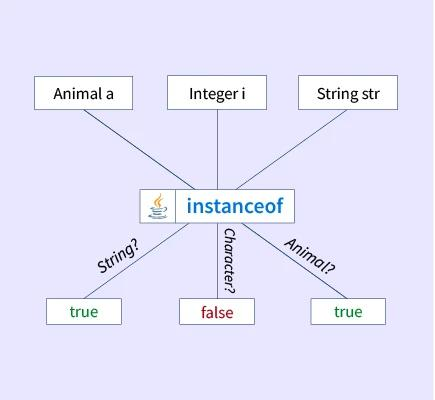
The traditional syntax is:
object instanceof ClassNameExample:
Object value = "Hello";
if (value instanceof String) {
    System.out.println("value is a String");
}
You can also store the result in a boolean variable:
Object value = "Hello";
boolean result = value instanceof String;
System.out.println(result);
Output:
trueSo instanceof produces a boolean result.
Java supports inheritance and polymorphism.
Suppose we have:
class Animal {
}class Dog extends Animal {
}class Cat extends Animal {
}
Now we can create:
Animal animal = new Dog();The variable type is Animal, but the actual object is a Dog.
If you need to determine the object's runtime type, instanceof can help.
if (animal instanceof Dog) {
    System.out.println("This is a Dog");
}
Output:
This is a DogThis is one of the most common situations where beginners encounter the instanceof operator.
Let's look at inheritance more closely.
class Animal {
    void eat() {
        System.out.println("Animal is eating");
    }
}class Dog extends Animal {
    void bark() {
        System.out.println("Dog is barking");
    }
}
Now:
Animal animal = new Dog();Although the reference type is Animal, the actual object is Dog.
We can check it:
if (animal instanceof Dog) {
    System.out.println("animal refers to a Dog");
}
Output:
animal refers to a DogThis happens because a Dog object is also an Animal.
Consider:
class Animal {
}class Dog extends Animal {
}
Now:
Dog dog = new Dog();
System.out.println(dog instanceof Dog);
System.out.println(dog instanceof Animal);
Output:
truetrueWhy is the second result also true?
Because Dog inherits from Animal.
So a Dog object is also considered an Animal.
Think of the relationship like this:
Animal ↑ | DogTherefore:
Dog object | +-- is a Dog → true | +-- is an Animal → trueYou can use multiple instanceof checks when different types need different behavior.
Example:
class Animal {
}class Dog extends Animal {
}class Cat extends Animal {
}
Then:
Animal animal = new Cat();
if (animal instanceof Dog) {
    System.out.println("Dog");
} else if (animal instanceof Cat) {
    System.out.println("Cat");
} else {
    System.out.println("Unknown animal");
}
Output:
CatThis can be useful when processing objects from a common parent type.
The instanceof operator is not limited to classes.
It can also check whether an object implements an interface.
Example:
interface Printable {
    void print();
}class Report implements Printable {
    public void print() {
        System.out.println("Printing report");
    }
}
Now:
Report report = new Report();
if (report instanceof Printable) {
    System.out.println("Report implements Printable");
}
Output:
Report implements PrintableThis is useful when working with interface-based designs.
One important rule is:
null instanceof AnyTypealways returnsfalse.
Example:
String value = null;
System.out.println(value instanceof String);
Output:
falseJava does not throw a NullPointerException for this check.
For example:
Object value = null;
if (value instanceof String) {
    System.out.println("String");
} else {
    System.out.println("Not a String");
}
Output:
Not a StringThis is a useful property of instanceof.
Before modern pattern matching, instanceof was often used together with explicit casting.
For example:
Object value = "Hello Java";
if (value instanceof String) {
    String text =(String) value;
    System.out.println(text.length());
}
There are two steps:
value instanceof StringString text =(String) value;This approach is still valid Java.
However, modern Java provides a shorter approach using pattern matching.
Pattern matching for instanceof allows Java to combine:
Type checking
Type casting
Variable declaration
into one expression.
Instead of writing:
if (value instanceof String) {
    String text =(String) value;
    System.out.println(text.length());
}
you can write:
if (value instanceof String text) {
    System.out.println(text.length());
}
This is called pattern matching for instanceof.
The variable text is automatically created after Java confirms that value is a String.
public class Main {
    public static void main(String[] args) {
        Object value = "Hello Java";
        if (value instanceof String text) {
            System.out.println("Length: " + text.length());
        }
    }
}
Output:
Length: 10The important part is:
value instanceof String textHere:
value is the object being checked.
String is the type.
text is the pattern variable.
If the check succeeds, text can be used as a String.
Here is the difference.
Object value = "Java";
if (value instanceof String) {
    String text =(String) value;
    System.out.println(text.toUpperCase());
}Object value = "Java";
if (value instanceof String text) {
System.out.println(text.toUpperCase());
}The second version avoids repeating the type and explicit cast.
It is generally easier to read.
The variable created by pattern matching is called a pattern variable.
Example:
Object value = "Java";
if (value instanceof String text) {
    System.out.println(text);
}
Here:
textis the pattern variable.
Inside the successful branch, Java knows that text is a String.
Therefore, you can call String methods:
if (value instanceof String text) {
    System.out.println(text.length());
    System.out.println(text.toUpperCase());
}One important concept is the scope of a pattern variable.
Consider:
Object value = "Java";
if (value instanceof String text) {
    System.out.println(text.length());
}
The variable text is available inside the part of the program where Java knows that the condition is true.
You cannot normally use it outside that valid scope:
Object value = "Java";
if (value instanceof String text) {
    System.out.println(text.length());
}// text is not available here
This prevents Java from using a variable when its type has not been safely established.
Pattern matching becomes especially useful with &&.
Example:
Object value = "Java";
if (value instanceof String text && text.length() > 3) {
    System.out.println("Long string: " + text);
}
Here Java first checks:
value instanceof String textIf that succeeds, Java can safely evaluate:
text.length() > 3This lets you perform the type check and additional condition together.
Be careful when using pattern variables with ||.
For example:
if (value instanceof String text || text.length() > 3) {
}
This is not valid in the same way because the second condition could be evaluated when the first condition is false. In that situation, Java cannot guarantee that text exists.
A useful rule is:
A pattern variable must be definitely matched before you use it.
For beginners, && is often easier to understand because the second condition is evaluated only after the first condition succeeds.
You can also use ! with instanceof.
Example:
Object value = 100;
if (!(value instanceof String)) {
    System.out.println("The value is not a String");
}
Output:
The value is not a StringThis is useful when you want to handle the "not this type" case first.
Modern Java can also use a pattern variable with a negated condition.
For example:
Object value = "Java";
if (!(value instanceof String text)) {
    return;
}System.out.println(text.length());
After the early exit, Java knows that the remaining code can safely use text as a String.
This style can make longer methods easier to read because the invalid case is handled early.
You can use instanceof with wrapper classes such as Integer, Double, and Long.
Example:
Object value = 100;
if (value instanceof Integer number) {
    System.out.println("Number: " + number);
}
Output:
Number: 100Remember that Java's primitive types such as int are not objects.
This is why you normally check an object containing an Integer, not an int itself.
Strings are one of the easiest examples.
Object value = "Hello";
if (value instanceof String text) {
    System.out.println("String value: " + text);
}
Output:
String value: HelloYou can then use any appropriate String methods:
if (value instanceof String text) {
    System.out.println(text.length());
    System.out.println(text.toLowerCase());
}You can also check whether an object implements a collection interface.
For example:
Object value = new ArrayList<String>();
if (value instanceof List<?>) {
    System.out.println("This object is a List");
}
Notice the use of:
List<?>rather than:
List<String>Java generally cannot use instanceof to test a parameterized generic type such as List<String> directly because generic type arguments are erased at runtime.
This is an important concept related to type erasure.
This is not valid:
if (value instanceof List<String>) {
}
Java does not retain the generic type argument String at runtime in a way that allows this direct check.
Instead, use:
if (value instanceof List<?>) {
}
This checks whether the object is a List without claiming a particular element type.
It is important not to confuse instanceof with casting.
Checks whether an object belongs to a type.
value instanceof StringThe result is:
trueor:
falseConverts the reference to another compatible reference type.
String text =(String) value;Casting does not simply return true or false.
If the runtime object is not compatible with the target reference type, an inappropriate cast can throw ClassCastException.
That's one reason type checking with instanceof can be useful before an explicit cast.
Let's put the concepts together.
class Animal {
    void eat() {
        System.out.println("Animal is eating");
    }
}class Dog extends Animal {
    void bark() {
        System.out.println("Dog is barking");
    }
}class Cat extends Animal {
    void meow() {
        System.out.println("Cat is meowing");
    }
}public class Main {
    public static void main(String[] args) {
        Animal animal = new Dog();
        if (animal instanceof Dog dog) {
            dog.bark();
        } else if (animal instanceof Cat cat) {
            cat.meow();
        }
    }
}
Output:
Dog is barkingHere, the variable animal has the type Animal, but the actual object is a Dog.
Pattern matching lets us safely access the Dog-specific method.
Imagine an application that processes different types of payments.
class Payment {
}class CreditCardPayment extends Payment {
    void processCard() {
        System.out.println("Processing credit card");
    }
}class UpiPayment extends Payment {
    void processUpi() {
        System.out.println("Processing UPI");
    }
}
Now a method can receive the common parent type:
static void processPayment(Payment payment) {
    if (payment instanceof CreditCardPayment card) {
        card.processCard();
    } else if (payment instanceof UpiPayment upi) {
        upi.processUpi();
    }
}
The method can accept a Payment, then determine the specific object type when needed.
This is a practical example of type checking using instanceof.
If a class is final, Java knows that no class can extend it.
For example:
final class Dog {
}
You can still use:
Object value = new Dog();
if (value instanceof Dog dog) {
    System.out.println("Dog object");
}
The check works normally.
The important difference is that no subclass of Dog can exist because Dog is final.
Suppose an application has a common interface:
interface Printable {
    void print();
}
Several classes can implement it:
class Invoice implements Printable {
    public void print() {
        System.out.println("Printing invoice");
    }
}class Report implements Printable {
    public void print() {
        System.out.println("Printing report");
    }
}
You can check the object type:
Object document = new Invoice();
if (document instanceof Printable printable) {
    printable.print();
}
Output:
Printing invoiceThis demonstrates how instanceof can work with interfaces as well as classes.
instanceof is often encountered when learning polymorphism.
Consider:
Animal animal = new Dog();This is polymorphism because an Animal reference points to a Dog object.
You can check the actual object type:
if (animal instanceof Dog dog) {
    dog.bark();
}
However, don't use instanceof everywhere simply because it is available.
Good object-oriented design often relies on polymorphism itself.
For example, if every Animal has a makeSound() method, it may be cleaner to call:
animal.makeSound();rather than repeatedly checking whether the object is a Dog, Cat, or another subclass.
instanceof is most useful when the specific type genuinely matters.
You cannot use instanceof directly with primitive values.
For example:
int number = 10;You cannot treat number itself as an object for an instanceof test.
Instead, an object such as Integer can be checked:
Object number = 10;
if (number instanceof Integer) {
    System.out.println("Integer");
}This:
value instanceof Stringchecks the type.
This:
(String) valueperforms a cast.
They have different purposes.
It does not.
value instanceof Stringonly checks the object's type.
It does not convert the object into a String.
Remember:
null instanceof Stringis:
falseThis is not valid:
value instanceof List<String>Use:
value instanceof List<?>when appropriate.
Beginners sometimes ask why they should use instanceof instead of getClass().
They are not exactly the same.
Consider:
class Animal {
}class Dog extends Animal {
}
Then:
Dog dog = new Dog();
System.out.println(dog instanceof Animal);
This returns:
truebecause a Dog is an Animal.
But:
System.out.println(dog.getClass() == Animal.class);returns:
falsebecause the actual class is Dog, not Animal.
So:
instanceofChecks whether the object is compatible with a type, including applicable superclass/interface relationships.
getClass()Gives the object's actual runtime class.
| Feature | instanceof | Type casting |
|---|---|---|
| Main purpose | Check object type | Treat reference as another compatible type |
| Returns boolean? | Yes | No |
| Can prevent unsafe cast? | Yes, when used appropriately | No |
| Example | obj instanceof String | (String) obj |
| Pattern matching available? | Yes | No |
A common older pattern is:
if (obj instanceof String) {
    String text =(String) obj;
}
Modern Java can simplify this to:
if (obj instanceof String text) {
    System.out.println(text);
}Pattern matching makes type-checking code shorter and clearer.
Instead of:
if (obj instanceof String) {
    String text =(String) obj;
}
you can write:
if (obj instanceof String text) {
}The type conversion is handled as part of the pattern.
The condition tells you both what is being checked and what variable becomes available.
The pattern variable is only available where Java knows the type check has succeeded.
instanceof | Checks object type | +-----------+-----------+ | | | Class Subclass Interface | | | String Dog Printable | | | +-----------+-----------+ | true / falseWith pattern matching:
Object
  |
  | instanceof String text
  |
  +------ false ------> Pattern not matched
  |
+------ true -------> text is available as Stringinstanceof is an operator that checks whether an object is an instance of a specified class, subclass relationship, or interface type.
It returns a boolean value: true or false.
Yes. You can use instanceof to check whether an object implements an interface.
The result is always false.
null instanceof Stringreturns:
falseNo. instanceof works with reference types and objects, not primitive values such as int, double, or boolean.
Pattern matching combines type checking with the declaration of a variable.
Instead of:
if (obj instanceof String) {
    String text =(String) obj;
}
you can use:
if (obj instanceof String text) {
}No. Pattern matching performs a type test and makes a correctly typed pattern variable available when the test succeeds. It avoids the need for a separate explicit cast in that common situation.
You cannot directly test a parameterized type such as:
List<String>because of type erasure.
You can check:
List<?>instead.
instanceof checks whether an object is compatible with a type. getClass() gives the object's actual runtime class.
No. It is useful when the specific runtime type matters, but many object-oriented designs are cleaner when they rely on polymorphism instead of repeatedly checking subclasses.
Try these examples yourself.
What will this print?
Object value = "Java";
System.out.println(value instanceof String);
Answer:
trueWhat will this print?
Object value = null;
System.out.println(value instanceof String);
Answer:
falseWhat does this code do?
Object value = "Hello";
if (value instanceof String text) {
    System.out.println(text.length());
}
Answer:
It checks whether value is a String. If it is, text becomes available as a String inside the valid pattern scope.
Is this valid?
Object value = new ArrayList<String>();
if (value instanceof List<String>) {
}
Answer:
No. A parameterized generic type such as List<String> cannot normally be used directly in an instanceof check because of type erasure.
What is the difference between these?
value instanceof Stringand:
(String) valueAnswer:
The first checks the type and returns a boolean. The second explicitly casts the reference to String.
The instanceof operator in Java is mainly used when you need to determine whether an object is compatible with a particular type.
The basic form is:
object instanceof TypeIt returns either true or false.
With inheritance:
Animal animal = new Dog();
if (animal instanceof Dog) {
    System.out.println("Dog");
}
Java also provides pattern matching:
if (animal instanceof Dog dog) {
    dog.bark();
}
This combines the type check with a usable pattern variable.
Remember these four ideas:
instanceof↓Checks an object's type

true / false
↓
Result of the check

instanceof Type variable
↓
Pattern matching

null instanceof Type
↓
Always false
Once you understand instanceof, you will have an easier time working with inheritance, polymorphism, interfaces, type casting, and modern Java pattern matching.
public class InstanceofDemo {
    public static void processObject(Object obj) {
        // Modern Pattern Matching for instanceof (Java 16+)
        if (obj instanceof String s && s.length() > 0) {
            System.out.println("String uppercase: " + s.toUpperCase());
        } else if (obj instanceof Integer i) {
            System.out.println("Integer squared: " +(i * i));
        } else {
            System.out.println("Unknown or null object: " + obj);
        }
    } public static void main(String[] args) {
        processObject("Java 21");
        processObject(5);
        processObject(null);
    }
}