Topic 37 of 119 4. Control Flow in Java Interactive Tutorial

Java for Loop: Syntax, Execution Flow, Variations, and Examples

12 mins read Last updated: 22 Aug 2026 21,401 views

Direct Answer & Core Concept

The for loop is the workhorse of Java, and the reason is that it keeps three things together in one visible place: the starting value, the condition that decides whether to keep going, and the step that moves you forward. Here is the execution order, and it is worth knowing precisely because so many loop bugs come from misremembering it. The initialisation runs exactly once, before anything else. Then the condition is tested before every single iteration. If it is true, the body runs. If it is false, the loop ends immediately and nothing more happens. After the body finishes, the update expression runs, and then control goes back to the condition, not back to the initialisation. That last point is the key: the first line runs one time, the other two run many times. Two practical notes that will save you time. First, all three parts are optional, so for (;;) is a legal infinite loop that is genuinely useful inside a break. Second, declaring the counter inside the header, as in for (int i = 0; ...), keeps the variable scoped to the loop, which prevents the classic mistake of accidentally reusing last run's i somewhere else in your method.

Detailed Explanation & Mechanics

1) The Syntax

A for loop has exactly three parts in its header, separated by semicolons.

Main.java
Run Online
for (initialisation;
condition;
update) {
    // body runs only while the condition is true
}

That is the whole shape. Here it is with real values.

Main.java
Run Online
final int LAST = 5;
for (int i = 1;
i <= LAST;
i++) {
    System.out.println("Round " + i);
}

Read it out loud in three parts: start i at 1, keep going while i is at most 5, and after each round add 1 to i. Once you can say a for loop as a sentence like that, you can read any for loop you meet.

2) The Exact Execution Order

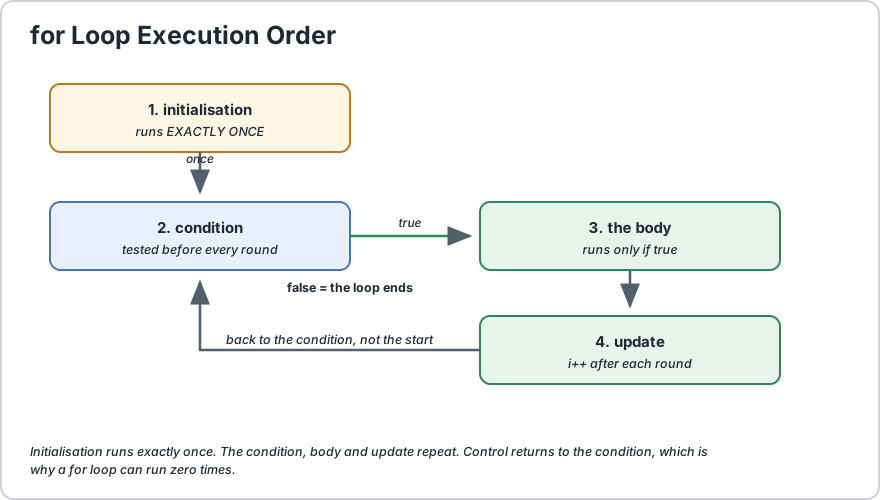
This is the part that matters most, so here it is as a numbered flow. Notice that initialisation appears once and the other two steps repeat.


Flow diagram showing for loop execution: initialisation runs once, then condition test, then body, then update, looping back to the condition test
Initialisation runs once. Condition, body and update repeat until the condition fails.

  1. Initialisation runs exactly once. The counter is created and given its first value before the loop body is ever reached.
  2. The condition is tested. If it is false, the loop ends right here and the body never runs. Not once.
  3. If true, the body runs. Every statement inside the braces executes from top to bottom.
  4. The update expression runs. This happens after the body completes, every single time.
  5. Control returns to the condition, not the initialisation. This is the detail people get wrong most often.

Step 5 is the one to remember. Because control goes back to the condition rather than the start, a loop can produce zero iterations. If the condition is false on the very first test, the body never executes even once. That is exactly the difference between a for loop and a do...while, where the body always runs at least once.

Beginner shortcut: a for loop may run zero times. If you need to guarantee one pass, either use a do...while or write the body once before the loop.

3) Counting Up and Counting Down

Most loops count upward, but a for loop is not limited to that. The direction is entirely up to how you write the condition and the update.

Main.java
Run Online
final int HIGHEST = 5;
// Counting up
for (int i = 1;
i <= HIGHEST;
i++) {
    System.out.println(i);
}// Counting down: the condition is reversed and the step is negative
for (int i = HIGHEST;
i >= 1;
i--) {
    System.out.println(i);
}// Counting by twos: the update just adds more
final int EVEN_LIMIT = 10;
final int STEP = 2;
for (int i = 0;
i <= EVEN_LIMIT;
i += STEP) {
    System.out.println(i);
}

Notice that counting down reverses both the condition and the step. Writing i-- while still testing i <= 5 is a genuine infinite loop, because the counter moves away from the bound and never reaches it. Whenever you change the direction, change the condition to match.

4) A Realistic Example, Sum With a Running Total

The most common beginner use of a for loop is accumulating something over a range. Here it is with the running total printed at each step, which is the best way to see what the loop is actually doing.

Main.java
Run Online
final int LIMIT = 5;
int sum = 0;
for (int i = 1;
i <= LIMIT;
i++) {
    sum = sum + i;
    System.out.println("Added " + i + ", running total is " + sum);
}

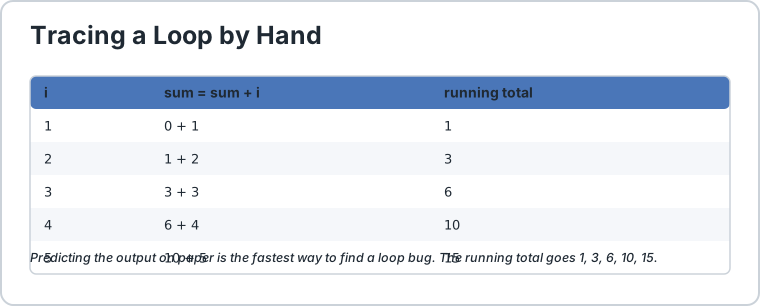
The output is 1, 3, 6, 10, 15. Tracing it by hand like this is the single best debugging habit for loops, because if you can predict the output on paper you will immediately see where the code disagrees with you.


Trace table showing each iteration of a for loop with the value of i and the running sum after that iteration
Tracing a loop by hand: i goes 1, 2, 3, 4, 5 and the sum goes 1, 3, 6, 10, 15.

5) The Useful Variations

Beyond simple counting, the for loop header has a few forms that come up regularly.

VariationWhat It Does
More than one counterInitialise and update several variables in the same header.
Empty partsAll three parts are optional, so for (;;) loops forever until a break.
Looping over an array by indexThe classic form, useful when you need the position.
Nested loopsA for loop inside another, for grids and tables.

Two Counters Moving Toward Each Other

Main.java
Run Online
final int HIGH = 10;
int low = 1;
for (int i = low, j = HIGH;
i < j;
i++, j--) {
    System.out.println("i is " + i + " and j is " + j);
}

Multiple variables in the header are separated by commas, and multiple update expressions too. This is handy for palindrome checks, where you walk in from both ends at once.

An Intentional Infinite Loop

Main.java
Run Online
for (;
;
) {
    String line = readInput();
    if (line.equals("quit")) {
        break;
    } process(line);
}

With all three parts empty, the condition is treated as permanently true. This is a legitimate and common pattern for a menu or REPL loop that runs until the user explicitly quits. The break becomes the only exit, so make sure one is always reachable.

Looping Over an Array by Index

Main.java
Run Online
String[] names = {
    "Ada", "Linus", "Grace"
};
for (int i = 0;
i < names.length;
i++) {
    System.out.println(i + ": " + names[i]);
}

Note the use of names.length rather than a hard-coded number, so the loop keeps working if the array grows. If you do not need the index, prefer the for-each loop, which cannot have an off-by-one error. We compare the two on our looping overview page and cover the details on the enhanced for loop page.

6) Scoping the Counter, and Why It Matters

Where you declare the loop variable changes where it can be used, and the recommended form keeps it inside the loop.

Main.java
Run Online
// RECOMMENDED: i exists only inside this loop
for (int i = 0;
i < 3;
i++) {
    System.out.println(i);
}// System.out.println(i);   // compile error, i is out of scope here
// AVOID: i leaks into the rest of the method
int j;
for (j = 0;
j < 3;
j++) {
    System.out.println(j);
}System.out.println(j);
// compiles, and is almost never what you meant

Declaring the counter in the header is better for a practical reason beyond tidiness. If you declare it outside, the variable survives after the loop holding its final value, and you can accidentally reuse it later in a way that produces a subtly wrong result. Scope it to the loop and the compiler stops you making that mistake.

7) The Off-By-One Error

The most common loop bug in all of programming is being wrong by exactly one. It comes down to whether your condition uses <= or <.

ConditionLoops Over
i = 0; i < length; i++Indices 0 to length minus 1, the safe default for arrays.
i = 1; i <= length; i++Values 1 to length inclusive, right for counting from one.
i = 0; i <= length; i++One too many. Causes an out-of-bounds error on the last pass.
i = 1; i < length; i++One too few. Silently skips the final element.

Remember the difference:<= means "and including", < means "but not including". Loop over array indices with < and .length, and count human numbers with <=.

8) Common Mistakes

MistakeSymptomFix
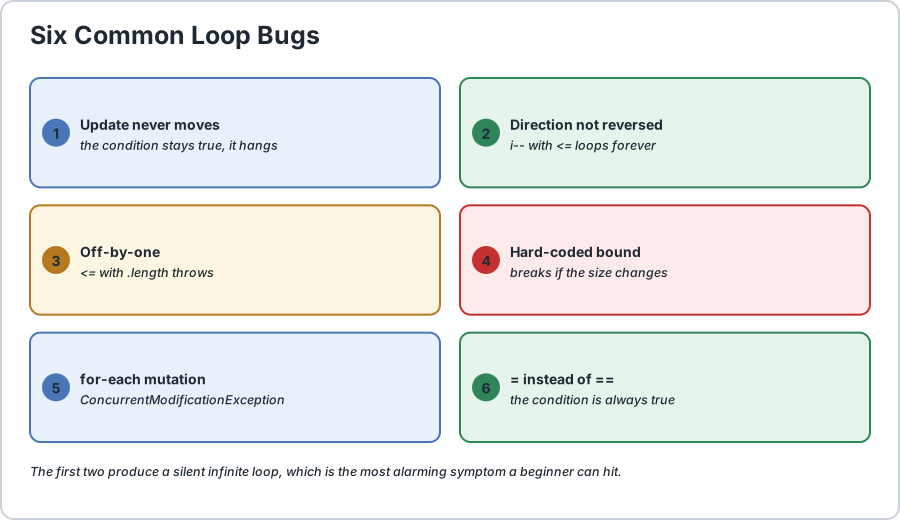
Update expression that does not move forwardInfinite loop, program hangs.Ensure the update actually changes the counter toward the bound.
Counting down but testing with <=Infinite loop, because the counter moves away from the bound.Reverse the condition when you reverse the direction.
Using <= with .lengthArrayIndexOutOfBoundsException on the final pass.Use < with .length.
Hard-coding the upper boundLoop breaks silently if the collection changes size.Use .length or .size().
Modifying the loop variable inside the bodyConfusing, and the update then fights your change.Let the update expression own the counter.
Declaring the counter outside the loopVariable leaks and can be misused later.Declare it in the for header.

The first two are the same underlying mistake seen from two sides, and both produce the most alarming symptom a beginner can hit, which is a program that appears to hang with no error at all. If your program freezes, check the update expression first.


Infographic of six common Java for loop bugs each shown with a wrong and a corrected code example
Six for loop bugs: the first two cause silent infinite loops.

For escaping a running loop, see our break statement page and continue statement page. If you need loops inside loops, the nested loops page covers that in detail, and the while loop page covers the case where you do not know the count in advance.

9) When to Use Something Other Than a for Loop

A for loop is not always the right tool, and recognising that saves you from forcing a square peg into a round hole.

  • You do not know the count in advance. Use a while loop, because a for loop with a made-up bound is just a while loop with extra steps.
  • The body must run at least once. Use a do-while loop, since a for loop may run zero times.
  • You are traversing data and do not need the index. Use the for-each loop, which has no off-by-one error to make.
  • You are transforming a collection. A stream often says what you want far more clearly than an index loop.

And one caution about performance, because it is a common misconception. Writing a tight index loop is not meaningfully faster than a for-each loop, and neither is meaningfully faster than a stream for a small collection. The JVM handles all of these efficiently. Choose the form that reads most clearly, because that is where the real gains are.

Frequently Asked Questions

What does for (;;) do?


It is an infinite loop. All three parts are optional, so with an empty condition Java treats the loop as permanently true and it runs until a break, a return, or an exception stops it. It is a legitimate pattern for a menu loop.

Can the parts of a for loop be left empty?


Yes, any of the three. You can keep only the condition, only the update, or none at all. This is what makes patterns like counting down with a manually managed counter possible, though a while loop is usually clearer for that.

Why is my for loop running forever?


Almost always because the update expression does not move the counter toward the condition, or because you reversed the direction without reversing the condition. Also check for a stray = where you meant ==.

Why does my loop run zero times?


Because the condition was already false on the very first test. A for loop checks the condition before the body, so if the starting value does not satisfy it, nothing runs. Use a do-while if you need one guaranteed pass.

Should I use <= or < with arrays?


Use < with .length, since valid array indices run from zero to length minus one. Using <= is the classic off-by-one that throws an exception on the last pass.

Can I declare the loop variable outside the loop?


You can, but it is not recommended. The variable then survives after the loop and can be misused later by accident. Declaring it in the header keeps its scope tight and lets the compiler catch mistakes.

Is a for loop faster than a while loop?


No, they compile to essentially the same thing. A for loop is preferred for readability, because the counter, the bound and the step sit together in one visible line instead of being split across the method.
Runnable Code Example: Java for Loop

Java 17+
Main.java
Run Online
// A complete tour of the Java for loop.
public class ForLoopDemo {
    public static void main(String[] args) {
        final int LIMIT = 5;
        final int HIGHEST = 5;
        final int HIGH = 10;
        final int EVEN_LIMIT = 10;
        final int STEP = 2;
        // 1) THE THREE PARTS
        //    init runs once, condition before every round, update after each.
        System.out.print("count up: ");
        for (int i = 1;
        i <= LIMIT;
        i++) {
            System.out.print(i + " ");
        } System.out.println();
        // 2) COUNTING DOWN
        //    Reverse BOTH the condition and the step, or it loops forever.
        System.out.print("count down: ");
        for (int i = HIGHEST;
        i >= 1;
        i--) {
            System.out.print(i + " ");
        } System.out.println();
        // 3) COUNTING BY STEPS
        System.out.print("by twos: ");
        for (int i = 0;
        i <= EVEN_LIMIT;
        i += STEP) {
            System.out.print(i + " ");
        } System.out.println();
        // 4) RUNNING TOTAL, the classic accumulator pattern.
        int sum = 0;
        System.out.println("running total:");
        for (int i = 1;
        i <= LIMIT;
        i++) {
            sum = sum + i;
            System.out.println("  added " + i + ", total is now " + sum);
        } // 5) A for loop can run ZERO times, because the condition
        //    is tested before the body ever executes.
        final int UNREACHABLE_BOUND = 100;
        int neverRuns = 0;
        for (int i = LIMIT;
        i >= UNREACHABLE_BOUND;
        i--) {
            neverRuns++;
        } System.out.println("zero-iteration loop ran the body " + neverRuns + " times");
        // 6) MULTIPLE COUNTERS in the same header, comma separated.
        System.out.print("two counters: ");
        for (int i = 1, j = HIGH;
        i < j;
        i++, j--) {
            System.out.print("(" + i + "," + j + ") ");
        } System.out.println();
        // 7) AN INTENTIONAL INFINITE LOOP, escaped only by break.
        final int EXIT_AFTER = 3;
        int rounds = 0;
        for (;
;
) {
            rounds++;
            if (rounds >= EXIT_AFTER) {
                break;
            }
        } System.out.println("infinite loop exited cleanly after " + rounds + " rounds");
        // 8) LOOPING OVER AN ARRAY BY INDEX, using .length not a hard number.
        String[] names = {
            "Ada", "Linus", "Grace"
        };
        System.out.println("names by index:");
        for (int i = 0;
        i < names.length;
        i++) {
            System.out.println("  position " + i + " is " + names[i]);
        } // 9) OFF-BY-ONE DEMO: using <= with .length oversteps the array.
        //    This line is left commented because it would crash.
        // for (int i = 0; i <= names.length; i++) {
        //     System.out.println(names[i]);   // throws on the last pass
        // }
        // The correct form uses < names.length, shown above.
        // 10) SCOPING: i is gone once the loop above ends.
        // System.out.println(i);   // compile error, i is out of scope
    }
}/*
    ACTUAL OUTPUT:

        count up: 1 2 3 4 5
        count down: 5 4 3 2 1
        by twos: 0 2 4 6 8 10
        running total:
          added 1, total is now 1
          added 2, total is now 3
          added 3, total is now 6
          added 4, total is now 10
          added 5, total is now 15
        zero-iteration loop ran the body 0 times
        two counters: (1,10) (2,9) (3,8) (4,7) (5,6)
        infinite loop exited cleanly after 3 rounds
        names by index:
          position 0 is Ada
          position 1 is Linus
          position 2 is Grace

    THE EXECUTION ORDER, WHICH IS THE WHOLE TOPIC
1. initialisation runs EXACTLY ONCE
2. condition is tested
3. if true, the body runs
4. update runs
5. go back to the CONDITION, not to the initialisation

    Because step 5 returns to the condition, a for loop can run
    ZERO times. That is the single fact most beginners get wrong.
*/

Common Java Technical Interview Questions & Answers

Interview Prep
Q1

What are the three parts of a Java for loop and when does each run?

Initialisation, condition and update. Initialisation runs exactly once before anything else. The condition is tested before every iteration, and if it is false the loop ends. The update runs after each completed iteration, and then control returns to the condition rather than the initialisation.
Q2

In what order does a for loop execute its parts?

Initialisation once, then the condition is tested, then the body runs if it was true, then the update executes, then control goes back to the condition. The initialisation is never revisited.
Q3

Can a for loop run zero times?

Yes. Because the condition is tested before the body, if it is false on the very first check the body never executes. Use a do-while loop if the body must run at least once.
Q4

What does for (;;) mean?

An intentional infinite loop. All three parts are optional, so an empty condition is treated as permanently true, and the loop runs until a break, a return or an exception ends it. It is a common and valid pattern for a menu or REPL loop.
Q5

Why does counting down sometimes loop forever?

Because the condition was not reversed along with the direction. When you change the update to i-- you must also change the test to i >= something, otherwise the counter moves away from the bound and never satisfies it.
Q6

What causes the classic off-by-one error?

Choosing the wrong comparison operator. Array indices run from zero to length minus one, so indexing requires a strict less-than with .length. Using less-than-or-equal steps one past the end and throws ArrayIndexOutOfBoundsException.
Q7

Should the loop variable be declared inside the for header?

Yes, preferably. Scoping the counter to the loop prevents it leaking into the rest of the method, where it could be reused by mistake, and the compiler can then catch that class of error.
Q8

Is a for loop faster than a while loop?

No, they compile to essentially the same code. A for loop is preferred for readability, since the counter, bound and step are visible together in the header rather than separated across the method body.
Q9

Can I declare more than one variable in a for loop?

Yes. Initialise them separated by commas, and list the update expressions the same way, as in for (int i = 0, j = 10; i < j; i++, j--). This is useful for walking in from both ends, such as a palindrome check.
Q10

When should I avoid a for loop?

When the iteration count is genuinely unknown, a while loop is clearer. When traversing a collection without needing the index, the for-each loop removes the off-by-one risk. And for simple collection transformations, a stream often expresses the intent more directly.

Key Takeaways, Best Practices & Clean Code Rules

Java Best Practice & Production Rules

1) Declare the loop counter in the for header, as in for (int i = 0; ...), so its scope is limited to the loop and it cannot be accidentally reused later in the method.
2) Use a for loop whenever you know the iteration count, and a while loop when you do not, since a for loop with an invented bound is only a while loop written the long way round.
3) Use a strict less-than with array .length and a less-than-or-equal when counting from one, since mixing these up is the most common off-by-one bug in Java.
4) Never hard-code the upper bound, and always write names.length or list.size(), so the loop keeps working when the collection changes size.
5) Always make sure the update expression moves the counter toward the condition, and if you reverse the direction, reverse the condition in the same edit.
6) Prefer the for-each loop when you only need the values, and drop to an indexed for loop only when you genuinely need the position or must skip elements.
7) Avoid the infinite loop for (;;) unless a break is clearly reachable, and treat a program that appears to hang as a missing or wrong update until proven otherwise.
8) Prefer array.length over a stored variable holding the size, since it cannot fall out of sync with the array.
9) Trace a new loop by hand on paper before running it, writing down the value of the counter and the result at each step, because predicting the output is the fastest way to find a logic error.
10) Do not modify the loop variable inside the body, since the update expression owns the counter and fighting it produces confusing results.
We value your privacy & transparency

OperateTools uses cookies and local storage to ensure basic tool functionality, preserve preferences, and analyze aggregated traffic. We never sell your personal data or index your document files. Learn more in our Privacy Policy.