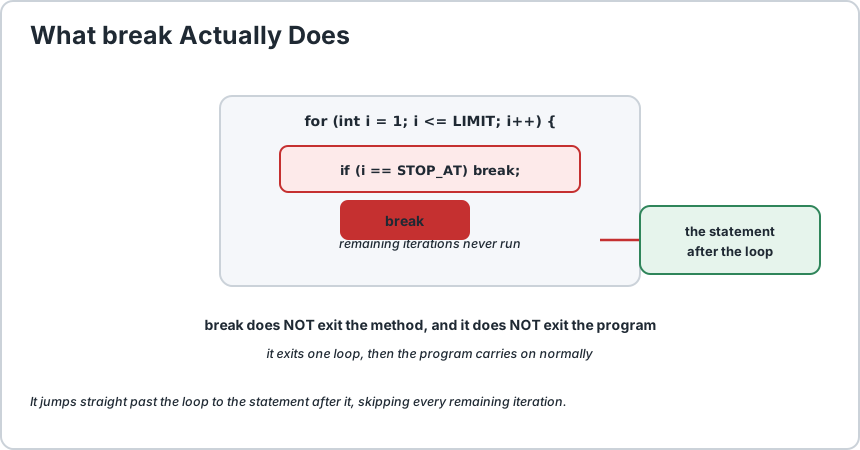
The break statement does one thing: it stops the loop it is inside and moves on to whatever comes after that loop. That is the whole concept, and it is genuinely useful in one specific situation, which is when you have found what you were looking for and there is no reason to keep going. Here is the part that surprises people. break exits only the innermost loop that contains it. If you are three loops deep and put a break in the third one, it leaves that third loop and the two outer loops carry on exactly as before. There is no way to exit an outer loop with a plain break, and this is the single most common misunderstanding about the statement. The second half of the story is that a plain break is not always the right tool, and using it too eagerly tends to hide a design problem. If you are breaking out of a loop on the third of five hundred iterations, the condition that is running the loop is probably doing too much. break is at its best when the loop is genuinely searching for something and has found it, such as locating an item in a list or stopping a menu loop on a quit command. There is also a labelled form, break outer;, which is the one exception to the innermost-only rule and the only way to leave an outer loop directly. We cover that on its own below.
final int LIMIT = 10;
final int STOP_AT = 4;
for (int i = 1;
i <= LIMIT;
i++) {
    if (i == STOP_AT) {
        break;
    } System.out.println(i);
}// prints 1, 2, 3 and then the loop is over
When break runs, the loop stops immediately. The remaining iterations never happen, and execution continues at the statement after the closing brace of the loop.
Two things it does not do, which are worth stating plainly. It does not exit the program, and it does not exit the method. It exits one loop and then the program carries on normally. If you want to leave a method you need return, which is covered on its own page.
break jumps straight past the loop to whatever comes next.
2) It Only Exits the Innermost Loop
This is the rule that catches everyone, usually at the worst possible moment. In a nested loop, a plain break leaves only the loop immediately around it.
final int SIZE = 3;
final int STOP_COLUMN = 2;
for (int row = 1;
row <= SIZE;
row++) {
    for (int col = 1;
    col <= SIZE;
    col++) {
        if (col == STOP_COLUMN) {
            break;
            // leaves the INNER loop only
        } System.out.print(row + "," + col + " ");
    } System.out.println();
}
Output is 1,1 on three separate lines. The break stopped the inner loop at column 2, but the outer loop still ran all three rows. If you were expecting the whole thing to stop, the code is wrong, and importantly it is wrong silently, with no error and no warning.
Before you debug an unexpected loop result, ask which loop the break is actually in. Nine times out of ten the answer explains the behaviour completely.
3) The Three Ways Out of a Loop
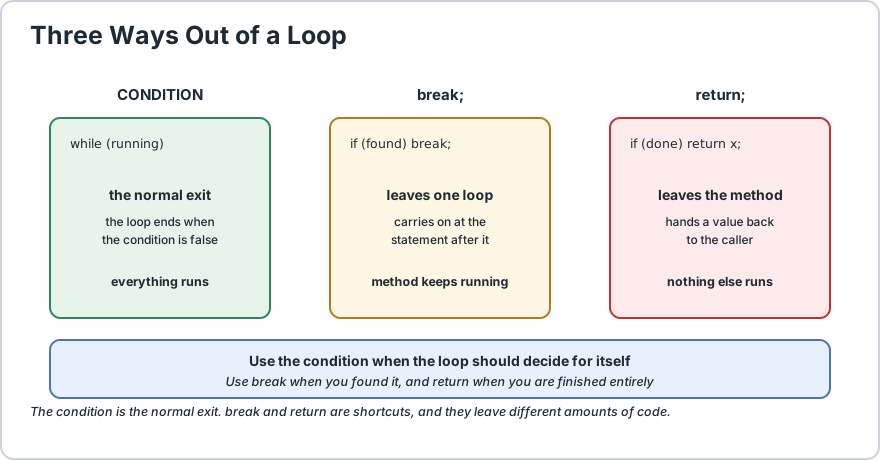
There are exactly three ways to stop a loop, and they are not interchangeable. Choosing the right one is most of the skill here.
Statement
Leaves
Then continues at
Condition becomes false
The loop
The statement after the loop
break;
The innermost loop
The statement after that loop
return;
The method, immediately
Wherever the caller continues
Three exits. The condition is the normal one; the other two are shortcuts.
This is why break is a shortcut rather than a necessity. In a well-written loop the condition already ends the loop, and break is there for the cases where the condition alone cannot express the exit.
4) The Classic Case, Finding a Match
Search is where break earns its keep. You are looking for one item, and once you have found it there is nothing left to do.
String[] names = {
    "Alex", "Sam", "Robin", "Jamie"
};
final String TARGET = "Robin";
final int UNSET = -1;
int foundAt = UNSET;
for (int i = 0;
i < names.length;
i++) {
    if (names[i].equals(TARGET)) {
        foundAt = i;
        break;
        // found it, no point checking the rest
    }
}if (foundAt != UNSET) {
    System.out.println(TARGET + " is at position " + foundAt);
} else {
    System.out.println(TARGET + " was not found");
}
Without the break the code still works, it simply keeps comparing names that cannot match. break here says what you mean: stop when the job is done.
The same shape appears constantly in real code, for locating a record, detecting a duplicate, capping a retry count, or ending a menu loop when the user quits.
5) When break Is the Wrong Tool
Here is the honest advice, and it is the part that is rarely taught. break is easy to reach for, and using it to escape a loop that is badly designed hides the problem rather than solving it.
Situation
Problem
Better
Breaking on iteration 3 of 500
The condition is doing too much work.
Rewrite the condition to express the real rule.
Several breaks in one loop
The logic is scattered and hard to follow.
Extract the cases into a helper method.
Break to escape an outer loop
You are really searching two dimensions.
Flatten the loops, or search a Map.
Break to skip the last few items
Trailing special cases.
Use an if with continue, or restructure.
Breaking out of a huge loop early
A real performance problem.
Use a Set or Map lookup instead.
The test to apply is simple. Ask yourself whether the loop would still make sense if the break were removed and the condition rewritten. If the answer is yes, the break is documenting a condition that belongs in the loop itself.
6) Labelled break, the One Exception
A plain break is limited to the innermost loop, but a labelledbreak can leave any loop you name. You attach a label to a loop with a name and a colon, then use that name.
final int SIZE = 3;
final int HIT = 2;
search:for (int row = 1;
row <= SIZE;
row++) {
    for (int col = 1;
    col <= SIZE;
    col++) {
        if (row == HIT && col == HIT) {
            break search;
            // leaves BOTH loops at once
        } System.out.print(row + "," + col + " ");
    } System.out.println();
}
Without the label this prints the whole first row and part of the second. With break search; both loops stop the moment the target is found, which is exactly what a two-dimensional search needs.
Statement
Effect
break;
Leaves the innermost loop.
break search;
Leaves the loop labelled search, whatever the nesting.
continue;
Skips to the next pass of the innermost loop.
continue search;
Skips to the next pass of the labelled loop.
return;
Leaves the method entirely, no label needed.
Labels are a genuine tool rather than a hack, and searching a two-dimensional structure is the legitimate use. But if you find yourself labelling three nested loops, that is usually a sign the algorithm wants to be a method of its own rather than a set of labels.
7) break in a switch Statement
You will also meet break inside a switch, where it does the same job: stop that case and move to the statement after the switch. Without it, execution falls through into the next case.
final int CHOICE = 2;
switch (choice) {
    case 1: System.out.println("Create a report");
    break;
    case 2: System.out.println("View a report");
    break;
    default: System.out.println("Unknown option");
}
Notice that the default at the end does not need a break, because there is nothing after it to fall into. That is a small detail that trips people who add a break everywhere out of habit.
In modern Java the arrow form removes the issue entirely, since case X -> never falls through and needs no break at all. We compare both forms on the Java switch statement page.
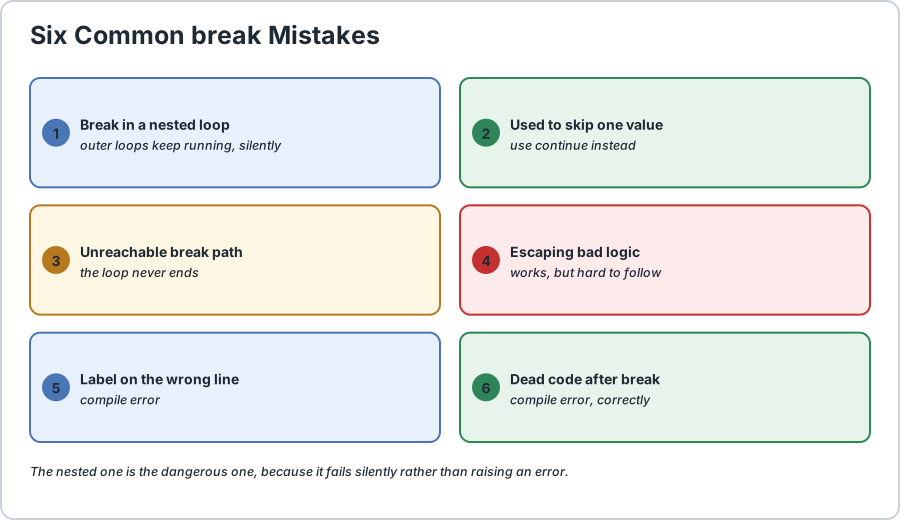
8) Common Mistakes
Mistake
Symptom
Fix
Break in a nested loop
Outer loops keep running, silently.
Label the loop and use break label;.
Using break to skip one value
Works, but the intent is unclear.
Use continue instead.
Break in an infinite loop
Loop never ends without the break.
Make sure the break is always reachable.
Break used to escape bad logic
Correct, but hard to follow.
Rewrite the condition and remove the break.
Label typed on the wrong line
Compile error, the label must precede a statement.
The label goes before the loop, not inside it.
Unreachable code after break
Compile error on the unreachable statement.
Move the dead code above the break or remove it.
Six break mistakes. The nested one is the dangerous one, because it fails silently.
The last row is worth a note. Java reports unreachable code as a compile error, which is unusual and genuinely helpful. If the compiler says a statement cannot be reached, it is because something like a break, continue or return always fires first. That is a real bug, not a warning to ignore.
Frequently Asked Questions
What does break do exactly?
It terminates the innermost loop or switch that contains it, and execution continues at the statement immediately after that block. It does not exit the program or the method, and it does not skip any code between the break and the closing brace.
Does break exit all nested loops?
No. An unlabelled break exits only the innermost loop. To leave an outer loop you must label it and write break labelName;, or use return to leave the method.
What is the difference between break and return?
A break leaves one loop and continues after it. A return leaves the entire method immediately and hands a value back to the caller. If you want to stop processing and return a result, return is usually the clearer choice.
When should I use break rather than a loop condition?
When the loop is genuinely searching and has found what it wanted, such as locating an item or detecting a duplicate. Avoid it when you are using it to escape a loop that is doing too much, since that hides a condition that should be rewritten.
Is break ever used outside a loop?
Yes, inside a switch statement, where it stops the current case and prevents fall-through into the next one. In the modern arrow form of switch, break is unnecessary because it cannot fall through.
How do I break out of an infinite loop?
The break statement is exactly for that, and the form while (true) { ... break; } is a common and legitimate pattern for a loop that should run until a specific event occurs.
Does a break skip the finally block of a try?
No. A finally block always runs when control leaves a try statement, whether that is through a normal exit, a break, a return or an exception. That guarantee is what makes try-with-resources reliable.
Runnable Code Example: Breaking Out of Java Loops With the brea
// Demonstrates the Java break statement.
public class BreakDemo {
    public static void main(String[] args) {
        final int SIZE = 3;
        final int TARGET = 2;
        final String NAME = "Robin";
        final int UNSET = -1;
        String[] names = {
            "Alex", "Sam", "Robin", "Jamie"
        };
        // 1) BREAK EXITS ONLY THE INNERMOST LOOP
        //    Each row stops at column 1, but all three rows still print.
        System.out.println("plain break in nested loops:");
        for (int row = 1;
        row <= SIZE;
        row++) {
            for (int col = 1;
            col <= SIZE;
            col++) {
                if (col == TARGET) {
                    break;
                    // inner loop only
                } System.out.print(row + "," + col + " ");
            } System.out.println();
        } // 2) A LABELLED break EXITS BOTH LOOPS
        System.out.println("labelled break:");
        search: for (int row = 1;
        row <= SIZE;
        row++) {
            for (int col = 1;
            col <= SIZE;
            col++) {
                if (row == TARGET && col == TARGET) {
                    break search;
                    // leaves BOTH loops
                } System.out.print(row + "," + col + " ");
            } System.out.println();
        } // 3) THE CLASSIC CASE: finding a match
        //    Once found there is nothing left to check, so break.
        int foundAt = UNSET;
        for (int i = 0;
        i < names.length;
        i++) {
            if (names[i].equals(NAME)) {
                foundAt = i;
                break;
            }
        } System.out.println(NAME + " found at index " + foundAt);
        // 4) break IN AN INFINITE LOOP
        //    This is a normal, deliberate use of break.
        final int EXIT_AFTER = 3;
        int counter = 0;
        while (true) {
            counter++;
            if (counter >= EXIT_AFTER) {
                break;
                // the only way out
            }
        } System.out.println("infinite loop exited after " + counter + " passes");
        // 5) break IN A switch PREVENTS FALL-THROUGH
        //    The final default needs no break, nothing follows it.
        System.out.println("switch with break:");
        int choice = TARGET;
        switch (choice) {
            case 1: System.out.println("  create a report");
            break;
            case 2: System.out.println("  view a report");
            break;
            default: System.out.println("  unknown option");
        } // 6) FALL-THROUGH, shown on purpose for contrast
        //    Without a break, case 1 runs case 2 as well.
        System.out.println("switch WITHOUT break (fall-through):");
        int noBreakChoice = 1;
        switch (noBreakChoice) {
            case 1: System.out.println("  create a report");
            // no break here
            case 2: System.out.println("  view a report");
            break;
            default: System.out.println("  unknown option");
        }
    }
}/*
    ACTUAL OUTPUT:

        plain break in nested loops:
        1,1
        2,1
        3,1
        labelled break:
        1,1 1,2 1,3
        2,1
        Robin found at index 2
        infinite loop exited after 3 passes
        switch with break:
          view a report
        switch WITHOUT break (fall-through):
          create a report
          view a report

    THE FOUR THINGS TO REMEMBER
    1) break leaves ONLY the innermost loop. In the first example all
       three rows printed, which is the behaviour people misread.
    2) To leave an outer loop you need a label: break search;
    3) break does not exit the method. Use return for that.
    4) Reach for break when you have FOUND something and there is
       nothing left to do, not as a way to escape awkward logic.
*/
Common Java Technical Interview Questions & Answers
Interview Prep
Q1: What does the break statement do in Java?\nA1: It terminates the innermost loop or switch statement that contains it, and execution continues at the statement immediately after that block. It does not exit the program or the method.\nQ2: Does break exit all nested loops at once?\nA2: No. An unlabelled break exits only the innermost loop containing it, and the outer loops carry on normally. To leave an outer loop you must label it and write break labelName, or use return to leave the method entirely.\nQ3: What is the difference between break and return?\nA3: A break leaves one loop or switch and continues after it. A return leaves the entire method immediately, optionally handing a value back to the caller. If you want to stop processing and produce a result, return is usually clearer.\nQ4: When is break the right tool rather than a loop condition?\nA4: When the loop is genuinely searching and has found what it wanted, such as locating an item, detecting a duplicate, or capping a retry count. Avoid it when escaping a loop that is doing too much, since that hides a condition that should be rewritten.\nQ5: Where else can break be used besides a loop?\nA5: Inside a switch statement, where it stops the current case and prevents fall-through into the next one. In the modern arrow form of switch it is unnecessary, because an arrow case never falls through.\nQ6: How do you break out of an infinite loop?\nA6: That is exactly what break is for, and the form while (true) with a break inside is a common and legitimate pattern for a loop that runs until a specific event occurs.\nQ7: Does a break skip a finally block in a try statement?\nA7: No. A finally block always runs when control leaves a try statement, whether through a normal exit, a break, a return or an exception, which is what makes try-with-resources reliable.\nQ8: Why does the compiler report unreachable code?\nA8: Because a statement such as a break, continue or return always fires before it, so it can never run. Java treats this as a compile error rather than a warning, and it is a genuine bug that should be fixed rather than suppressed.
Key Takeaways, Best Practices & Clean Code Rules
Java Best Practice & Production Rules
Use break when the loop has genuinely found what it was looking for and there is nothing useful left to do, which is the case it was designed for.\nRemember that break leaves only the innermost loop, and use a labelled break when you need to leave an outer loop from inside a nested one.\nPrefer return over break when the goal is to leave the method with a result, since return is unambiguous about where control goes.\nAvoid using break to escape a loop whose condition is doing too much, and rewrite the condition instead so the loop explains its own exit rule.\nIf a loop contains several different break statements, extract the logic into a small method, because scattered exits are hard to follow and harder to change.\nKeep any break on a path that is definitely reachable, since a break in an infinite loop that never fires means the loop really does run forever.\nDo not add a break to the final case of a switch statement, because there is nothing after it to fall into and the extra line is noise.\nUse a labelled break for two-dimensional searches, but reach for a helper method rather than labels when you need three or more levels.\nRemember that a finally block still runs after a break, so break is safe inside a try with resources.\nWhen a loop breaks far too early, suspect a performance problem and consider a Set or Map lookup instead of scanning repeatedly.
Share with friends, students, or your developer network
We value your privacy & transparency
OperateTools uses cookies and local storage to ensure basic tool functionality, preserve preferences, and analyze aggregated traffic. We never sell your personal data or index your document files. Learn more in our Privacy Policy.
Stay Updated
Enable Notifications?
Get real-time updates, instant tool alerts & daily news directly on your device.