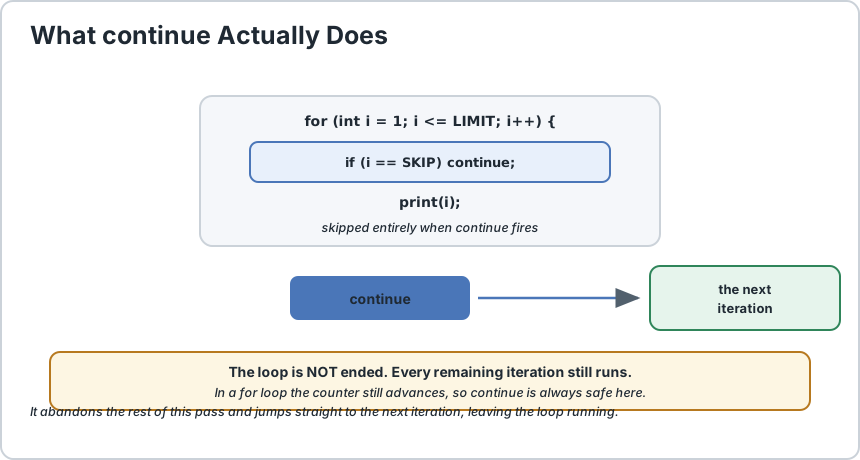
The continue statement does one thing: it abandons the rest of the current loop iteration and jumps straight to the next one. The loop keeps running. Nothing ends, nothing is returned, the iteration is simply skipped early. The clearest way to see the difference from break is to picture a row of ten items. A break says stop processing the whole list. A continue says skip this one item and carry on with the rest. One leaves the loop, the other just moves to the next turn around. The detail that catches people is where control actually goes, because it is not the same place in every kind of loop. In a for loop, continue jumps to the update expression, so the counter still advances. In a while or do...while loop there is no update expression, so it jumps to the condition test instead, which means your loop variable must be updated before the continue or you will loop forever. That single difference is the cause of most infinite loops involving continue. There is also a labelled form, continue outer;, which skips the rest of the current pass of a named outer loop. Like break, it is a genuine tool for nested loops, and it deserves the same caution about not becoming a substitute for clearer logic.
final int LIMIT = 6;
final int SKIP = 3;
for (int i = 1;
i <= LIMIT;
i++) {
    if (i == SKIP) {
        continue;
    } System.out.println(i);
}// prints 1, 2, 4, 5, 6
The value 3 is never printed, but the loop still runs to completion. That is the entire effect: skip the rest of this pass, go to the next one, keep the loop alive.
continue abandons this pass only. The loop carries on with the next one.
2) continue and break Are Not the Same
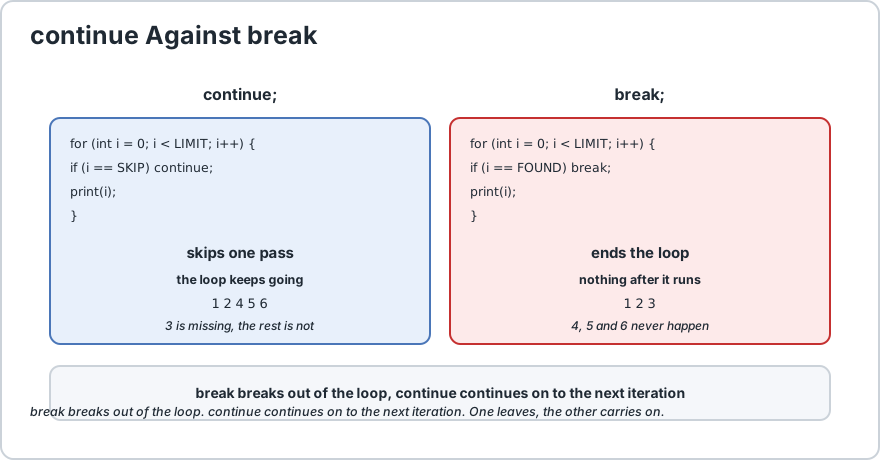
They look similar and do completely different things. Getting them confused is the most common error with both statements, so it is worth putting them side by side.
Question
continue
break
What happens to the loop?
It keeps going
It ends immediately
Where does control go?
The next iteration
The statement after the loop
Code after it in the body
Skipped
Skipped
Remaining iterations
Still run
Never run
Typical use
Filter out items you do not want
Stop once you have found something
continue skips one pass. break ends the loop. Different outcomes, similar shape.
A memory aid that helps: break breaks out, continue continues on. One leaves, the other carries on.
3) Where Control Actually Jumps
This is the detail that matters most in practice, and it is different depending on the loop type.
Loop type
continue jumps to
Safe?
for
The update expression, so the counter still advances
Yes, always safe
Enhanced for
The next element, handled by the iterator
Yes, always safe
while
The condition test
Only if you updated the variable first
do...while
The condition test at the bottom
Only if you updated the variable first
This is the number one cause of infinite loops involving continue. In a for loop the counter is advanced for you. In a while loop you own it, so a continue placed above the increment skips the increment and the loop never ends.
final int LIMIT = 5;
final int SECOND = 2;
int i = 0;
while (i < LIMIT) {
    i++;
    if (i == SECOND) {
        continue;
        // fine, i was already incremented
    } System.out.println(i);
}int j = 0;
while (j < LIMIT) {
    if (j == SECOND) {
        continue;
        // BROKEN: j never advances
    } j++;
    // this line is never reached for j == 2
    System.out.println(j);
}
The rule is simple: in a while loop, put the state update at the top of the body, before any continue that might skip it. That way no path through the body can bypass it.
4) The Classic Use, Filtering
continue earns its place when you are processing a list and some items should be passed over. The pattern is: check the item, skip it if it is not what you want, otherwise do the work.
import java.util.ArrayList;
import java.util.List;
final int IGNORE = 0;
List<Integer> values = new ArrayList<>(List.of(4, IGNORE, 7, IGNORE, 2, IGNORE));
int total = 0;
int skipped = 0;
for (int value : values) {
    if (value == IGNORE) {
        skipped++;
        continue;
        // ignore the unwanted entries
    } total = total + value;
}System.out.println("sum of " +(values.size() - skipped) + " values is " + total);
System.out.println("skipped " + skipped + " entries");
This reads clearly because the guard clause at the top says what to ignore, and everything after it can assume the value is usable. That is the shape to aim for: handle the exception first, then the normal case sits at the left margin.
5) continue and break Together
Sometimes you want to skip some items and give up entirely on the rest. The two statements combine naturally, and the order you put them in is the important part.
final int UNSET = -1;
final int STOP_VALUE = 8;
final int SKIP_VALUE = 0;
int[] numbers = {
    1, 0, 5, 8, 2, 0, 7
};
int sum = UNSET;
int lastSeen = UNSET;
for (int number : numbers) {
    if (number == SKIP_VALUE) {
        continue;
        // ignore this one
    } if (number == STOP_VALUE) {
        break;
        // give up on the rest
    } sum = sum + number;
    lastSeen = number;
}
The order matters and this is the classic mistake. If the break check came first, the loop would exit on the sentinel value before it ever had a chance to skip anything after it. Always put the skip check before the stop check, so the skip rule is applied to as many items as possible.
6) Labelled continue
Just like break, a plain continue only affects the innermost loop. To skip the rest of the current pass of an outer loop, label it.
final int SIZE = 3;
outer:for (int row = 1;
row <= SIZE;
row++) {
    for (int col = 1;
    col <= SIZE;
    col++) {
        if (row == col) {
            continue outer;
            // skip to the next ROW, not the next column
        } System.out.print(row + "," + col + " ");
    } System.out.println();
}
This prints every pair except the diagonal, where row equals column. With an unlabelled continue the diagonal would simply be skipped but the row would keep printing the remaining columns, which is not what a "skip this whole row" intention needs.
Statement
Effect
continue;
Skips the rest of the innermost loop pass.
continue outer;
Skips the rest of the labelled loop pass.
break;
Leaves the innermost loop.
break outer;
Leaves the labelled loop.
return;
Leaves the method entirely.
Use labels when you genuinely need to act on an outer loop, such as skipping whole rows of a grid. If you are labelling three nested loops, that is usually a sign the work belongs in its own method rather than in a web of labels.
7) When continue Is the Wrong Tool
As with break, restraint pays off. Two situations in particular are worth calling out.
Deeply nested if blocks. If you find yourself adding a continue at the end of a block just to escape the indentation, the better fix is to invert the condition so the skip sits at the top and the real work stays at the left margin.
// HARDER TO READ: the work is buried
final int MIN_QTY = 1;
for (Item item : items) {
    if (item.isActive()) {
        if (item.getQuantity() > MIN_QTY) {
            if (!item.isExpired()) {
                process(item);
            }
        }
    }
}// EASIER TO READ: guard clauses, no continue needed
for (Item item : items) {
    if (!item.isActive()) {
        continue;
    } if (item.getQuantity() < MIN_QTY) {
        continue;
    } if (item.isExpired()) {
        continue;
    } process(item);
}
Both versions are correct. The second is flatter and each rule is named, which is why the guard-clause style is preferred. Note that in the second version the continue statements are the whole body of the early checks rather than something you jump to from deeper down.
Using it instead of break. If you write continue in the last statement of a loop body, you probably meant break, because the two are equivalent there and break says what you mean.
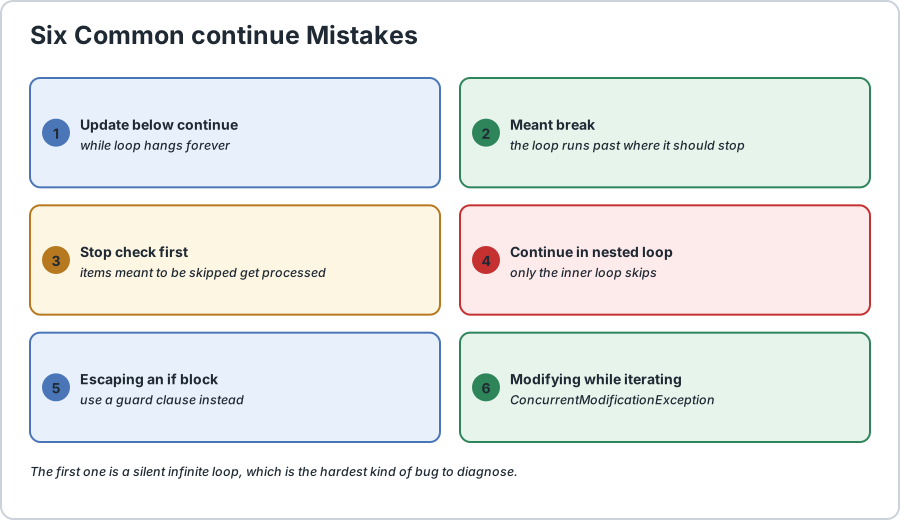
8) Common Mistakes
Mistake
Symptom
Fix
Update below a continue in a while loop
Infinite loop, no output at all.
Move the update to the top of the body.
Meant break, wrote continue
The loop keeps running past the point you wanted to stop.
Use break for stopping and continue for skipping.
Stop check placed before the skip check
Items meant to be skipped are processed.
Put the continue check first.
continue in a nested loop
Only the inner loop skips, silently.
Label the outer loop and use continue label;.
Used to escape an if block
Correct, but the logic is harder to follow.
Invert the condition into a guard clause.
Continue in a for-each over a collection being modified
ConcurrentModificationException.
Do not modify the structure while iterating.
Six continue mistakes. The first one is a silent infinite loop, which is the worst kind.
Frequently Asked Questions
What does the continue statement do in Java?
It abandons the rest of the current iteration and jumps to the next one. The loop is not ended, so every remaining iteration still runs. Anything after the continue in the current pass is skipped.
What is the difference between continue and break?
A continue skips the current iteration and keeps the loop running. A break ends the loop entirely and continues at the statement after it. Use continue to ignore an item, and break once you have found what you were looking for.
Why does continue cause an infinite loop in a while loop?
Because a while loop has no update expression, so continue jumps to the condition test. If the state variable is updated after the continue rather than before it, the variable never changes and the condition stays true forever. Put the update at the top of the body.
Where does continue jump in a for loop?
To the update expression, so the counter still advances normally. This is why continue is always safe in a for loop, and why the same code in a while loop can hang.
Does continue work with nested loops?
Yes, but an unlabelled continue only affects the innermost loop. To skip the rest of the current pass of an outer loop, label it and write continue labelName, exactly as you would with a labelled break.
What happens if continue is the last statement in a loop?
It is equivalent to a break, because there is nothing left to skip and the loop would move to the next iteration regardless. In that position a break says what you actually mean, so prefer it.
Is continue considered bad practice?
Not in itself. A continue as a guard clause at the top of a loop body, where it filters out unwanted items, is clear and readable. It becomes a problem when used to escape deeply nested blocks or to imitate a break that was mistyped.
Runnable Code Example: Skipping an Iteration in Java With continue
// Demonstrates the Java continue statement.
public class ContinueDemo {
    public static void main(String[] args) {
        final int LIMIT = 6;
        final int SKIP = 3;
        final int MAX = 5;
        final int UNSET = -1;
        final int STOP_VALUE = 8;
        final int SKIP_VALUE = 0;
        final int SIZE = 3;
        int[] numbers = {
            1, 0, 5, 8, 2, 0, 7
        };
        // 1) THE BASICS: skip this one value, keep looping
        System.out.print("basic: ");
        for (int i = 1;
        i <= LIMIT;
        i++) {
            if (i == SKIP) {
                continue;
                // 3 is never printed
            } System.out.print(i + " ");
        } System.out.println();
        // 2) continue IS SAFE IN A for LOOP
        //    The update expression still runs, so the counter advances.
        System.out.print("for loop is safe: ");
        for (int i = 0;
        i < MAX;
        i++) {
            if (i == 2) {
                continue;
            } System.out.print(i + " ");
        } System.out.println();
        // 3) IN A while LOOP THE UPDATE MUST COME FIRST
        //    Otherwise continue skips it and the loop never ends.
        System.out.print("while, update first: ");
        int i = 0;
        while (i < MAX) {
            i++;
            // MUST be before the continue
            if (i == 2) {
                continue;
            } System.out.print(i + " ");
        } System.out.println();
        // 4) THE BROKEN VERSION, left commented because it would hang.
        // int stuck = 0;
        // while (stuck < MAX) {
        //     if (stuck == 2) {
        //         continue;             // skips the increment below
        //     }
        //     stuck++;                   // never reached when stuck == 2
        // }
        // 5) FILTERING, the classic use
        int sum = 0;
        int skipped = 0;
        for (int number : numbers) {
            if (number == SKIP_VALUE) {
                skipped++;
                continue;
                // ignore zeros entirely
            } sum = sum + number;
        } System.out.println("sum of " +(numbers.length - skipped) + " values is " + sum);
        System.out.println("skipped " + skipped + " entries");
        // 6) continue AND break TOGETHER
        //    The skip check MUST come before the stop check.
        int runningTotal = 0;
        int lastSeen = UNSET;
        for (int number : numbers) {
            if (number == SKIP_VALUE) {
                continue;
                // skip first
            } if (number == STOP_VALUE) {
                break;
                // then give up
            } runningTotal = runningTotal + number;
            lastSeen = number;
        } System.out.println("total before the stop value: " + runningTotal);
        System.out.println("last value processed: " + lastSeen);
        // 7) A LABELLED continue SKIPS THE WHOLE REST OF THE ROW
        System.out.println("labelled continue, diagonal skipped:");
        outer: for (int row = 1;
        row <= SIZE;
        row++) {
            for (int col = 1;
            col <= SIZE;
            col++) {
                if (row == col) {
                    continue outer;
                    // next row, not next column
                } System.out.print(row + "," + col + " ");
            } System.out.println();
        } // 8) GUARD CLAUSES: continue at the top keeps the work flat
        String[] raw = {
            "  Alex  ", "", "Sam", null, "Robin"
        };
        System.out.println("cleaned names:");
        for (String value : raw) {
            if (value == null) {
                continue;
            } String trimmed = value.trim();
            if (trimmed.isEmpty()) {
                continue;
            } System.out.println("  " + trimmed);
        }
    }
}/*
    ACTUAL OUTPUT:

        basic: 1 2 4 5 6
        for loop is safe: 0 1 3 4
        while, update first: 1 3 4 5
        sum of 4 values is 23
        skipped 3 entries
        total before the stop value: 6
        last value processed: 5
        labelled continue, diagonal skipped:
        1,2 1,3
        2,1 2,3
        3,1 3,2
        cleaned names:
          Alex
          Sam
          Robin

    THE FOUR THINGS TO REMEMBER
    1) continue skips this pass only. The loop keeps running, which is
       the whole difference from break.
    2) In a for loop it jumps to the update, so it is always safe.
       In a while loop it jumps to the condition, so YOU must have
       already updated the variable or the loop never ends.
    3) When combining continue and break, put the continue check
       first, or the break fires before anything gets skipped.
    4) Reach for continue as a guard clause at the top of the body,
       where the real work then stays flat and readable.
*/
Common Java Technical Interview Questions & Answers
Interview Prep
Q1: What does the continue statement do in Java?\nA1: It abandons the rest of the current loop iteration and jumps to the next one. The loop is not ended, so every remaining iteration still runs, and any code after the continue in the current pass is skipped.\nQ2: What is the difference between continue and break?\nA2: A continue skips the current iteration and keeps the loop running, while a break ends the loop entirely and continues at the statement after it. Use continue to ignore an item and break once you have found what you were looking for.\nQ3: Why can continue cause an infinite loop in a while loop?\nA3: Because a while loop has no update expression, so continue jumps straight to the condition test. If the state variable is incremented after the continue rather than before it, the variable never changes and the condition stays true forever. Put the update at the top of the body.\nQ4: Where does continue jump in a for loop?\nA4: To the update expression, so the counter still advances normally. This is why continue is always safe in a for loop while the equivalent code in a while loop can hang.\nQ5: Does continue work with nested loops?\nA5: Yes, but an unlabelled continue only affects the innermost loop. To skip the rest of the current pass of an outer loop, label it and write continue labelName, exactly as with a labelled break.\nQ6: What happens if continue is the last statement in a loop body?\nA6: It behaves the same as a break, because there is nothing left to skip. In that position a break is clearer, since it states the actual intent, so prefer it.\nQ7: When combining continue and break in one loop, what order is correct?\nA7: The continue check must come first. If the break check is placed above it, the loop exits on the stop condition before the skip rule has a chance to apply to anything after it.\nQ8: Is using continue considered bad practice?\nA8: Not by itself. A continue as a guard clause at the top of a loop body, filtering out unwanted items, is clear and readable. It becomes a problem when used to escape deeply nested blocks or to stand in for a break that was meant.
Key Takeaways, Best Practices & Clean Code Rules
Java Best Practice & Production Rules
In a while or do-while loop, put the state update at the very top of the body so no continue statement can ever skip it and turn the loop into an infinite one.\nUse continue as a guard clause for filtering, placing the skip conditions at the top so the real work stays flat and unindented at the left margin.\nPrefer break when you mean to stop, since continue in the last position of a body is equivalent to break but less clear about the intent.\nWhen combining continue and break in the same loop, always test the continue condition first so the skip rule applies before the stop rule fires.\nKeep using for loops rather than while loops when you need continue repeatedly, since the update expression is handled for you and cannot be accidentally skipped.\nUse a labelled continue only when you genuinely need to skip the rest of an outer loop, such as moving to the next row of a grid.\nIf you are adding continue to escape a deeply nested if block, invert the condition into a guard clause instead, which flattens the code without needing a jump.\nDo not modify a collection while iterating it with continue, since the structure change will throw ConcurrentModificationException regardless of the continue.\nAvoid several continue statements scattered through a long loop body, since extracting the filtering into a separate method usually reads better.\nRemember that continue does not end the loop and does not exit the method, so if you actually want to finish early, reach for break or return instead.
Share with friends, students, or your developer network
We value your privacy & transparency
OperateTools uses cookies and local storage to ensure basic tool functionality, preserve preferences, and analyze aggregated traffic. We never sell your personal data or index your document files. Learn more in our Privacy Policy.
Stay Updated
Enable Notifications?
Get real-time updates, instant tool alerts & daily news directly on your device.