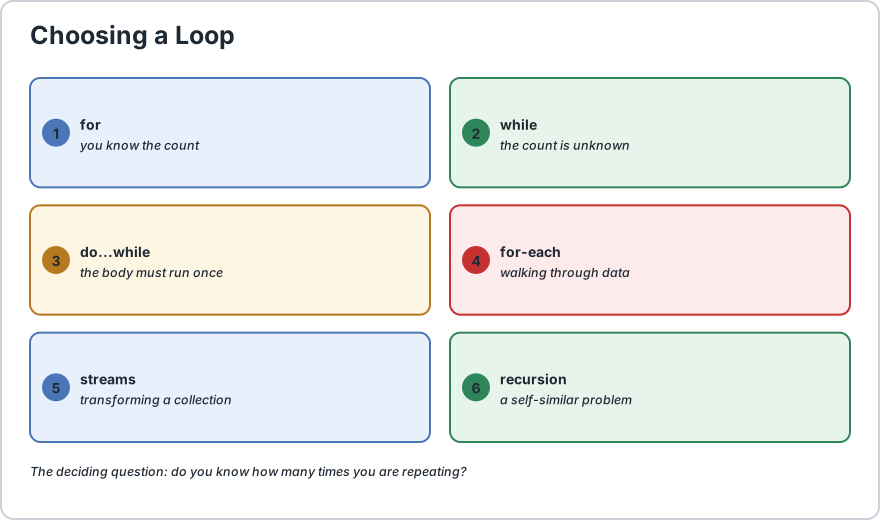
Java has four loop types, and choosing between them is mostly a matter of asking one question: do you know how many times you are going to repeat? If you know the count, use a for loop, because it keeps the counter, the limit and the step in one visible place. If you do not know the count and you are repeating until something changes, use a while loop. If the body must run at least once before the condition is even tested, such as showing a menu and waiting for input, use a do...while loop. And if you are walking through an array or a collection and do not need the index, use the enhanced for-each loop, which removes the chance of an off-by-one error entirely. Here is the single most important habit that separates working loops from broken ones. Every loop must have a termination guarantee, meaning something inside the body has to move the condition toward becoming false. If nothing changes the condition, you have written an infinite loop and the program will hang forever. A for loop is fairly safe here because the step is written in the header where you cannot forget it, but a while loop is only safe if you are careful, because the condition lives far away from the code that changes it. Two keywords give you more control once a loop is running. break leaves the loop immediately, and continue skips the rest of this iteration and jumps to the next one. Neither one is a substitute for a correct condition, though, and using them to escape a badly designed loop usually hides a design problem rather than solving it.
Detailed Explanation & Mechanics
1) The Four Loops at a Glance
Here is the whole picture on one page. Read the right-hand column as the question to ask yourself, because that is genuinely all the choice comes down to.
Loop
Use It When
Dedicated Page
for
You know the number of iterations, or you are counting.
final int LIMIT = 5;
for (int i = 1;
i <= LIMIT;
i++) {
    System.out.println("Round " + i);
}
Part
When It Runs
int i = 1
Exactly once, before anything else.
i <= LIMIT
Before every single iteration. If false, the loop ends.
i++
After every completed iteration, before testing again.
Because the step sits in the header, it is much harder to forget than in a while loop. That is the main practical reason to prefer a for loop whenever you are counting. Full detail is on our Java for loop page.
3) The while Loop, When the Count Is Unknown
A while loop asks one question before every iteration: is this still true? The condition and the code that changes it can be far apart, which is exactly why this loop is the one beginners most often turn into an infinite loop.
int countdown = 3;
boolean stillCounting = true;
while (stillCounting) {
    System.out.println(countdown);
    countdown = countdown - 1;
    stillCounting = countdown > 0;
    // forget this line and the loop never ends
}
The last line, which recalculates the flag, is the whole reason the loop terminates. Remove it and the condition stays true forever. This is the termination guarantee mentioned earlier, and in a while loop you have to actively maintain it. More detail is on our Java while loop page.
4) The do...while Loop, When the Body Must Run Once
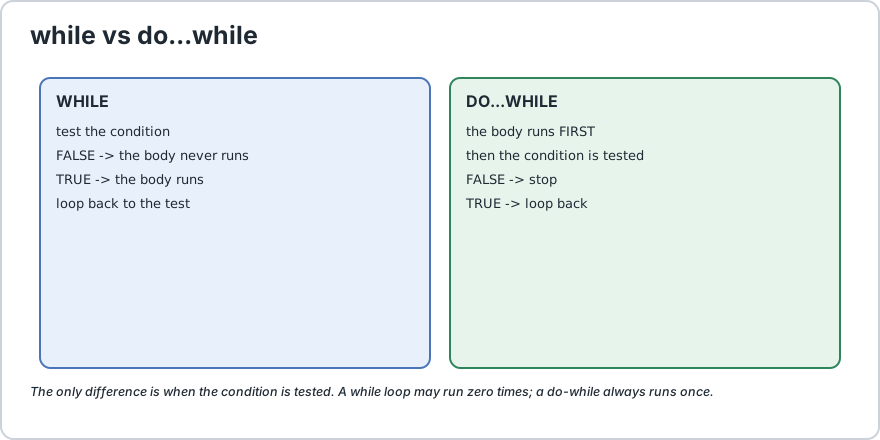
The difference with do...while is simple and important: the condition is tested after the body, so the body always runs at least once.
final int SECRET = 7;
int guess;
do {
    System.out.println("Guess a number");
    guess = readNumber();
} while (guess != SECRET);
This is the right shape for anything interactive, because a menu must appear before the user can answer it. Note the semicolon after the closing brace, which is a genuine exception to the usual rule and confuses almost everyone the first time. Full detail is on our Java do-while loop page.
while may run zero times. do-while always runs at least once.
5) The for-each Loop, and Why It Is the Safest
The enhanced for loop walks through an array or any collection without an index, and it is the hardest loop in Java to write incorrectly.
String[] cities = {
    "Dhaka", "London", "Tokyo"
};
for (String city : cities) {
    System.out.println(city);
}
Compare that with the manual version, where three things can go wrong: the starting index, the ending index, and the increment. The for-each form has no index at all, so none of those mistakes are possible. This is why the practical advice is to reach for it by default whenever you are traversing data and do not genuinely need the position.
Two limits are worth knowing. You cannot modify the size of the underlying collection while using for-each, because it would throw a ConcurrentModificationException, and you cannot skip ahead or count backwards without going back to a plain for loop. If you need the index, use the classic form. Full detail is on our enhanced for loop page.
6) The Rule That Separates Working Loops From Broken Ones
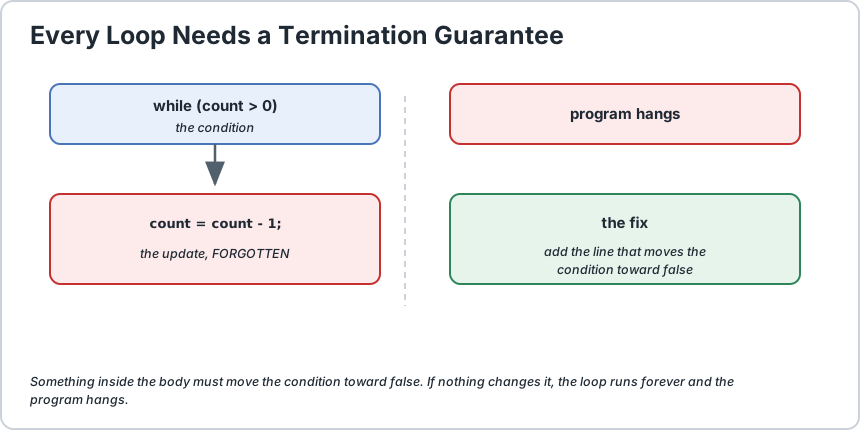
Every loop needs a termination guarantee. Something inside the body must move the condition toward false. If nothing changes it, the loop runs forever and the program hangs.
No line changes the condition, so the loop never ends. The program hangs.
Recognising an infinite loop quickly matters because it is one of the easiest beginner mistakes to make and one of the most alarming to watch. The usual cause is a while where the counter is never changed, or an = written where == was meant. If your program freezes, check the loop condition and its update line first.
There is one more trap specific to while loops that catches experienced developers too. If the condition is false before the loop even starts, the body never runs at all. If you genuinely need one pass regardless, that is exactly what do...while is for.
7) break and continue, and Labelled Loops
Two keywords adjust a running loop. break leaves immediately, and continue skips the rest of this iteration and moves to the next one.
final int SKIP_NUMBER = 3;
final int STOP_AT = 5;
for (int i = 1;
i <= 8;
i++) {
    if (i == SKIP_NUMBER) {
        continue;
        // skip this one, keep looping
    } if (i == STOP_AT) {
        break;
        // leave the loop entirely
    } System.out.println(i);
}
With those values the output is 1 2 4. Number 3 is skipped by continue, and the loop stops at 5 via break. Note the order of the two checks, which matters: test for the skip before the stop, or you will exit before you ever reach the value you wanted to skip.
break and continue only affect the innermost loop, which surprises people writing nested loops. To act on the outer one you add a label.
outer:for (int row = 1;
row <= 3;
row++) {
    for (int col = 1;
    col <= 3;
    col++) {
        if (row == col) {
            continue outer;
            // skip to the next row, not the next column
        } System.out.println(row + "," + col);
    }
}
8) Choosing the Right Loop, and When Not to Loop at All
Situation
Best Choice
Why
Iterating an array or collection
for-each
No index, so no off-by-one possible.
Counting to a known number
for
Counter and step live together in the header.
Waiting on user input
do-while
The prompt must appear at least once.
Repeating until a state changes
while
You cannot know the count in advance.
Transforming a collection
Streams
Streams avoid the loop entirely and read closer to the intent.
A self-similar problem
Recursion
Some problems, such as tree traversal, are naturally recursive.
That last two rows are the ones beginners usually miss. Once you are comfortable with loops, a for loop that builds a new list is often better written as a stream, which says what you want rather than how to do it. And a problem that breaks into the same smaller problem, such as walking a directory tree, is usually clearer with recursion.
A word of caution on nesting. Nested loops grow as the square of the work, so three levels of nesting on a thousand items is a billion operations. Before nesting a fourth level, look for a loop over a collection or a stream instead.
9) Common Loop Mistakes
Mistake
Symptom
Fix
Condition never changes
The program hangs forever.
Add the update that moves the condition toward false.
Writing = instead of ==
Condition is always true, so an infinite loop.
Use == for comparison, = only for assignment.
Off-by-one in the condition
One item too many or too few.
Prefer for-each, or test the exact bound you intend.
Forgetting the do-while semicolon
Compile error near the closing brace.
Add the semicolon after }, unlike other loops.
Modifying a collection while using for-each
ConcurrentModificationException at run time.
Iterate over a copy, or use an iterator.
break used to escape a messy loop
Correct, but the logic is hard to follow.
Restructure the condition instead of bolting on a break.
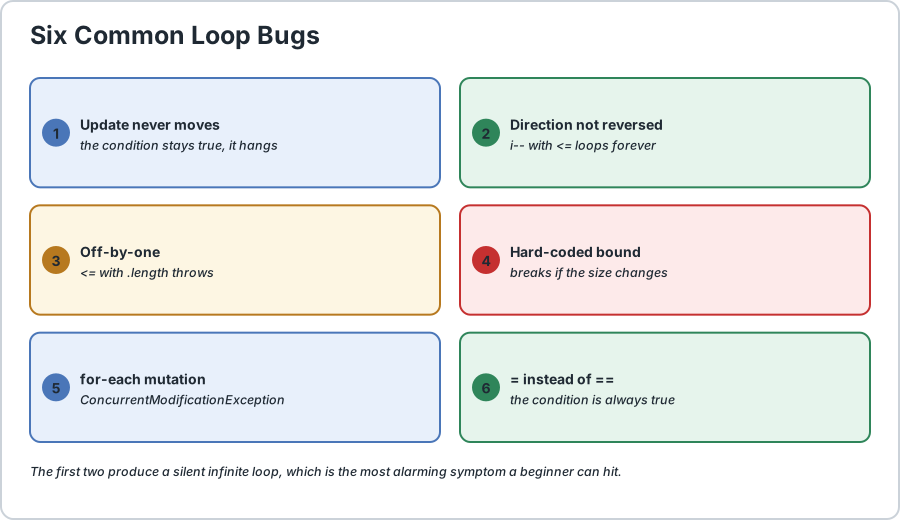
Six loop bugs that account for most beginner compile errors and hangs.
Frequently Asked Questions
How do I choose between a for loop and a while loop?
If you know how many times you are repeating, use a for loop, because the counter and the step sit together in the header and you cannot forget the update. If the count is unknown and you are repeating until something changes, use a while loop.
What is the difference between while and do-while?
Only when the condition is tested. A while tests first, so its body may run zero times. A do...while tests last, so the body always runs at least once. That single difference decides which one you want for a menu prompt or any other must-happen-once step.
When should I use the for-each loop?
Whenever you are traversing an array or a collection and do not need the index. It has no counter to get wrong, so it removes the most common loop bug entirely. Go back to a classic for loop only when you need the position or must skip elements.
How do I stop an infinite loop?
Interrupt the program from the terminal, usually with Ctrl + C. Then find the loop whose condition never changes, and add the update that makes it progress. The cause is nearly always a missing counter increment or an = written where == was intended.
Does break exit all nested loops at once?
No. It only exits the innermost loop containing it. To act on the outer loop you add a label before it and write break labelName;.
Should I use break and continue or fix the condition?
Prefer fixing the condition. break and continue are fine for genuinely exceptional cases, but using them to escape a poorly designed loop usually hides the real problem and makes the code harder to follow later.
Is there a difference between iterating an array and a List?
The for-each syntax is identical for both, which is one of its main benefits. The difference is what you can do while iterating: a List can be modified through an iterator, whereas changing the size of a collection during a for-each throws ConcurrentModificationException.
When should I avoid loops entirely?
When you are transforming a collection, use a stream, which expresses the intent without the bookkeeping. And when a problem is naturally self-similar, such as walking a directory tree, recursion is usually clearer than a loop with a stack. Loops are still the right tool for plain counting and traversal.
// Demonstrates all four Java loop types plus break and continue.
public class LoopingOverview {
    // A tiny stand-in for user input, so this class has no imports
    // and can be pasted straight into any online compiler.
    static int readNumber() {
        // Pretend the user typed 7
        return 7;
    } public static void main(String[] args) {
        final int LIMIT = 3;
        final int SECRET = 7;
        final int SKIP_NUMBER = 3;
        final int STOP_AT = 5;
        final int ROWS = 3;
        // 1) FOR LOOP: best when you know the count.
        //    init runs once, condition before each round, step after each.
        System.out.print("for: ");
        for (int i = 1;
        i <= LIMIT;
        i++) {
            System.out.print(i + " ");
        } System.out.println();
        // 2) WHILE LOOP: best when the count is unknown.
        //    The line that decrements is the termination guarantee.
        System.out.print("while: ");
        int countdown = LIMIT;
        while (countdown > 0) {
            System.out.print(countdown + " ");
            countdown = countdown - 1;
        } System.out.println();
        // 3) DO-WHILE: the body ALWAYS runs once before the test,
        //    and note the semicolon after the closing brace.
        System.out.print("do-while guesses: ");
        int guess;
        int attempts = 0;
        do {
            System.out.print("guess -> ");
            guess = readNumber();
            attempts++;
        } while (guess != SECRET);
        System.out.println("correct in " + attempts + " attempt(s)");
        // 4) FOR-EACH: no index, so no off-by-one possible.
        String[] cities = {
            "Dhaka", "London", "Tokyo"
        };
        System.out.print("for-each: ");
        for (String city : cities) {
            System.out.print(city + " ");
        } System.out.println();
        // 5) break LEAVES the loop, continue SKIPS this iteration.
        //    Output is 1 2 4 : three is skipped, five stops it.
        System.out.print("break and continue: ");
        for (int i = 1;
        i <= 8;
        i++) {
            if (i == SKIP_NUMBER) {
                continue;
            } if (i == STOP_AT) {
                break;
            } System.out.print(i + " ");
        } System.out.println();
        // 6) LABELLED continue acts on the OUTER loop.
        System.out.println("outer loop skipped on the diagonal:");
        outer: for (int row = 1;
        row <= ROWS;
        row++) {
            for (int col = 1;
            col <= ROWS;
            col++) {
                if (row == col) {
                    continue outer;
                } System.out.print(row + "," + col + " ");
            }
        } System.out.println();
        // 7) A while loop with NO update is an infinite loop.
        //    Uncomment the next three lines only to see the program hang.
        // int stuck = 5;
        // while (stuck > 0) {
        //     System.out.println("this never ends");
        //     // forgot to decrease stuck
        // }
    }
}/*
    ACTUAL OUTPUT:

        for: 1 2 3
        while: 3 2 1
        do-while guesses: guess -> correct in 1 attempt(s)
        for-each: Dhaka London Tokyo
        break and continue: 1 2 4
        outer loop skipped on the diagonal:
        1,2 1,3 2,1 2,3 3,1 3,2

    CHOOSING A LOOP IN ONE LINE
        known count              -> for
        unknown count            -> while
        body must run at least once -> do-while
        walking through data     -> for-each
        transforming a collection -> streams
        self-similar problem     -> recursion

    THE ONE RULE
        Every loop needs a termination guarantee. Something inside the
        body must move the condition toward false, or the loop runs
        forever and the program hangs.
*/
Common Java Technical Interview Questions & Answers
Interview Prep
Q1
What loop types does Java provide and when is each used?
Java has four. A for loop when the iteration count is known, a while loop when the count is unknown and you repeat until a condition changes, a do-while loop when the body must execute at least once before the condition is tested, and a for-each loop when traversing an array or collection without needing the index.
Q2
What is the difference between a while loop and a do-while loop?
Only when the condition is tested. A while tests before the body so it may run zero times, while a do-while tests after the body so it always runs at least once. Both require a semicolon after the closing brace of the do-while form.
Q3
What is a termination guarantee?
The requirement that something inside the loop body moves the condition toward false. Without it the condition stays true and the loop runs forever. A for loop makes this easier because the step is written in the header where it cannot be forgotten.
Q4
Why is the for-each loop considered safer than a classic for loop?
It has no index variable at all, so the three common mistakes of a wrong starting index, a wrong ending bound and a wrong increment are impossible. The trade-off is that you cannot access the index or modify the collection size while iterating.
Q5
What exception is thrown when you modify a collection during a for-each loop?
ConcurrentModificationException, thrown at run time rather than compile time, because the loop would otherwise be iterating over a structure that is changing underneath it. Use an iterator or iterate over a copy instead.
Q6
Does break exit all nested loops?
No, it only exits the innermost loop. To exit an outer loop you add a label before it and write break labelName.
Q7
How do I stop a program stuck in an infinite loop?
Interrupt it from the terminal with Ctrl and C together, then locate the loop whose condition never changes. The usual causes are a missing counter update or a single equals sign written where a double equals was intended.
Q8
When is a do-while loop preferable to a while loop?
When the body must run at least once regardless of the initial condition, such as displaying a menu and reading a response, or performing a setup or validation step that has to happen before you can sensibly test whether to continue.
Q9
Should break and continue be used to escape a complicated loop?
Prefer restructuring the condition. They are appropriate for genuinely exceptional cases, but using them to escape a poorly designed loop hides the underlying problem and makes the code harder to maintain.
Q10
When is it better to avoid a loop entirely?
When transforming a collection, where a stream expresses the intent without bookkeeping, and when a problem is naturally self-similar, such as traversing a directory tree, where recursion is clearer than a loop with an explicit stack.
Key Takeaways, Best Practices & Clean Code Rules
Java Best Practice & Production Rules
1) Use the for-each loop by default when traversing an array or a collection, and drop back to a classic for loop only when you genuinely need the index or need to skip elements.
2) Choose a for loop whenever you know the iteration count, since keeping the counter, the bound and the step together in the header makes a missing update almost impossible.
3) Guarantee termination in every loop by making sure some line inside the body moves the condition toward false, and treat a hang as the first symptom of a missing update.
4) Avoid deep nesting, because nested loops multiply the work, so three nested loops over a thousand items is a billion operations, and look for a collection loop or a stream instead.
5) Test loop conditions on the exact bound you intend, since the off-by-one error of using less than instead of less than or equal is the single most common loop mistake.
6) Use continue to skip a value and break to leave entirely, and always place the continue check before the break check so you do not exit before reaching the value you meant to skip.
7) Remember that break and continue only affect the innermost loop, and reach for a label only when the outer loop really is what you mean to act on, because labels are easy to misuse.
8) Prefer fixing a loop condition over sprinkling break statements through it, since breaks that exist to escape awkward logic usually conceal a design problem.
9) Avoid modifying a collection while iterating it with for-each, and iterate over a copy or use an iterator when the structure genuinely has to change.
10) Move to a stream for simple collection transformations once you are comfortable with loops, since it states the intent directly, and keep loops for plain counting and traversal.
Share with friends, students, or your developer network
We value your privacy & transparency
OperateTools uses cookies and local storage to ensure basic tool functionality, preserve preferences, and analyze aggregated traffic. We never sell your personal data or index your document files. Learn more in our Privacy Policy.
Stay Updated
Enable Notifications?
Get real-time updates, instant tool alerts & daily news directly on your device.