Learning Java is not about memorising fifty keywords. It is about understanding about ten ideas that everything else in the language builds on. This page is your map of those ideas.
Here is the whole picture in one breath. All of your code lives inside a class. Every variable has a type, and Java has eight primitive types plus reference types such as String, arrays and your own classes. Control flow uses if, switch, while, do-while and for. Methods package behaviour and are the only way to reuse logic. An object combines state, which is data held in fields, with behaviour, which is the methods that work on that data. Inheritance, interfaces and composition are how you organise your types so they stay maintainable. Arrays hold a fixed number of values, while the Collections Framework handles the general case. A String cannot be changed after you create it, which surprises almost every beginner. Exceptions are how Java deals with failure. And the garbage collector reclaims memory for you, so there is no free and no delete.
Two ideas cause more confusion than everything else combined, so read these twice. First, Java is statically typed. Every variable has a declared type, and conversions between types are always explicit, never accidental. Second, Java always passes copies, even when you pass an object. That one fact explains an entire category of "wait, why did my list just change?" bugs, and we will prove it with code below.
Detailed Explanation & Mechanics
1) All Code Lives Inside a Class
Java has no loose functions floating around at the top level. Every piece of code you write sits inside a class, and a class is not just a container, it is a type that you can later create objects from. This is the single biggest structural difference from languages like C, and it is worth accepting early rather than treating it as an annoying file format rule.
Once you accept it, everything gets easier. When you later learn objects, arrays, and inheritance, they all fall out of this one idea: the class is the type, and everything you do is either declaring a type or using one.
A variable is a labelled box that holds a value. You choose the name, you choose the type, and the value inside can change later unless you stop that with final.
int age = 25;
// declare and set in one line
String name;
// declare only
name = "Alex";
// set the value later
final int MAX = 100;
// this value can never change
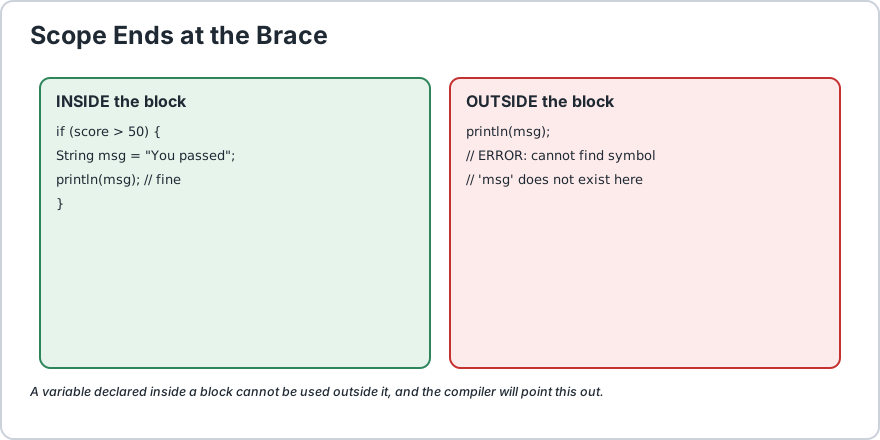
Two things surprise beginners here. First, a variable declared inside a block disappears at the closing brace, which is called scope. Second, Java refuses to let you read a local variable before it has a value, so this is a compile error rather than a surprise at run time.
A variable declared inside braces lives and dies inside those braces.
3) The Eight Primitive Data Types
Java has exactly eight primitive types. They are the basic building blocks, and they are not objects, which is why you cannot call a method directly on an int.
Type
Size
What It Holds
Example
byte
1 byte
Small whole numbers
byte b = 100;
short
2 bytes
Slightly larger whole numbers
short s = 30000;
int
4 bytes
Normal whole numbers
int i = 25;
long
8 bytes
Very large whole numbers
long l = 9000000000L;
float
4 bytes
Approximate decimal
float f = 3.14f;
double
8 bytes
Decimal, the default choice
double d = 87.6;
char
2 bytes
A single character
char c = 'J';
boolean
1 byte
Only true or false
boolean ok = true;
The most common beginner mistakes with these are using a lowercase l instead of an uppercase L on a long number, and forgetting the f on a float. Note also that a boolean cannot hold a number in Java. There is no true == 1, which is a nice bit of protection.
Going from a small type to a big one happens automatically. Going from big to small needs a cast, which is an explicit instruction that says "I know what I am doing".
int small = 25;
long big = small;
// fine, automatic: int fits inside long
double average = 87.6;
int broken = average;
// compile error! you need a cast
int cut =(int) average;
// fine now, and it gives 87
Read that output carefully. (int) 87.6 is 87, not 88. A cast truncates, it does not round. This one silently gives wrong results in school projects and payroll calculations, so make a point of remembering it.
There is also a subtler version of the same trap. If you add two byte values, Java promotes both to int before adding, so the result is an int and not a byte. We cover this in detail on the Java type casting page.
The classic beginner trap: casting a decimal to an int truncates rather than rounds, so (int) 3.99 becomes 3, not 4.
5) Control Flow Is How Your Program Makes Decisions
Control flow is the set of tools that decide which lines run, and how many times.
Tool
Use It When
if / else if / else
You need to choose between two or three paths.
switch
You are matching one value against a list of exact options.
while
You do not know the count in advance.
do-while
You must run the body at least once.
for
You know exactly how many times to repeat.
for-each
You want to walk through a whole list or array, and you do not need the index.
break / continue
You need to jump out of a loop early or skip to the next round.
One rule that catches people: a loop needs a termination guarantee. If nothing inside the loop changes the condition, you have written an infinite loop and your program will hang. Java has no goto, which is a relief, so you break out of a loop using break or skip an iteration using continue.
A method is a named block of code that takes inputs and gives back an output. Writing methods is how you stop copy-pasting the same five lines for the tenth time.
static int add(int a, int b) {
    return a + b;
}static void greet(String name) {
    System.out.println("Hello, " + name);
}
int before the name is the return type. If nothing comes back, use void.
a and b are parameters. The actual values you pass in are arguments.
static means you can call it without creating an object first.
You can also define several methods with the same name as long as the parameters differ. This is called overloading, and it is very handy for keeping your code readable.
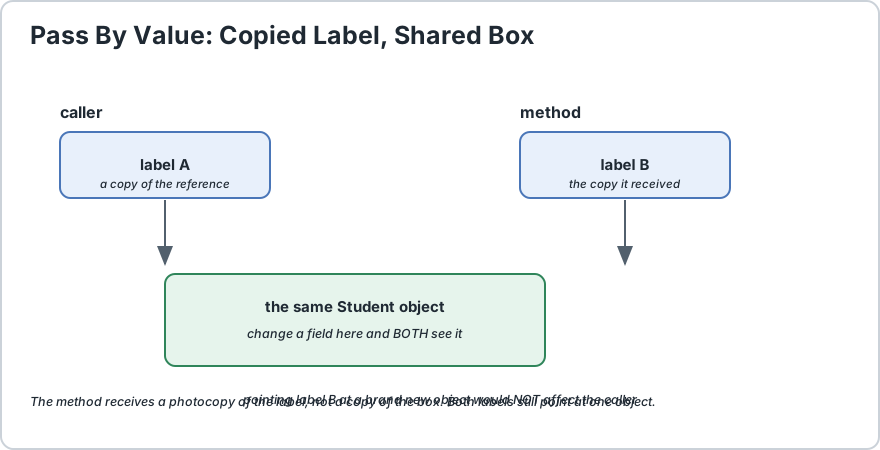
Java always copies. With an object, the copy is a pointer to the same object.
7) Objects Combine State and Behaviour
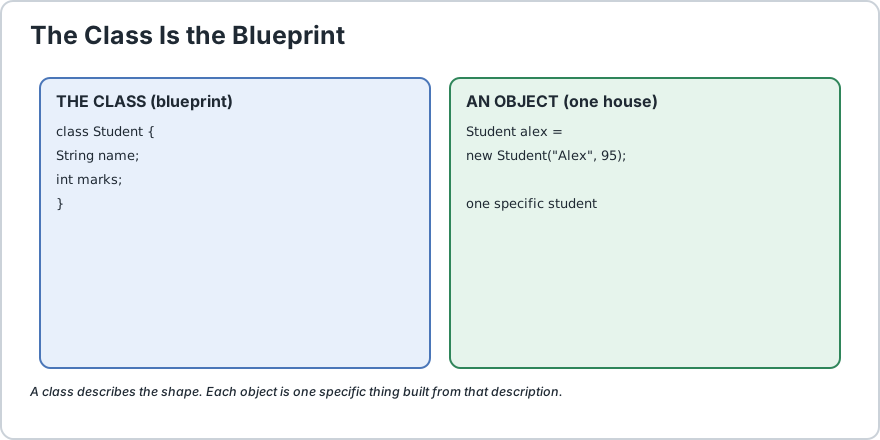
An object is one specific thing made from a class. The class describes the shape, and the object is a particular example of it, so think blueprint versus house.
A class holds fields for state, meaning the data it remembers, and methods for behaviour, meaning what it can do. A constructor sets up a brand new object.
public class Student {
    private String name;
    // field: the state
    private int marks;
    // field: the state
    public Student(String name, int marks) {
        // constructor
        this.name = name;
        this.marks = marks;
    } public boolean hasPassed() {
        // method: the behaviour
        return marks >= 40;
    }
}
Notice that the fields are private. That is the correct default in real Java. You expose the data through methods such as getName() rather than letting anyone reach in and change things directly, because then you are free to change how the data is stored later without breaking everyone who used your class.
The class is the blueprint, the object is one house built from it.
8) Inheritance Interfaces and Composition
Once you have many classes, you need ways to relate them so you do not repeat yourself.
Inheritance means a class is a kind of another class. A Dog is a kind of Animal. A Java class can extend only one superclass, so overusing it gets messy fast.
Interfaces describe a capability or a promise rather than a parent-child bond. A class can implement as many interfaces as it likes.
Composition means holding a reference to another object inside yours. This is safer and far more flexible, and honestly you should reach for it by default.
Beginner rule of thumb: if you cannot finish the sentence "a Dog is a Animal" with a straight face, do not use inheritance. Use composition instead.
int[] marks = {
    90, 88, 76
};
System.out.println(marks[0]);
// the first value, counting starts at 0
System.out.println(marks[3]);
// throws ArrayIndexOutOfBoundsException
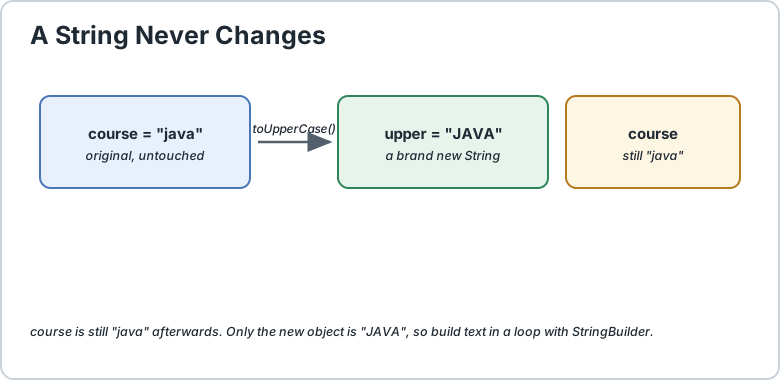
Strings are the thing beginners are most surprised by. A String is immutable, meaning it cannot be changed after you create it. Every "change" gives you a brand new String instead.
String course = "java";
String upper = course.toUpperCase();
System.out.println(course);
// still "java"
System.out.println(upper);
// the new one is "JAVA"
Because every change allocates a new object, use StringBuilder when you are building a lot of text in a loop.
For real application code you will use the Collections Framework from java.util almost every time: List for an ordered growable collection, Set for unique values, and Map for key-value lookups. Learn these three and you can handle almost any data task.
A String never changes. Every operation returns a new one.
10) Exceptions Are How Java Handles Failure
Something will eventually go wrong: a file will not open, an index will be out of range, a user will type letters into a number field. An exception is an object that represents such a failure, and it travels up the call stack until some code catches it.
try {
    int[] marks = {
        90, 88
    };
    System.out.println(marks[5]);
    // boom: index out of bounds
} catch (ArrayIndexOutOfBoundsException e) {
    System.out.println("That position does not exist");
} finally {
    System.out.println("This always runs, error or not");
}
There are two families and the difference matters. Unchecked exceptions, such as NullPointerException and the one above, extend RuntimeException. They signal a genuine bug in your logic, and Java does not force you to declare them. Checked exceptions, such as IOException, are a contract: the compiler forces you to handle them or declare them, which is useful for problems you can genuinely recover from.
Rule of thumb: if the failure is a mistake in your code, let it crash during testing rather than hiding it behind a try-catch. If it is an expected external problem, handle it gracefully.
Java reclaims memory automatically. When an object is no longer used anywhere, the garbage collector removes it. That is why you will never write free() or delete the way you would in C, and it removes an entire category of memory bugs.
One important caveat: the collector reclaims memory, not external resources. File handles, network sockets, and database connections are outside the Java heap and must still be closed by you. That is what the try-with-resources syntax is for.
try(BufferedReader reader = Files.newBufferedReader(Path.of("data.txt"))) {
    System.out.println(reader.readLine());
} // closed automatically, even if the line above throws
12) Pass By Value and the Mental Model That Matters
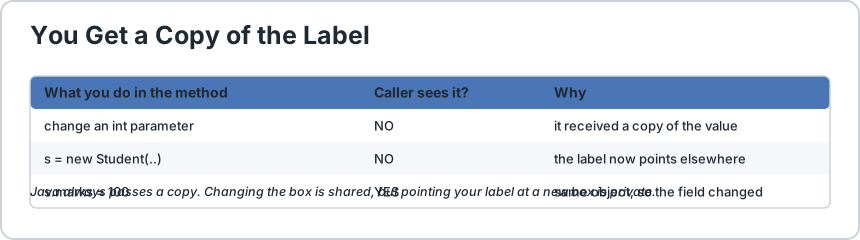
If you read only one section of this page, make it this one. Java always passes a copy. Always. There is no pass-by-reference in Java, and believing otherwise is the root of a huge number of beginner bugs.
static void addBonus(int score) {
    score = score + 10;
    // changes the local copy only
}static void rename(Student s) {
    int zero = 0;
    s = new Student("Changed", zero);
    // points the local copy at a new object
}
In the first method, score is a copy, so adding 10 changes nothing for the caller. In the second method, the copy is a reference, so reassigning s only points the local copy at a brand new object and the caller never learns about it.
Here is the part that confuses everyone, so read it twice. If instead you change a field through that reference, the caller does see it, because both references point at the same object.
static void raiseTopUp(Student s) {
    s.marks = 100;
    // modifies the shared object
}int startingScore = 50;
Student alex = new Student("Alex", startingScore);
raiseTopUp(alex);
System.out.println(alex.marks);
// 100, the change is visible
So the mental model is: you get a photocopy of the label, not the box. Changes to the box are shared, but pointing your label at a different box is private. This single idea explains "why did my list change?", "why did my array change?", and "why did my int not change?" all at once.
You get a copy of the label, not a copy of the box. So changing the box is shared.
What To Learn Next
You now have the vocabulary of Java. Take these in order, and each one links straight to its dedicated page in this tutorial:
Write a small program that uses each idea at least once: a class with two fields, a method that returns a value, an if that makes a decision, a loop, a List, and one try-catch. Twenty lines is plenty. Once you can write that without looking anything up, you are genuinely ready to move on.
import java.util.ArrayList;
import java.util.List;
// A class is a TYPE. Everything below lives inside one.
public class JavaBasics {
    // FIELDS hold the state. Keep them private in real code.
    private final String name;
    // final means it can never change
    private int score;
    // CONSTRUCTOR sets up a new object.
    public JavaBasics(String name, int score) {
        this.name = name;
        this.score = score;
    } // METHODS hold the behaviour.
    public int addPoints(int bonus) {
        this.score += bonus;
        // same as: this.score = this.score + bonus
        return this.score;
    } // OVERLOADING: same name, different parameters.
    public int addPoints(int bonus, boolean doubleBonus) {
        int total = addPoints(bonus);
        return doubleBonus ? total * 2 : total;
    } public String getName() {
        return name;
        // expose data through a method, not a public field
    } public static void main(String[] args) {
        // 1) OBJECTS
        JavaBasics alex = new JavaBasics("Alex", 95);
        System.out.println("Player : " + alex.getName() + " score " + alex.score);
        System.out.println("Bonus  : " + alex.addPoints(10));
        System.out.println("Doubled: " + alex.addPoints(10, true));
        // 2) NARROWING truncates, it does NOT round
        double average = 87.6;
        System.out.println("(int) 87.6 = " +((int) average) + "   // not 88!");
        // 3) PROMOTION: byte + byte gives an int
        byte small = 100;
        int promoted = small + small;
        System.out.println("100 + 100 = " + promoted + " and its type is int");
        // 4) CONTROL FLOW: switch expression (Java 14+)
        int examScore = 95;
        String grade = switch (examScore) {
            case 100, 99 -> "A+";
            case 95 -> "A";
            default -> "Needs work";
        };
        System.out.println("Grade: " + grade);
        // 5) COLLECTIONS: prefer List over an array when size is unknown
        List<String> names = new ArrayList<>();
        names.add("Alex");
        names.add("Jordan");
        for (String n : names) {
            // for-each
            System.out.println("Top player: " + n);
        } // 6) STRING immutability
        String course = "java";
        String upper = course.toUpperCase();
        System.out.println("Original is still: " + course + " / new one is: " + upper);
        // 7) PASS BY VALUE: an int copy is completely independent
        int number = 10;
        tryChange(number);
        System.out.println("int after method = " + number + "   // unchanged, it was a copy");
        // 8) PASS BY VALUE: an object copy is a copy of the reference,
        //    so changing a FIELD inside the object is visible to the caller
        int[] shared = {
            1, 2, 3
        };
        tryMutate(shared);
        System.out.println("array after method = " + shared[0] + "   // changed, same object");
        // 9) EXCEPTIONS
        try {
            int[] marks = {
                90, 88
            };
            System.out.println(marks[5]);
            // throws ArrayIndexOutOfBoundsException
        } catch (ArrayIndexOutOfBoundsException e) {
            System.out.println("Caught: that position does not exist");
        } finally {
            System.out.println("finally always runs");
        }
    } // A copy of the int was passed, so the original never changes.
    static void tryChange(int n) {
        n = n + 100;
    } // A copy of the REFERENCE was passed, so both still point at one array.
    static void tryMutate(int[] data) {
        data[0] = 99;
    }
}/*
    ACTUAL OUTPUT:
        Player : Alex score 95
        Bonus  : 105
        Doubled: 230
        (int) 87.6 = 87   // not 88!
        100 + 100 = 200 and its type is int
        Grade: A
        Top player: Alex
        Top player: Jordan
        Original is still: java / new one is: JAVA
        int after method = 10   // unchanged, it was a copy
        array after method = 99   // changed, same object
        Caught: that position does not exist
        finally always runs

    THE ONE IDEA TO REMEMBER:
        Java always passes a COPY. With an int, the copy is the value,
        so changes are private. With an object, the copy is a pointer,
        so changing the object is shared, but pointing at a new object is private.
*/
Common Java Technical Interview Questions & Answers
Interview Prep
Q1
What are the core concepts a Java beginner must know?
Classes as the container for all code, variables and the eight primitive types, control flow, methods, objects combining state with behaviour, inheritance and interfaces, arrays and the Collections Framework, String immutability, exceptions, and the pass-by-value model.
Q2
Why must a public class live in a file named after it?
So the compiler and classloader can locate a class by name without searching every source file, and so the public API of a package is never ambiguous.
Q3
Does Java pass objects by reference?
No. Java is always pass-by-value. When you pass an object, the reference is copied. The method can reassign its own variable without affecting the caller, but any change made through that reference hits the same object and is visible to both.
Q4
What is the difference between == and .equals() for strings?
== compares references, so two separate strings with identical text can still be unequal. equals() compares the actual characters. For text comparison always use equals(), and use compareTo() for ordering.
Q5
Why is String immutable, and what does that give me?
It makes a String safe to share between threads without copying, allows it to be used as a Map or Set key, and lets the JVM cache literals. The cost is that every modification allocates a new object, so use StringBuilder when building text in a loop.
Q6
What is the difference between a checked and an unchecked exception?
Unchecked exceptions extend RuntimeException, signal a bug in your logic, and need no declaration. Checked exceptions are a compile-time contract the caller must handle or re-declare, used for recoverable external failures such as file access.
Q7
Why does byte plus byte give an int?
All byte, short and char values are promoted to int in arithmetic, because widening to int guarantees the operands cannot overflow during the calculation.
Q8
Should I prefer inheritance or composition?
Composition. Inheritance ties a subclass to the parent implementation and Java allows only one superclass, so it is far less flexible. Use inheritance only for a genuine is-a substitutability.
Q9
What does the garbage collector not do for me?
It does not release external resources such as file handles, sockets and database connections, which is why try-with-resources exists. It also does not stop a collection from holding far more memory than you expect.
Q10
Why does casting 87.6 to an int give 87 and not 88?
A cast truncates toward zero rather than rounding. If you need rounding, call Math.round and cast the result, which gives 88.
Key Takeaways, Best Practices & Clean Code Rules
Java Best Practice & Production Rules
1) Declare every variable with the narrowest type that actually works, and use final or immutable types where a value should never change, so an accidental reassignment becomes a compile error instead of a subtle bug.
2) Keep fields private and expose them through methods, so you can change the internal representation later without breaking any caller.
3) Remember that Java is pass-by-value in every case. If a method must change what the caller sees, return a new value instead of expecting the parameter to change.
4) Prefer composition over inheritance unless the subclass is genuinely substitutable for the parent, because only one superclass is ever allowed.
5) Use the Collections Framework rather than arrays once the size is not known in advance, and declare the variable with the interface type, List and not ArrayList.
6) Use == only for primitives. For objects compare with equals(), and always override hashCode whenever you override equals.
7) Use try-with-resources for anything holding a file, socket or database connection, because the garbage collector will not release those for you.
8) Do not wrap risky code in a broad try-catch, since a catch that hides NullPointerException will hide a real bug. Let logic mistakes fail loudly during testing.
9) Never assume a cast rounds. It truncates, so round explicitly with Math.round when that is what you meant.
10) Name things after what they mean, using UpperCamelCase for classes, lowerCamelCase for variables and methods, and UPPER_SNAKE_CASE for constants, and keep each class small enough that you can describe its job in one sentence.
Share with friends, students, or your developer network
We value your privacy & transparency
OperateTools uses cookies and local storage to ensure basic tool functionality, preserve preferences, and analyze aggregated traffic. We never sell your personal data or index your document files. Learn more in our Privacy Policy.
Stay Updated
Enable Notifications?
Get real-time updates, instant tool alerts & daily news directly on your device.