Topic 5 of 59 JavaScript Core Fundamentals Interactive Tutorial

Understanding JavaScript Data Types: Primitive and Reference Values

23 mins read Last updated: 22 Aug 2026 14453 views
Quick Summary & Key Takeaway Target Skill Level: Beginner to Advanced ES6+

Bottom-Line Answer: JavaScript (JS) is a high-level, single-threaded, just-in-time (JIT) compiled programming language with first-class functions that conforms to the ECMAScript specification. It powers dynamic client-side web interactivity alongside HTML and CSS, and executes backend server runtimes via Node.js, Deno, and Bun.

Target Audience: Frontend developers, full-stack engineers, students & QA testers.
Prerequisites: Basic HTML semantics & fundamental CSS styling rules.
Primary Use Cases: Dynamic web UI, DOM manipulation, asynchronous REST APIs, Node.js backend services.

What is Understanding JavaScript Data Types? Core Concept & Direct Summary

Core Objective & Problem Statement

What are primitive vs reference data types in JavaScript?

Direct Answer Summary

The answer isdata types— and understanding them is what separates beginners whocopy codefrom beginners whounderstand code. Data types explain why"5" + 5gives you"55"instead of10🤯, why comparing two empty arrays returnsfalse, and why changing one variable sometimes mysteriously changes another.

By the end of this lesson, all three mysteries will make complete sense. Let's dive in.

How Does Understanding JavaScript Data Types Work? In-Depth Mechanics & Architecture

What Is a Data Type?

Adata typetells JavaScript whatkindof value it's dealing with — and therefore what it's allowed to do with it.

Real-world analogy: think of a kitchen. 🍳

  • You canchopa vegetable, but not a glass of water
  • You canpourwater, but not a potato

Same stuff (food), different types, different allowed actions. JavaScript works the same way:

script.js
Run Online
"hello".toUpperCase();
// ✅ "HELLO" — strings can be uppercased
(42).toUpperCase();
// ❌ Error — numbers can't

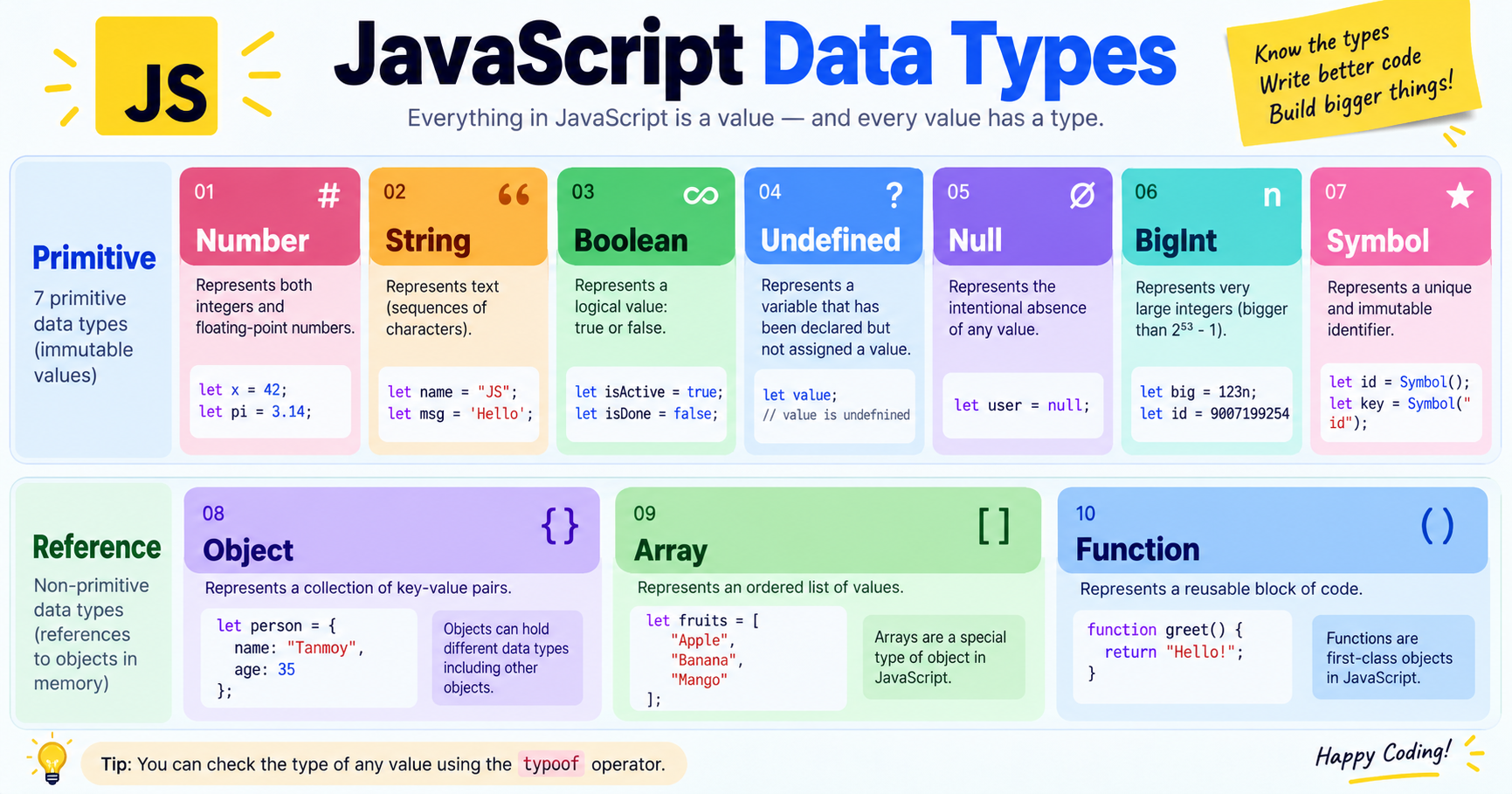
JavaScript has8 fundamental data types, split into two families:

FamilyMembers
🧱Primitive(simple, single values)String, Number, Boolean, Undefined, Null, Symbol, BigInt
📦Reference(collections of values)Object (includes Arrays, Functions, Dates…)

Don't worry about memorizing — we'll meet each one properly right now.
Tutorial illustration

The 7 Primitive Data Types

1️⃣ String — Text

Astringis any piece of text wrapped in quotes:

script.js
Run Online
let name = "Priya";
// double quoteslet city = 'Mumbai';          // single quoteslet greeting = `Hello!`;      // backticks (template literals)

All three quote styles work — butbackticks have a superpower: they let you embed variables with${ }:

script.js
Run Online
let user = "Amit";
let score = 95;
console.log("Well done, " + user + "! Score: " + score);
// old wayconsole.log(`Well done, ${user}! Score: ${score}`);         // modern way ✨// Output: Well done, Amit! Score: 95

Useful string tricks you'll use daily:

script.js
Run Online
let word = "JavaScript";
console.log(word.length);
// 10 — how many characters?console.log(word.toUpperCase()); // "JAVASCRIPT"console.log(word.toLowerCase()); // "javascript"console.log(word[0]);            // "J" — first character (counting starts at 0!)

2️⃣ Number — All Numbers, One Type

Unlike many languages, JavaScript hasone number typefor everything:

script.js
Run Online
let age = 25;
// integerlet price = 99.99;     // decimallet temperature = -5;  // negative

Math works exactly as you'd expect:

script.js
Run Online
console.log(10 + 5);
// 15console.log(10 - 5);    // 5console.log(10 * 5);    // 50console.log(10 / 5);    // 2console.log(10 % 3);    // 1  → "remainder" operator (10 ÷ 3 leaves 1)

Two special number values to recognize:

script.js
Run Online
console.log(1 / 0);
// Infinity ♾️console.log("hello" * 2);  // NaN — "Not a Number" (a failed math attempt)

⚠️ Famous quirk:0.1 + 0.2equals0.30000000000000004, not0.3! This isn't a JavaScript bug — it's how all computers handle decimal math in binary. Round money calculations before displaying them.

3️⃣ Boolean — True or False

Abooleanhas only two possible values — it's JavaScript's yes/no answer:

script.js
Run Online
let isLoggedIn = true;
let hasSubscription = false;

Booleans usually come fromcomparisons, and they power every decision your code will ever make:

script.js
Run Online
console.log(10 > 5);
// true
console.log(10 < 5);
// false
console.log(10 === 10);
// true (=== means "is exactly equal")

4️⃣ Undefined — "The Box Exists But It's Empty"

script.js
Run Online
let futureValue;
console.log(futureValue);
// undefined

undefinedmeans:a variable was declared, but nothing was ever put inside.JavaScript assigns this automatically — you rarely type it yourself.

5️⃣ Null — "Deliberately Empty"

script.js
Run Online
let selectedProduct = null;
// nothing selected YET — on purpose

nullmeans:a developer intentionally set this to "no value."

null vs undefined — The Classic Interview Question

undefinednull
Meaning"Not assigned yet""Intentionally empty"
Who sets itJavaScript (automatic)You (the developer)
Analogy📦 Box was never filled📦 Box was deliberately emptied

6️⃣ Symbol — Unique Identifiers (Brief Intro)

Symbols create values that areguaranteed unique, mainly used as object keys in advanced code:

script.js
Run Online
const id1 = Symbol("id");
const id2 = Symbol("id");
console.log(id1 === id2);
// false — even with the same description!

Beginner verdict:know that they exist; you won't need them for months.

7️⃣ BigInt — Huge Numbers (Brief Intro)

Regular numbers lose precision beyond about 15–16 digits.BigInthandles integers ofanysize — add ann:

script.js
Run Online
const bigNumber = 9007199254740991123456789n;

Used in finance/cryptography apps. Also a "know it exists" type for now.

Reference Types: Objects, Arrays & Functions

Primitives holdone simple value. Reference types holdcollections— and they behave differently in memory (we'll see why in a moment).

📦 Objects — Labeled Collections

Anobjectgroups related data as key-value pairs:

script.js
Run Online
const student = {
  name: "Riya", // key: "name", value: "Riya"  age: 22,  isEnrolled: true};
  console.log(student.name);
  // "Riya" — dot notationconsole.log(student["age"]);      // 22 — bracket notationstudent.age = 23;                 // updating a value

Think of an object as aform: labeled fields, each holding a value.

📋 Arrays — Ordered Lists

Anarraystores multiple values in order, accessed by position (index):

script.js
Run Online
const skills =["HTML", "CSS", "JavaScript"];
console.log(skills[0]);
// "HTML" — first item (index starts at 0!)console.log(skills.length);  // 3 — how many items?skills.push("React");        // adds to the endconsole.log(skills);         // ["HTML", "CSS", "JavaScript", "React"]

⚙️ Functions — Callable Code

Surprise: functions are also a reference type! That's why you can store them in variables:

script.js
Run Online
const greet = function() {
  return "Hello! 👋";
};
console.log(greet());
// "Hello! 👋"

The Detective Tool: typeof 🔍

How do you check a value's type? With thetypeofoperator:

script.js
Run Online
console.log(typeof "Hello");
// "string"
console.log(typeof 42);
// "number"
console.log(typeof true);
// "boolean"
console.log(typeof undefined);
// "undefined"
console.log(typeof Symbol());
// "symbol"
console.log(typeof 10n);
// "bigint"
console.log(typeof {
  a: 1
});
// "object"
console.log(typeof[1, 2, 3]);
// "object" — wait, what?!
console.log(typeof null);
// "object" — WHAT?! 😱

Two famous surprises:

  1. typeof []returns"object"— arrays ARE objects under the hood. To check for an array, useArray.isArray([1,2,3])→true
  2. typeof nullreturns"object"— this is abug from 1995that can never be fixed (fixing it would break old websites). It's the most famous bug in programming history — now you can impress people at parties. 🎉

Primitive vs Reference: The Big Difference 🧠

This is the heart of the lesson — and the explanation for the mystery fromLesson 4.

🧱 Primitives: Stored by VALUE (Copied)

script.js
Run Online
let a = 10;
let b = a;
// b receives a photocopy of 10
b = 99;
console.log(a);
// 10 — untouched ✅
console.log(b);
// 99

Each variable gets itsown independent copy. Changing one never affects the other.

📦 References: Stored by REFERENCE (Shared)

script.js
Run Online
const cart1 =["shoes", "watch"];
const cart2 = cart1;
// cart2 points to the SAME list — no copy!
cart2.push("cap");
console.log(cart1);
// ["shoes", "watch", "cap"] 😮 — changed too!
console.log(cart2);
// ["shoes", "watch", "cap"]

Why?With reference types, the variable doesn't hold the data itself — it holds theaddressof where the data lives in memory.cart2 = cart1copies theaddress, not the contents. Two labels, one box.

🏠 The House Analogy

  • Primitive= giving someone a photocopy of your document. They can scribble on theirs; yours stays clean.
  • Reference= giving someone your house address. If they repaint the walls, YOU see the new color too.

✅ How to Actually Copy an Array/Object

Use thespread operator(...) to make a true copy:

script.js
Run Online
const cart1 =["shoes", "watch"];
const cart2 =[...cart1];
// 📸 a REAL copy
cart2.push("cap");
console.log(cart1);
// ["shoes", "watch"] ✅ untouched!
console.log(cart2);
// ["shoes", "watch", "cap"

🎁 Bonus: This Also Explains === Comparison

script.js
Run Online
console.log(5 === 5);
// true  — values compared
console.log("hi" === "hi");
// true
console.log([1] ===[1]);
// false! 😱
console.log( {
} === {
});
// false!

Two arrays/objects are compared byaddress, not contents.[1]and[1]are twodifferentboxes that happen to look alike — so JavaScript says "not the same."


Dynamic Typing: JavaScript's Flexible (Dangerous?) Nature

JavaScript isdynamically typed— variables have no fixed type, and can change type mid-program:

script.js
Run Online
let mystery = 42;
// number
mystery = "forty-two";
// now a string — perfectly legal!
mystery = true;
// now a boolean

Flexible? Yes. Risky? Also yes — this freedom causes real bugs, which is why many professional teams useTypeScript(JavaScript + enforced types) on big projects. That's a topic for much later in your journey, but now you knowwhyit exists.


Common Beginner Mistakes (And Fixes)

❌ Mistake🔍 What Happens✅ Fix
"5" + 5"55"— string wins, number gets glued onConvert first:Number("5") + 5→10
typeof null === "null"checkAlways false!Check directly:value === null
if (typeof x === "array")Never works — typeof [] is "object"UseArray.isArray(x)
Modifying a "copied" arrayOriginal changes too (shared reference)True copy:[...original]
myArray[1]for first itemGets theseconditemIndex starts at 0 →myArray[0]
Expecting0.1 + 0.2 === 0.3false(binary math)Round:(0.1+0.2).toFixed(2)

Quick Self-Check: Lesson 5 Quiz 🧠

  1. How many primitive data types does JavaScript have? Name three.
  2. What doestypeof nullreturn, and why is it famous?
  3. What's the output?console.log("5" + 3);
  4. Why doescart2 = cart1NOT create a copy of an array?
  5. What's the difference betweennullandundefined?

(Answers: 1. Seven — e.g., string, number, boolean · 2. "object" — an unfixable bug from 1995 · 3. "53" — string concatenation wins · 4. The variable holds a memory address, so both point to the same array · 5. null = deliberately emptied by developer; undefined = never assigned, set automatically by JavaScript)

JavaScript Decision Matrix & Syntax Comparison

Understanding the mechanical differences between variable declarations and execution environments is critical for writing performant, bug-free modern JavaScript.

Variable Declarations: var vs let vs const
Feature / Propertyvar (Legacy ES5)let (Modern ES6+)const (Modern ES6+)
ScopeFunction ScopeBlock Scope ({})Block Scope ({})
Hoisting BehaviorHoisted (initialized as undefined)Hoisted (Temporal Dead Zone - ReferenceError)Hoisted (Temporal Dead Zone - ReferenceError)
Reassignable✓ Yes✓ Yes✗ No (Immutable binding)
Redeclarable in Same Scope✓ Yes (Error-prone)✗ No (SyntaxError)✗ No (SyntaxError)
Window Object BindingCreates property on windowDoes not attach to windowDoes not attach to window
Environment Decision Matrix: Browser Client-Side vs Node.js Server-Side
DimensionClient-Side (Web Browser)Server-Side (Node.js / Deno)
Global Objectwindow, document, navigatorglobal, process, globalThis
DOM & UI Manipulation✓ Full access (document.querySelector)✗ No DOM (Headless / Non-UI)
File System & OS Access✗ Blocked (Sandboxed security)✓ Full access (fs, os, child_process)
Primary FocusInteractive UI, animations, client stateREST APIs, microservices, databases, I/O streaming

Runnable JavaScript Code Example & Practical Implementation

script.js
Run Online
// Primitive value copy
let a = 10;
let b = a;
b = 20;
console.log(a);
// 10
// Reference type copy
let obj1 = {
  name: 'John'
};
let obj2 = obj1;
obj2.name = 'Jane';
console.log(obj1.name);
// 'Jane'

Frequently Asked Questions & Technical Interview Insights

Technical Interview & Viva Questions

Frequently asked questions for frontend & full-stack roles
Q

Q: What does typeof null return in JavaScript and why?

A: typeof null returns 'object'. This is a historical bug in JavaScript's initial type system implementation preserved for backward compatibility.

Related Tools, Tutorials & Authoritative References

Recommended Interactive Tools

Authoritative Standards & Citations